10 Minute Check: Read ASO Keyword Difficulty by App Maturity
10 Minute Check: Read ASO Keyword Difficulty by App Maturity
ASO keyword difficulty is a third-party estimate of how hard it is to rank for a term in the App Store or Google Play, and it should guide your keyword picks, not dictate them. The single best next move: pick a keyword only when its difficulty falls under a ceiling that matches your app’s current weight class, then confirm that number with a five-minute manual check before you touch your metadata. Tools like Apple Search Ads and some ASO platforms give you the raw signals to make that call with confidence.
TL;DR:
- Target keywords with a difficulty score below the threshold matching your app’s maturity, ensuring you concentrate on achievable ranking opportunities.
- Use free signals like Apple Search Ads popularity scores and manual store searches to validate keyword demand and competitive landscape before investing in paid tools.
- Focus on keywords where the top apps have review counts under 1,000 or where smaller apps hold positions 11 to 20, indicating potential for easier wins.
- Build a diversified keyword portfolio by balancing low-difficulty, high-relevance terms with a few stretch keywords to grow your app gradually.
- Avoid relying solely on third-party difficulty scores; manual validation and regional market differences are critical for effective ASO keyword targeting.
Table of Contents
- What Goes Into an ASO Keyword Difficulty Score?
- What Do the Difficulty Buckets Actually Mean?
- Where Do You Get Free Keyword Signals?
- How Do You Check Keyword Difficulty in 10 Minutes?
- How Do You Build a Keyword Portfolio by App Weight Class?
- What Mistakes Should You Avoid With Difficulty Scores?
- How Does Apptenium Support This Workflow?
- A Simple Heuristic Worth Keeping
- Try Apptenium’s Free ASO Tools Before Your Next Metadata Update
- Sources
- FAQ
What Goes Into an ASO Keyword Difficulty Score?
No app store hands out an official difficulty rating. Every KD number you see, whether it comes from a 0 to 10 scale or a 0 to 100 scale, is a third-party tool’s attempt to model how hard a term is to crack, built from signals that are technically public but tedious to track by hand.
Most tools pull from the same rough ingredients:
- Top apps’ strength — how many reviews and ratings the current top 10 apps have earned for that term
- Title presence — how many of the ranking apps actually use the keyword in their title, which App Store algorithms weight heavily
- Install velocity — how fast the leading apps are gaining downloads for that search term
- Search popularity — how often people actually type the term, since a “hard” score means nothing if nobody searches it
The scale matters more than people assume. A score of 40 on a 0 to 100 index is not the same difficulty as a 4 on a 0 to 10 index, even though the math looks equivalent, because tools weight these signals differently and normalize their scores against different app samples. According to ASOhack’s breakdown of the mechanics, the underlying signals are consistent across tools even when the output number is not.
Here’s a useful mental model: imagine a keyword where the number one app has over a million reviews and has held that position for two years. That single app can drag the entire index for the term upward, even if the apps ranking third through tenth are relatively weak. One dominant incumbent can make a whole keyword look harder than it actually is for a challenger who only needs to crack position eight or nine.
What Do the Difficulty Buckets Actually Mean?
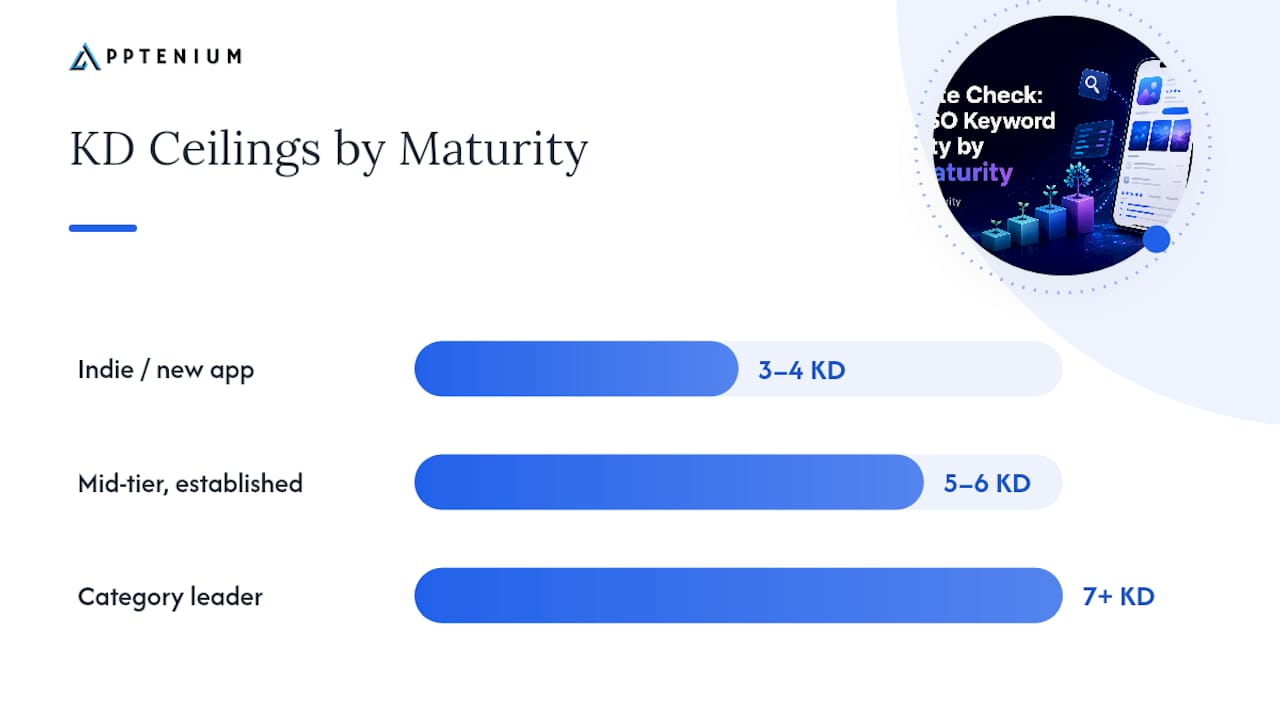
A KD score only becomes useful once you attach it to a bucket, and the buckets only become useful once you know what they cost you.
The median US App Store keyword difficulty sits at roughly 8.13 on a 0 to 10 scale, according to MWM’s dataset. That single number should reframe how you read any KD tool: most keywords worth searching for are already crowded, and a “medium” score is often the realistic floor, not a comfortable middle ground.
By the numbers: MWM’s dataset shows top-10 daily download rewards roughly triple with each additional point of KD on their 0 to 10 scale, which means the hardest keywords also carry the biggest realistic payoff if you can actually win them.
That relationship should shape your targets:
| App maturity | Recommended KD ceiling (0–10 scale) | Rough equivalent (0–100 scale) |
|---|---|---|
| Indie or new app | 3 to 4 | 30 to 40 |
| Mid-tier, established install base | 5 to 6 | 50 |
| Category leader | 7 and above | 50 or more |
A new app chasing a KD 8 keyword is fighting for scraps against apps with years of review volume behind them. A category leader ignoring KD 7 keywords is leaving download volume on the table it’s actually equipped to win. Match the ceiling to where your app stands today, not where you want it to stand in a year.
Where Do You Get Free Keyword Signals?
Before you trust any paid tool’s difficulty number, get your hands on the free signals that feed it. They cost nothing and they are often more current than a cached third-party score.
- Apple Search Ads popularity score — this is the most reliable free demand metric available for the App Store, straight from Apple’s own reporting tools. It tells you how often people search a term relative to other terms, without guessing.
- Manual store search — type the keyword into the store yourself and study who shows up in positions one through ten.
- Keyword density checks — free tools that scan competitor titles and subtitles to show you how saturated a term already is across the top results.
- Review count comparison — pull the review totals for the top 10 apps and compare them against your own; a wide gap is your clearest red flag.
ASOhack’s guide recommends exactly this kind of free stack for teams validating keywords before they commit paid-tool budget to tracking. Paid KD scores still earn their keep once you need to monitor dozens of terms over time, since manual checks don’t scale past a handful of keywords a week. Use free signals to decide what’s worth tracking, then let a paid tool watch it.
How Do You Check Keyword Difficulty in 10 Minutes?
Run this checklist before you commit precious title or subtitle space to any keyword. It takes less time than writing the metadata itself.
- Check the Apple Search Ads popularity score. If the term scores low on demand, stop here. No difficulty score matters for a keyword nobody searches.
- Search the term in the store and study the top 10. Note how many of them use the exact keyword in their title, and pull their review counts. Three or more apps with over 50,000 reviews each is your signal this term is dominated by incumbents.
- Scan positions 11 through 20 for indie or newer apps. If you spot two or three smaller apps holding position in that range, the keyword is beatable even with a strong incumbent at the top.
- Apply a simple decision rule. If the average review count in the top 10 is under 1,000 and at least one small app cracked the top 20, the keyword is worth targeting now. If every app in the top 10 has over 100,000 reviews and title matches across the board, shelve it until your app grows.
Pro Tip: Keep a running spreadsheet of every keyword you validate this way. After ten or fifteen checks, you’ll start recognizing patterns in your specific category faster than any KD tool can flag them for you.
How Do You Build a Keyword Portfolio by App Weight Class?
Progressive targeting means starting where you can actually win, then climbing as your app earns the signals that make harder keywords reachable. Install velocity and review counts are two of the same ingredients that feed difficulty scores in the first place, so every keyword you win becomes fuel for the next one.
Structure your approach around three tiers:
- Indie or new app: target low-to-moderate KD keywords first, generally under 4 on a 0 to 10 scale. Prioritize relevance over volume. A smaller keyword that matches your app’s exact function converts better than a broad, popular term you can’t rank for anyway.
- Mid-tier app with an install base: mix moderate KD terms with one or two stretch keywords slightly above your comfort ceiling. Use these stretch attempts to test whether your recent review growth has shifted your competitive position.
- Category leader: compete directly for the highest-value terms, but keep a rotating set of mid-tail keywords in your portfolio too. Even leaders benefit from diversified traffic sources rather than depending on one or two head terms.
Emerging markets deserve a specific note here. A keyword that sits at KD 7 in the US market might sit at KD 3 or 4 in a market where competitor apps haven’t localized their metadata yet, which makes regional expansion one of the fastest ways to unlock easier wins without changing your product at all.
Pro Tip: Never rank a keyword purely by difficulty. Multiply expected relevance and conversion potential against the KD score before you prioritize, since a slightly harder keyword that matches user intent will often out-earn an easy one that draws the wrong installs.
Rather than betting everything on one or two moonshot terms, build a spread of mid-tail keywords that balance demand against difficulty. That portfolio approach compounds gradually instead of leaving your ranking exposed to a single term’s volatility.
What Mistakes Should You Avoid With Difficulty Scores?
Most wasted ASO effort traces back to one of these habits.
- Trusting a single tool’s number as gospel. Different tools weight signals differently, so a score that looks safe in one platform might undersell the real competition. Manual validation of the actual top 10 catches what an algorithm can miss.
- Reaching for moonshot keywords too early. Targeting KD 8 terms before your app has any install velocity or review volume to back it up almost always ends in a listing that never cracks the top 50.
- Ignoring relevance and conversion in favor of raw difficulty. An easy keyword that doesn’t match what your app does will rank fine and convert terribly.
- Assuming long-tail phrases are automatically easier. MWM’s data shows single-word and six-word keywords carry similar median difficulty in the US App Store, which breaks the standard web-SEO assumption that adding more words always lowers the bar.
How Does Apptenium Support This Workflow?
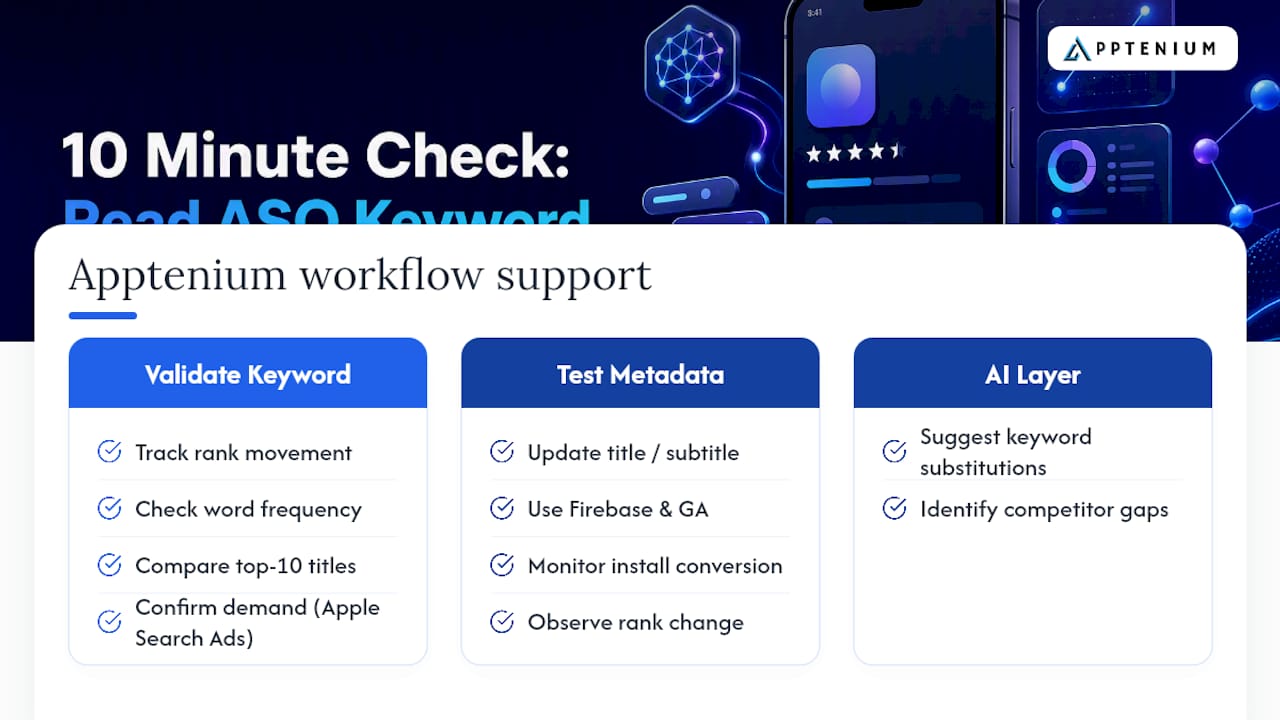
Running the checklist above by hand works, but it doesn’t scale past a handful of keywords a week. Apptenium’s ASO scanner automates the metadata side: it flags keyword density, title placement, and gaps against competitors in one pass instead of ten manual store searches.
Two workflows show this in practice. First, validating a candidate keyword: run it through keyword tracking to see current rank movement, cross-check Word Frequency data against your top 10 competitors’ titles, then confirm demand with Apple Search Ads popularity before committing metadata space. Second, testing a metadata change: update your title or subtitle, then use Firebase and Google Analytics integrations to watch whether install conversion actually shifts, not just rank position.
The AI recommendations layer on top of both workflows, suggesting keyword substitutions based on the gaps it finds. Full feature details live on the Apptenium features page.
A Simple Heuristic Worth Keeping
Start low, validate fast, scale only when your signals match the incumbents you’re chasing. That’s the entire discipline behind sustainable keyword growth, and it’s the one heuristic worth carrying into every metadata update you make. Case studies and specific portfolio results will follow as more teams share their numbers publicly, but the mechanics above hold regardless of your app’s category.
— Mike
Try Apptenium’s Free ASO Tools Before Your Next Metadata Update
Manually running the validation checklist above works for a handful of keywords, but most growth teams are tracking dozens across multiple markets at once. Some ASO platforms replace that spreadsheet-and-guesswork routine with one dashboard: keyword tracking, competitor intelligence, and AI-generated metadata suggestions that update as your rankings shift.

If you’re an SMB or startup team weighing which ASO tool actually fits your size and budget, the breakdown on Apptenium’s SMB comparison page walks through exactly how the platform handles the workflows covered in this guide, including the free tier for teams who want to test it on a limited number of scans before committing to a paid plan. Run a scan on your current listing and see which keywords are actually worth your next metadata slot.
Sources
For deeper reading on the mechanics covered here, start with MWM’s keyword difficulty benchmarks for real data on score distributions and download rewards, ASOhack’s explainer for how tools calculate their scores, Apple’s own Search Ads reporting guidance for popularity data, and AppFollow’s documentation on how their Top-10 estimate is built.
- App Store Keyword Difficulty — Scores, Benchmarks & Real Data | MWM
- App Store Keyword Difficulty Explained (2026) | ASOhack
FAQ
What Is a Good Keyword Difficulty Score?
A good score depends entirely on your app’s maturity. Indie or new apps should target under 4 on a 0 to 10 scale, while established mid-tier apps can push toward 5 or 6, and category leaders can compete at 7 and above.
How Do You Check Keyword Difficulty?
Start with the Apple Search Ads popularity score to confirm demand, then manually search the term and review the top 10 apps’ review counts and title matches. A tool like Apptenium’s ASO scanner can automate this check across many keywords at once.
What Does a High Difficulty Score Mean?
A high score means the current top-ranking apps are strong on reviews, title placement, or install velocity, making it harder for a new entrant to break into the top 10. It often also signals a bigger download reward if you can win it, since reward tends to scale with difficulty in most datasets.
How Do You Find Low-Difficulty Keywords?
Search for terms where the top 10 results show weaker review counts, fewer exact title matches, and at least one indie or newer app already cracking positions 11 through 20. Long-tail phrases are not automatically easier, so this manual check matters more than the word count of the term itself.
Is Keyword Difficulty the Same Across Apple Search Ads and Third-Party Tools?
No. Apple Search Ads only reports popularity, a demand signal, while third-party KD scores estimate ranking difficulty using a mix of signals that vary by tool and scale. Use both together rather than treating either as complete on its own.