Competitor Keyword Analysis for ASO: A Practical Workflow
Over 65% of app installs start with a store search, which means your keyword choices are your primary discovery engine. Competitor keyword analysis for ASO finds the high-opportunity search terms your rivals already rank for, then converts those signals into metadata updates and test hypotheses you can validate before committing to organic changes. The recommended approach is a repeatable four-step cycle: collect competitor rankings across the Apple App Store and Google Play, build a keyword gap matrix, score gaps by relevance, store search volume, and ranking difficulty, then validate the top candidates through Apple Search Ads exact-match tests or Custom Product Pages before touching your organic metadata. Platforms like Apptenium run this entire loop, from automated scans and competitor history to Firebase and Google Analytics attribution, in a single dashboard.
Collect competitor rankings weekly; run full audits monthly
Build a gap matrix that maps which competitors rank for which terms
Score gaps by relevance, volume, difficulty, and conversion potential
Validate with Apple Search Ads before updating organic metadata
Measure downstream impact through Firebase/GA retention cohorts
Key Takeaways
Competitor keyword analysis for ASO is a repeatable monthly cycle: collect rankings, build a gap matrix, score by relevance and retention potential, validate with Apple Search Ads, and measure through Firebase/GA cohorts.
PointDetailsStore search drives installsOver 65% of app installs start with a store search, making keyword visibility the primary growth lever.Gap-first prioritizationTarget keywords where fewer than 40% of tracked competitors rank in the top 25 for faster ranking gains.Test before metadata changesRun Apple Search Ads exact-match tests for 7–14 days before updating your title or subtitle.Retention is the real KPIA keyword that lifts installs but drops D7 retention is a ranking liability, not a win.Apptenium for the full loopApptenium connects ASO scanning, competitor history, gap matrices, and Firebase/GA attribution in one workflow.
Table of Contents
How to track competitor keywords and monitor impact over time
Measuring impact: experiments, attribution, and success criteria
What does competitor keyword analysis mean for ASO?
Competitive ASO analyzes a competitor’s full app store presence: their keywords, metadata, visual assets, ratings, and ranking patterns. The goal is to surface opportunities and threats that drive both offensive (new keyword targets) and defensive (protecting current rankings) strategy. This is distinct from web SEO or Google Ads research. The signals live entirely inside the app stores.
Core outputs you should expect from every analysis cycle:
Competitor keyword matrix: which apps rank for which terms, and at what position
Gap list: high-volume terms where you are absent but competitors rank
Creative messaging signals: screenshot copy, CPP variants, and value-proposition framing competitors use per query
Metadata change log: title, subtitle, and description edits over time
Review-derived long-tail phrases: natural-language terms from competitor reviews that map to real user intent
Primary data sources:
Store rankings and in-store search suggestions
App store tags and category browse signals
Competitor Custom Product Pages (iOS) and Google Play Custom Store Listings
Competitor review text (pain points and feature requests)
How to run competitor keyword analysis step by step
A single analysis cycle takes roughly two to three hours the first time and under an hour once you have a baseline matrix in place.
Define your competitor set. Segment into three tiers: direct competitors (same core job-to-be-done), category leaders (top-ranked apps in your category), and niche apps (smaller apps targeting a specific user segment you want to own). Aim for five to ten apps total.
Pull rankings across stores and markets. For each competitor, capture their top-ranking keywords in every market you care about. Export title, subtitle, description, and keyword field text where visible.
Mine competitor reviews. Competitor reviews are a rich source of natural-language keywords and pain points. Look for recurring phrases that describe features or problems. These often surface long-tail, high-intent terms that never appear in a competitor’s metadata but drive real search behavior.
Build the keyword gap matrix. Map every candidate keyword against your competitor set. Mark which apps rank in the top 10, top 25, and unranked. Your gaps are the terms where competitors rank but you do not.
Score and prioritize gaps. Apply the scoring formula in the next section.
Design tests before touching organic metadata. Apple Search Ads discovery and exact-match campaigns validate conversion performance in days rather than waiting weeks for organic ranking signals to stabilize.
Implement metadata updates. Once a keyword shows strong conversion in paid tests, add it to your title, subtitle, or keyword field. Note iOS Custom Product Pages can be indexed in organic search, and Google Play supports up to 50 Custom Store Listing variations, giving you significant surface area to test messaging per query.
Log every change with a timestamp. You need a clean before/after record to attribute rank changes to specific edits.
Pro Tip: Run a discovery campaign in Apple Search Ads for 7 days using broad match, then switch the top-converting terms to exact match for another 7 days. The exact-match conversion rate tells you whether the keyword is worth the metadata real estate.
How to score and prioritize competitor keywords
Not every gap is worth chasing. The scoring formula below weights four dimensions:
Relevance (1–3): Does the keyword describe what your app actually does? A score of 3 means it maps directly to your core use case.
Estimated store volume (1–3): Higher search impression estimates score higher. Use your ASO tool’s volume index.
Ranking difficulty (1–3, inverted): Fewer competitors in the top 10 scores higher. Keywords where fewer competitors rank create faster ranking velocity, especially for newer apps. A practical threshold: if fewer than 40% of your tracked competitors rank in the top 25, treat it as low-saturation.
Conversion potential (1–3): Based on Apple Search Ads TTR data or CPP engagement signals for similar terms.
Final priority score = Relevance × (Volume + Difficulty + Conversion)
“Fitness tracker app” scores highest despite moderate difficulty because relevance multiplies everything. “Calorie counter daily” scores low because it is tangential to the app’s core value, so even decent volume does not save it.

How to track competitor keywords and monitor impact over time
Tracking is where most teams underinvest.
Metrics to track per keyword:
Store rank (position 1–10, 11–25, 26–50, unranked)
Search impressions and impression share
Installs attributed to each keyword
Impression-to-install conversion rate
D1, D7, and D30 retention cohorts for keyword-sourced installs
Rating changes (a sudden drop often signals a competitor’s product issue you can capitalize on)
Recommended cadence: Run weekly metadata diff checks to catch title, subtitle, or screenshot changes. Full competitor audits, including review mining and matrix rebuilds, belong on a monthly schedule. Quarterly-only reviews are too slow for reactive ASO.
Set alerts for two specific triggers: a competitor changing their title or subtitle (signals a strategic keyword pivot), and a sudden rank shift of more than 10 positions on any keyword in your top-20 list.
Pro Tip: Wire your store-ranking tracker to Firebase or Google Analytics using UTM parameters on Apple Search Ads campaigns. When a keyword test drives installs, you can pull the D7 retention cohort directly in Firebase and confirm whether those users are actually sticking around.
Retention-weighted keyword targeting matters because app store algorithms increasingly factor engagement signals into rankings. A keyword that drives installs but produces low retention can hurt your overall ranking health over time.
Measuring impact: experiments, attribution, and success criteria
A keyword change with no experiment design is just a guess. Structure every test before you ship it.
Experiment checklist:
Write a hypothesis: “Adding [keyword] to the subtitle will increase search impressions by X% without reducing install conversion rate.”
Define your primary KPI: search impressions → installs → D7 retention → estimated LTV.
Segment your test: use a CPP or Apple Search Ads campaign to isolate the keyword’s audience before touching your main listing.
Set a run length: 14 days minimum for organic tests; 7 days is sufficient for Apple Search Ads exact-match validation.
Define your sample size threshold: enough installs to detect a 10–15% lift with reasonable confidence.
Attribution notes:
Tag Apple Search Ads campaigns with campaign-level UTMs and pull cohort data from Firebase or Google Analytics.
Use ad-network signals (Google App Campaigns, Apple Search Ads) to separate paid-keyword installs from organic.
Cohort analysis in Firebase lets you compare D7 retention for keyword-sourced installs versus your baseline.
Success criteria: A keyword change succeeds when search impressions lift AND install-to-D7 retention holds or improves. Impressions up but retention down is a signal the keyword attracts the wrong audience. Roll the change back and retest with a more specific variant.
What tools and integrations make this workflow repeatable?
Tooling checklist:
ASO rank tracker (keyword positions across App Store and Google Play)
Metadata scanner with competitor history (title/subtitle/description diffs over time)
Apple Search Ads for keyword discovery and exact-match validation
Firebase or Google Analytics for install attribution and retention cohorts
Creative analytics tool for CPP performance monitoring
A single dashboard that connects all of the above
Apptenium covers the full stack: automated ASO scans, competitor metadata history, keyword gap matrices, CPP monitoring, and direct Firebase/Google Analytics integration for attribution. Instead of stitching together four separate tools, you get one workflow from detection to measurement.
Workflow sequence: Data sources (store rankings, competitor metadata, review text) → Gap matrix build → Prioritized keyword queue → Test design (Apple Search Ads + CPP) → Tracking and attribution (Firebase/GA + Apptenium dashboard).
Pro Tip: When your keyword analysis feeds into broader distribution planning, it also informs your tech brand marketing strategy — the same gap data that surfaces organic opportunities can guide paid channel targeting and creative messaging.
Common mistakes that waste time or create false positives
Copying competitor metadata blind. Their keywords fit their app’s authority, review velocity, and install history. Yours may not rank for the same terms at the same positions.
Chasing volume-only keywords. High-volume terms with poor relevance drive installs that churn at D1. That retention signal can suppress your overall ranking.
Updating metadata without testing first. A title change affects every keyword in your current ranking. Test in a CPP or Apple Search Ads campaign before touching the main listing.
Ignoring review-driven long-tail phrases. These terms often have lower competition and higher purchase intent than generic category keywords.
Red flags and correctives:
Sudden ranking gains without retention lift: the keyword is attracting the wrong users. Pause the test and narrow the match type.
Competitors bidding on terms you also target: monitor your Apple Search Ads impression share. If it drops, a competitor is cannibalizing your paid visibility on that term.
Over-reliance on a single market snapshot: rankings shift weekly. A snapshot from 30 days ago is not a strategy.
A 30-minute competitor keyword audit: before and after
Before (minutes 0–15):
Pick your top five direct competitors.
Pull their current title, subtitle, and keyword field text.
Run a store search for your 10 core queries and record which competitors appear in the top 10 for each.
Tabulate the results: which queries are you missing from entirely?
After (minutes 15–30):
Identify two to three gaps where fewer than three of your five competitors rank in the top 10.
Set up a 7–14 day Apple Search Ads exact-match campaign for each gap keyword.
Prepare one CPP variant with screenshot copy that speaks directly to the gap keyword’s intent.
Signal timing to expect:
Apple Search Ads impression data: visible within 24–48 hours
Install conversion signal: meaningful after 200–300 impressions per keyword
D7 retention cohort: readable at day 8 after campaign launch
Organic rank movement after metadata update: typically 7–21 days on the App Store, 2–4 weeks on Google Play
A keyword gap matrix built from this 30-minute audit gives you a clear view of quick wins, must-wins, and longer-term targets — without spending hours on data collection.
What most ASO guides get wrong about competitor analysis
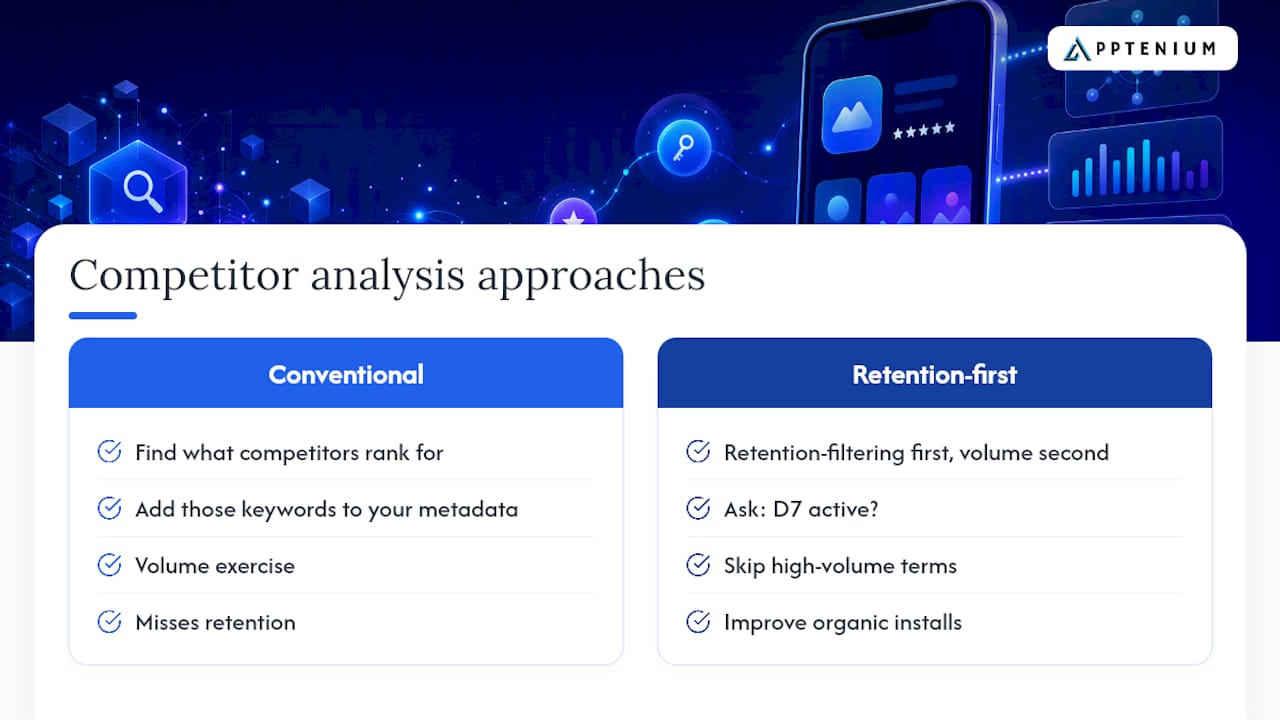
The conventional advice is to find what competitors rank for and add those keywords to your metadata. That framing misses the most important variable: retention.
A keyword that drives installs from users who churn at D1 is not a win. It is a ranking liability. App store algorithms on both iOS and Google Play factor engagement and retention signals into search rankings, which means a poorly matched keyword can actively suppress your visibility over time.
The teams that consistently improve organic installs treat competitor keyword analysis as a retention-filtering exercise first and a volume exercise second. They ask: “Does this keyword attract users who will still be active at D7?” That question changes which gaps you prioritize and which high-volume terms you deliberately skip.
Weekly metadata diffs matter for the same reason. A competitor’s title change is not just a keyword signal. It is a signal about which audience segment they are now targeting. Catching that shift in week one, rather than month three, gives you time to respond before they consolidate ranking authority on the new term.
Apptenium runs the full workflow for you
Running this workflow manually across five competitors, two stores, and multiple markets takes hours every week. Apptenium cuts that to minutes by combining ASO scanning, competitor metadata history, keyword gap matrices, CPP monitoring, and Firebase/Google Analytics integration in one place.

Every stage of the cycle above maps directly to an Apptenium feature:
Scan: automated metadata scans capture competitor title, subtitle, and keyword field changes as they happen
Prioritize: the gap matrix surfaces low-saturation keywords ranked by relevance, volume, and difficulty
Test: CPP monitoring tracks which creative variants competitors are running per query
Measure: Firebase and Google Analytics integration connects keyword tests to install cohorts and D7 retention
Start your free scan on Apptenium and run your first competitor gap audit in under 30 minutes.
Sources
FAQ
What is competitor keyword analysis for ASO?
Competitor keyword analysis for ASO identifies the search terms rival apps rank for in the Apple App Store and Google Play, then maps those terms against your own rankings to find gaps you can target to increase organic installs.
How is ASO competitor keyword analysis different from web SEO keyword research?
ASO keyword analysis works entirely within app store search algorithms, using store rankings, metadata fields, and in-app search signals rather than Google Search Console or web backlink data. The ranking factors, data sources, and test methods are specific to the App Store and Google Play.
How often should I run a competitor keyword audit?
Run weekly metadata diff checks to catch title and subtitle changes, and a full competitor audit, including review mining and matrix rebuilds, on a monthly cadence. Quarterly reviews are too slow to catch strategic pivots before competitors consolidate ranking authority.
How do I validate a keyword before updating my app’s metadata?
Run a 7–14 day Apple Search Ads exact-match campaign for the candidate keyword. If the conversion rate and early retention signal are strong, the keyword is worth adding to your title, subtitle, or keyword field.
Can Apptenium run competitor keyword analysis automatically?
Yes. Apptenium automates ASO scans, stores competitor metadata history, generates keyword gap matrices, and integrates with Firebase and Google Analytics so you can connect keyword tests directly to install cohorts and retention data.