Ad Network Integration: A Practical Guide for Marketers & Engineers

Ad network integration connects your publisher inventory (web or app) to advertising demand via SDKs, mediation adapters, or server-to-server APIs, enabling ad serving and performance data capture in a single pipeline. According to Adpushup, the process can use JavaScript tags, SDKs, or mediation layers depending on your stack. The fastest correct approach: choose the integration method that matches your architecture, define your ad-unit hierarchy before writing a line of code, and validate postbacks and revenue hooks in a staged environment before full rollout.
Start here before anything else:
Map your inventory. List every placement (app screen, web page section) and assign each a named ad unit with format, size, and floor price before touching any SDK.
Choose your integration method. Direct SDK per network, a mediation SDK with adapters, or a server-to-server API each carry different trade-offs. Pick based on your platform, privacy requirements, and how many networks you plan to run.
Build your test plan first. Create separate test credentials, define postback endpoints in a staging environment, and confirm revenue events fire correctly before any production traffic touches the integration.
Pro Tip: Never initialize ad SDKs lazily. Initialize at app launch and wait for the completion callback before loading the first ad. Skipping this step is the single most common cause of low fill rates in waterfall and bidding setups.
Table of Contents
What accounts and credentials you need before writing any code
How to measure ad performance and close the loop to analytics
Privacy, consent, and partner policy obligations during integration
The organizational pitfall most teams miss during integration
Platform-specific integration highlights you need to know
Each platform has non-obvious requirements that block activation if you miss them.
Google AdMob
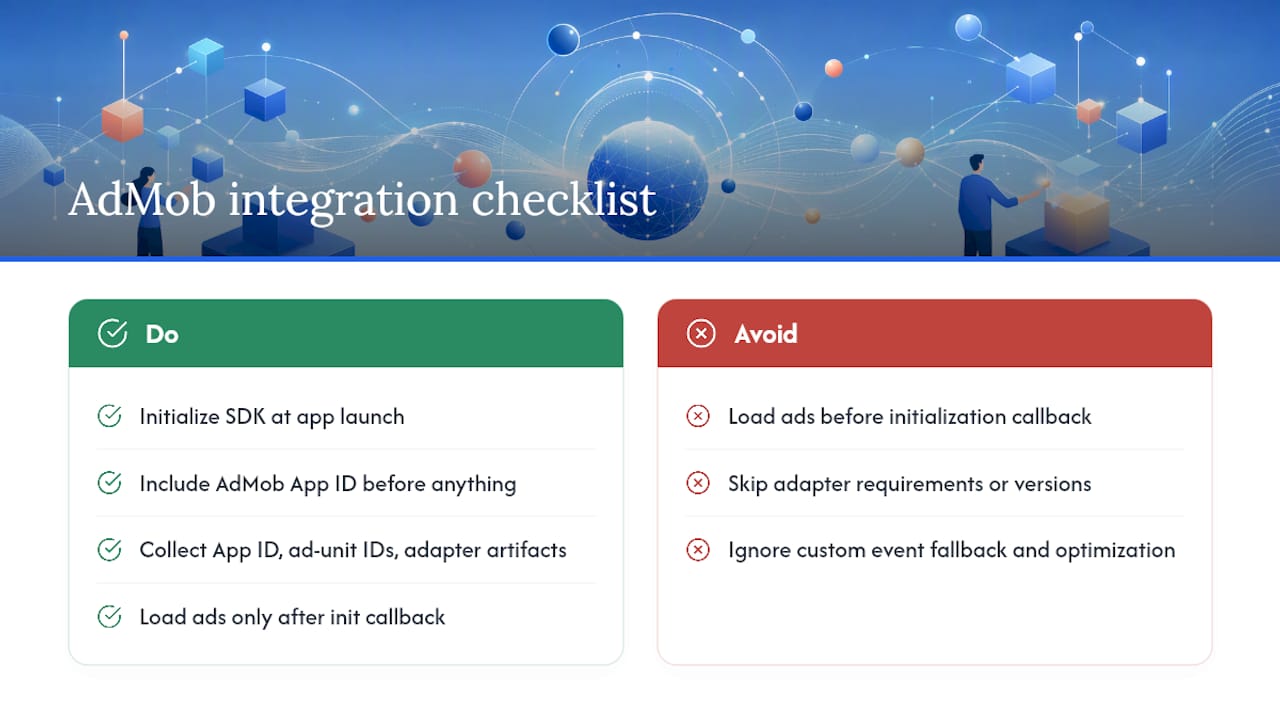
Initialize the Google Mobile Ads SDK at app launch and include your AdMob App ID in AndroidManifest.xml before anything else. The AdMob quick-start guide is explicit: load ads only after the initialization callback fires. AdMob Mediation supports both bidding and waterfall ad sources; the ad sources guide covers adapter requirements, custom event fallback, and ad source optimization options. Collect your App ID, ad unit IDs per format, and each adapter’s versioned artifact before handing off to engineering.
Unity LevelPlay
After integrating the network adapter in your build, you must enter your account credentials directly in the LevelPlay platform dashboard. The Unity LevelPlay network setup docs detail account-level requirements and format-specific notes for rewarded, interstitial, and banner placements. Missing the dashboard step after SDK integration is a common reason networks appear configured but never serve.
AppsFlyer and Adjust
Both platforms support SDK-to-SDK and server-to-server integration paths. Adjust’s integration guide documents automated callbacks for ad revenue, ad spend, installs, and custom events, and recommends testing every callback URL with live links before campaigns go live. For AppsFlyer, complete the partner activation in the dashboard, configure postback mapping for each event, and verify that partner data access permissions are set correctly before expecting attribution data to flow.
Google AdSense
AdSense is web-only. Connecting your site to AdSense requires placing the AdSense code snippet in your site’s <head>, completing site verification, and waiting for the site review process, which typically takes days to a few weeks. AdSense also provides guidance on ads.txt file placement and CMP options for consent messaging.
Marketo and Amplitude
Neither platform is an ad network, but both sit downstream in the data pipeline. Ad network data (campaign IDs, spend, impressions, revenue) feeds into Marketo for lead scoring and campaign attribution, and into Amplitude for product analytics and funnel analysis. The integration work here is event mapping: define a consistent naming schema for campaign and creative IDs, send ad events via API or connector, and confirm field-level mapping (currency, timestamp, placement ID) before relying on the data for decisions.
Key artifacts to collect per platform before starting:
AdMob: App ID, ad unit IDs per format, adapter artifact names and versions
Unity LevelPlay: account credentials, app key, placement names
AppsFlyer: app token, partner activation status, postback event mapping
Adjust: app token, callback URL, event tokens per event type
AdSense: publisher ID, site verification status,
ads.txtentryMarketo / Amplitude: API keys, event schema documentation, field mapping table
What accounts and credentials you need before writing any code
Credential gaps are the most common reason integration projects stall mid-sprint. Resolve these before engineering starts.
Required accounts:
Publisher or developer account on each ad network (AdMob, AdSense, Unity LevelPlay)
Attribution platform accounts (AppsFlyer, Adjust) with app registered and SDK key generated
Mediation platform account if using a third-party mediation layer
Analytics platform accounts (Amplitude, Marketo, Firebase) with data connectors configured
Critical credentials and IDs to collect:
Ad unit IDs / placement IDs for every format you plan to serve
Publisher IDs for AdSense and any display network
API keys and client secrets for S2S integrations and analytics connectors
Postback / callback URLs for attribution platforms, with authentication tokens
Test device IDs for AdMob and other networks that require device-level test mode
Environment separation matters more than most teams expect. Create a dedicated test app in each network’s dashboard, use test credentials exclusively in your staging build, and store all secrets in a secrets manager (AWS Secrets Manager, HashiCorp Vault) rather than hardcoded in source. Google Ad Manager’s network setup guidance reinforces the importance of mapping inventory to ad units before integration begins, because the hierarchy you define here drives targeting, reporting, and revenue reconciliation downstream.
How to measure ad performance and close the loop to analytics
Measurement is where most teams leave money on the table. The events exist; they just never get mapped correctly.
Core events to capture per integration:
Impressions: fired when a creative renders, timestamped to the millisecond
Clicks: user interaction events, with creative ID and placement ID attached
Viewability: percentage of the ad visible for the required duration (varies by format and network)
Ad revenue events: the dollar value of each impression, forwarded via adapter or postback
Rewarded events: completion signal with reward type and quantity
Install and re-attribution postbacks: sent from attribution platform to ad network to close the conversion loop
Network fieldAnalytics schema fieldNotesTimestampevent_timeNormalize to UTCRevenue (USD)ad_revenueNormalize currency before storingPlacement IDplacement_idMap to ad unit name for readabilityCreative IDcreative_idRequired for A/B analysisCountrygeo_countryISO Alpha-2Device typedevice_typeMobile, tablet, desktopNetwork namead_networkUse canonical name, not adapter class
Implementation checklist:
Use HTTPS endpoints for all postback receivers; reject HTTP callbacks.
Add idempotency keys to postback handlers to prevent double-counting on retries.
Normalize all revenue to USD at ingestion time using the exchange rate at event time, not processing time.
Reconcile daily totals between your analytics system and each network’s dashboard; discrepancies above a small threshold should trigger an alert.
Testing and validation steps before you go live
A broken integration that reaches production is far more expensive to fix than one caught in QA.
Unit tests: confirm each adapter class loads without errors and that the SDK initialization callback fires within an acceptable timeout.
Integration tests: fire a test ad request and verify the response contains a valid creative object. Check that impression and click events fire with the correct payload.
End-to-end tests: trigger a postback from a test event and confirm it arrives at your analytics endpoint with the correct fields. Use Adjust’s live link testing feature to verify callback URLs before campaigns go live.
Real-device tests: run on physical devices, not just emulators. Some ad formats (video, app-open) behave differently on real hardware.
Load tests: simulate concurrent ad requests to confirm your postback receiver handles volume without dropping events.
QA checklist before launch:
Test credentials confirmed in staging; production credentials not present in the test build
Test creatives served and rendered correctly for every format
Postback URLs return 200 for valid payloads and 400 for malformed ones
Revenue events appear in analytics within the expected latency window
Reward validation fires server-side for rewarded formats
Validation window: monitor the first 48–72 hours of live traffic closely. Reconcile impression counts and revenue figures between your analytics system and each network dashboard before scaling spend. For staged rollouts, start at 5–10% of traffic, confirm data integrity, then expand.
Rollback strategy: in mediation, you can disable a network adapter in the dashboard without a code release. For direct SDK integrations, use a remote config flag to disable ad loading per format. Always have a fallback network in your waterfall so disabling one source does not create a zero-fill scenario.
Privacy, consent, and partner policy obligations during integration
Privacy compliance is not a post-launch task. It must be wired into the integration from the start.
Consent flags at SDK init: pass the user’s consent status to the mediation SDK before the first ad request. AdMob Mediation requires consent flags to be set before initialization completes, not after.
Per-network consent propagation: each mediated network requires its own consent flag. Setting consent on the mediation SDK does not automatically propagate to all adapters. Check each adapter’s documentation for the correct API.
CMP selection: use a Consent Management Platform (CMP) that is compatible with your mediation SDK. AdSense provides CMP options for consent messaging, and AdMob Mediation has a list of certified CMPs.
Data minimization in postbacks: strip PII from postback URLs. Use hashed identifiers (SHA-256 of email or IDFA) where attribution platforms require user-level signals, and prefer aggregated measurement where possible.
Partner policy compliance: you are responsible for complying with both the mediation platform’s policies and each individual network’s policies. A policy violation on one mediated network can affect your entire mediation stack.
Pro Tip: Store consent records with a timestamp and version of the consent string. Regulators and network policy teams may ask for proof of consent at a specific point in time. A log entry is not enough; store the full consent object.
US-focused compliance checklist:
Consent UI implemented and tested on both iOS and Android
CMP certified by your mediation platform selected and configured
Consent records stored with timestamp and consent string version
Per-network consent flags set in each adapter’s initialization call
ads.txtandapp-ads.txtfiles published and verified
Common integration errors and how to fix them
Most integration failures fall into a short list of repeatable patterns.
Adapter not loading: the adapter class is missing from the build or the dependency is not resolved. Enable verbose adapter logs and confirm the adapter class name appears in the initialization output.
SDK init timeout: the initialization callback never fires, usually because the App ID in the manifest is incorrect or the network is unreachable in the test environment.
Missing placement IDs: ad requests return no-fill because the placement ID in the code does not match any active ad unit in the network dashboard.
Mismatched test/production keys: production keys in a test build trigger real ad serving and policy violations; test keys in a production build return only test creatives and zero revenue.
Postback URL 4xx/5xx: the postback receiver is rejecting requests. Check authentication headers, URL encoding, and whether the endpoint is publicly reachable from the attribution platform’s IP range.
Currency mismatches: revenue figures differ between your analytics system and the network dashboard because currency normalization is applied at different points in the pipeline.
Diagnostic steps:
Enable verbose logging on the mediation SDK and capture the full initialization sequence.
Confirm each adapter class appears in the log output with a success status.
Fire a test ad request and inspect the network response for error codes.
Replay a test postback event and check your receiver’s server logs for the incoming request.
Compare impression counts between the network dashboard and your analytics system for the same 1-hour window.
When escalating to partner support, include: SDK version, adapter version, initialization log output, the exact ad unit ID, and a sample postback payload with the response code your server returned.
How ad network data feeds into analytics and ASO workflows
Ad metrics are not just monetization data. They are growth signals, and teams that treat them that way make better decisions about keyword investment, creative testing, and store listing optimization.
The data flow looks like this:
Ad revenue events, campaign IDs, and creative IDs flow from your ad networks into your analytics platform (Amplitude, Firebase, or a data warehouse).
Ad spend data flows from your attribution platform (AppsFlyer, Adjust) into the same pipeline, enabling campaign-level ROI calculation.
Placement performance data (which ad unit, which screen, which format) feeds into product analytics to identify high-value user flows.
Implementation checklist for analysts:
Define a canonical campaign ID and creative ID schema before any network goes live. Inconsistent naming makes cross-network analysis impossible.
Tag every ad revenue event with placement ID, network name, format, and country.
Reconcile daily ad revenue totals across networks and your analytics system. Discrepancies signal a mapping error or a postback failure.
Map campaign ROI (spend vs. installs vs. revenue per install) to keyword clusters in your ASO workflow. High-ROI campaigns often point to audience segments worth targeting in store listing copy and screenshots.
Use-case example: if a rewarded video campaign on one network consistently drives users with a 30-day retention rate above your organic average, that audience profile is worth targeting in your App Store keyword strategy. The signal lives in your ad attribution data; the action lives in your ASO workflow. Connecting the two is what separates teams that grow efficiently from those that optimize in silos.
Pro Tip: Automate a daily reconciliation job that compares ad revenue from each network’s API against your analytics system’s ingested totals. Set an alert threshold of 5% discrepancy. Anything above that warrants investigation before the next day’s data compounds the error.
Key Takeaways
Successful ad network integration requires choosing the right method for your stack, mapping your inventory hierarchy before coding, and validating every postback and revenue event in a staged environment before full rollout.
PointDetailsChoose method firstMatch your integration approach (SDK, mediation, S2S) to your platform and network count before writing code.Map inventory before codingDefine ad unit hierarchy, placement IDs, and floor prices upfront; this drives reporting and targeting accuracy downstream.Validate postbacks in stagingTest every callback URL with live links and confirm revenue events reconcile before scaling traffic.Plan for adapter maintenancePin adapter versions, schedule quarterly updates, and budget engineering time for each release cycle.Centralize with AppteniumApptenium consolidates ad revenue, campaign performance, and ASO metrics in one dashboard, removing the need to reconcile fragmented network dashboards manually.
The organizational pitfall most teams miss during integration
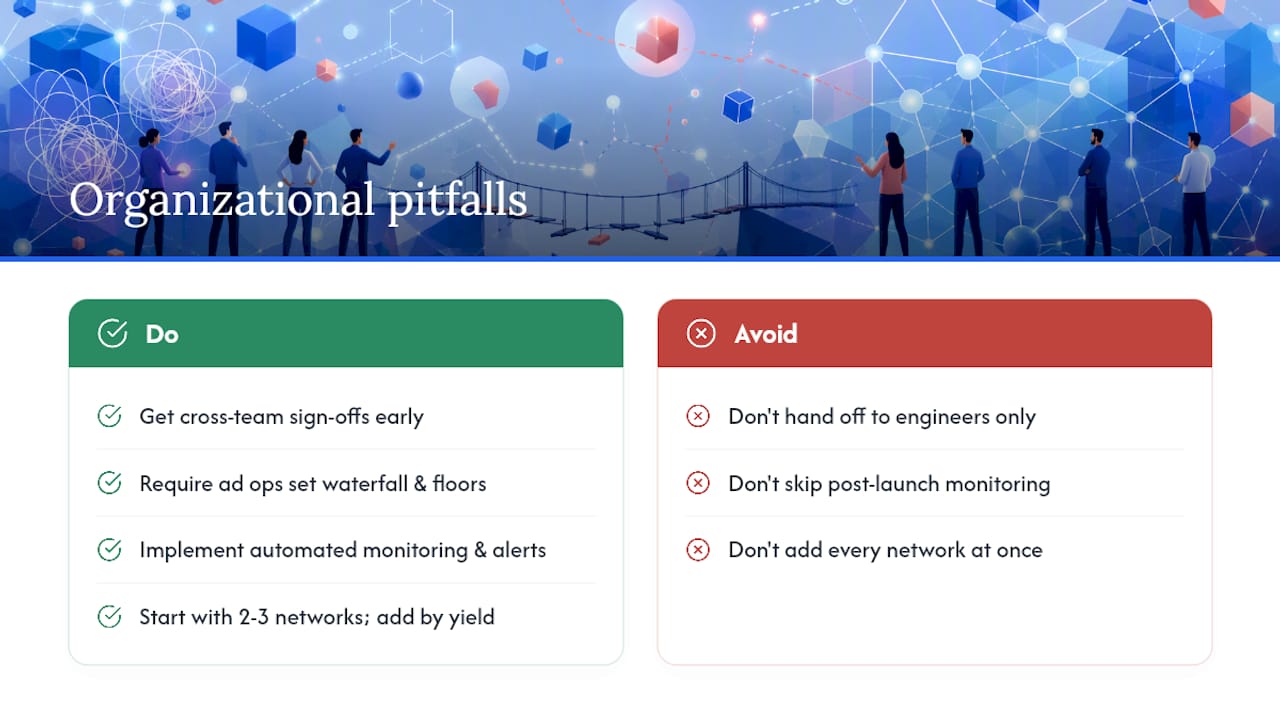
The teams that struggle most with ad network integration are not the ones with the hardest technical problems. They are the ones that treat integration as a purely engineering task and hand it off without cross-functional alignment.
Ad ops needs to define waterfall ordering and floor prices before the first SDK is initialized. The privacy or legal reviewer needs to approve the consent flow before any ad request fires. The analytics engineer needs to sign off on the event schema before postbacks start arriving. When these conversations happen after engineering finishes, the result is a technically functional integration that produces data no one trusts and a consent implementation that may not hold up to scrutiny.
The second recurring failure is the absence of a post-launch monitoring plan. Teams spend weeks on integration QA, go live, and then assume the data will keep flowing correctly. It does not. Adapters update and break silently. Postback endpoints rotate. Currency normalization logic drifts. Without automated reconciliation and alerting, these failures accumulate for weeks before anyone notices the revenue discrepancy.
The third mistake is over-integration: adding every available network at once to maximize fill rate. The result is a mediation stack with eight networks, three of which generate less than 2% of revenue, all of which require adapter updates, policy compliance checks, and dashboard monitoring. Start with two or three networks that match your audience and format mix. Add networks incrementally, based on measured yield improvement, not theoretical fill rate.
The first 30 days after rollout are the most important. Watch impression-to-fill rate, revenue per thousand impressions by network, postback delivery rate, and consent opt-in rate daily. Those four metrics tell you whether your integration is healthy before any downstream reporting catches up.
Apptenium brings your ad and app performance data together
Reconciling ad revenue across five network dashboards while also tracking keyword rankings and install conversion rates is the kind of fragmented workflow that costs hours every week and still produces incomplete answers. Apptenium consolidates ad revenue, campaign performance, and store analytics in a single dashboard, so your team stops copying numbers between tabs and starts making decisions from a unified view.

The platform connects directly to Firebase and Google Analytics, maps ad monetization data alongside ASO metrics (keyword rankings, competitor intelligence, download trends), and surfaces AI-powered recommendations for listing improvements grounded in actual performance data. If your ad campaigns are driving installs but your store listing is not converting them, Apptenium shows you both signals in the same place.
Start with a free scan of your app listing and see where your ad-driven traffic is landing. Try Apptenium to connect your ad network metrics with your ASO workflow today.
Useful sources for implementation
Official documentation your engineering and analytics teams will need: