App Marketers: Four Step Apple Search Ads ASO Workflow for 2026
App Marketers: Four Step Apple Search Ads ASO Workflow for 2026
Use Apple Search Ads to discover which search phrases actually convert, validate those keywords against real tap-through and conversion data, then fold the winners into your metadata and creative. This is the fastest way to lower your cost-per-tap while compounding your organic install rate. Apple reports that ads placed at the top of search results can convert above 60%, which makes Apple Search Ads (ASA) less an acquisition channel and more a live keyword lab for your App Store Optimization (ASO). The rest of this guide walks through the workflow, the campaign structure, and the measurement rules that make it repeatable.
TL;DR:
- Apple Search Ads provides fast, actionable data on search phrase conversion, enabling rapid validation before optimizing app metadata.
- Campaign management should separate search match from manual keyword targeting to maintain clean attribution and reliable insights.
- Updating key metadata fields like your app title, subtitle, and keyword field based on ASA data can reduce cost-per-tap by 20 to 35 percent.
- A structured, disciplined workflow with weekly, monthly, and quarterly rhythms prevents data scatter and maximizes the ASA–ASO feedback loop.
- Using integrated tools that combine ASA performance, keyword tracking, and app store insights accelerates decision-making and improves overall campaign effectiveness.
Table of Contents
- What Is Apple Search Ads ASO and Why Does It Matter?
- How Does Apple Search Ads Actually Work?
- Does Your App Store Listing Affect Your Ad Costs?
- What’s the Right Workflow to Turn ASA Data Into ASO Gains?
- How Should You Structure Campaigns to Avoid Cannibalization?
- What Attribution Framework Should You Trust in 2026?
- Can Apple Search Ads Really Speed Up Your Launch-Day Ranking?
- What Does a Governance Cadence for ASA and ASO Look Like?
- What App Marketers Get Wrong About the ASA→ASO Loop
- Run the ASA→ASO Loop Without Juggling Five Tools
- Sources
- FAQ
What Is Apple Search Ads ASO and Why Does It Matter?
Apple Search Ads ASO refers to the practice of using ASA campaign data, specifically search term reports and conversion metrics, to inform and improve your organic App Store Optimization strategy. The two disciplines get treated as separate line items on a lot of marketing dashboards. ASA lives under paid acquisition. ASO lives under “organic” or “product.” That split is a mistake, and it’s an expensive one.
Here’s the mechanism: every keyword you bid on in ASA generates a conversion rate you can measure within days. Every keyword ranked in your organic metadata takes weeks or months to show a rank movement you can trust. When you run ASA first, you get a fast, cheap answer to the question “will this keyword convert?” before you commit it to your title, subtitle, or keyword field. That answer then de-risks your next metadata update.
- Faster keyword discovery. Search Match and Discovery campaigns surface phrases users actually type, not phrases you guessed at.
- Better Quality Score, lower cost-per-tap (CPT). Apple’s ad ranking system rewards ads whose metadata and creative match search intent, so ASO improvements can directly cut what you pay per tap.
- Faster organic velocity. Keywords proven to convert in ASA tend to earn organic rank faster once added to your listing, because Apple’s algorithm reads the same relevance and conversion signals.
- CPT that trends down over time. As your organic rank climbs on a keyword, you often need less aggressive bidding to hold the same search position.
Where each channel takes the lead:
Run ASA-first when you’re dealing with a cold start (a brand-new app with zero organic signal), a category with heavy incumbent competition, or a launch window where you need installs now, not in six weeks. Prioritize ASO-first work on low-competition long-tail terms where organic ranking is achievable without a bidding war, and on keywords you’ve already validated through ASA and now want to “lock in” for free.
Budget expectations vary enormously by category, but a workable starting point for a discovery phase is $15 to $40 per day, split across a handful of ad groups, run for one to two weeks before you make any metadata decisions. Search itself is worth the investment: it’s the dominant discovery method on the App Store, with roughly 65 to 70 percent of App Store discovery happening through search rather than browsing or editorial features.
How Does Apple Search Ads Actually Work?
Apple Search Ads places ads in four spots: the Today tab, the Search tab (before a user types anything), Search results (after a query), and on competitor or related product pages. Search results carry the strongest intent signal, since the user has already typed something specific, which is why most serious ASA budget should live there rather than in Today tab placements aimed at pure discovery.
Apple splits campaign management into two tiers, and the choice matters more than most teams realize:
- Basic is automated, budget-capped at $10,000 in lifetime spend, and gives you almost no keyword-level control. It’s fine for a tiny app testing the waters, but it won’t feed your ASO pipeline with usable data.
- Advanced gives you keyword-level bidding, Custom Product Page (CPP) assignment per ad group, and the Search Terms report you need for this entire strategy. If you’re serious about the ASA→ASO loop, Advanced is not optional.
Inside Advanced, you choose how keywords get matched to search queries:
- Exact match targets a specific phrase you define, giving you precise control and clean data.
- Broad match targets your keyword plus related variations Apple decides are similar, useful for surfacing adjacent phrasing you hadn’t considered.
- Search Match lets Apple’s algorithm pick relevant search terms automatically based on your metadata, with zero keyword input from you.
Search Match is genuinely useful for the discovery phase of this whole strategy. It surfaces the raw language real users type, some of which will surprise you. But Search Match and explicit keyword campaigns should never share an ad group. Apple’s own guidance is to keep Search Match separate from manually targeted keywords so your learning signals and attribution data stay clean. Mix them, and you lose the ability to tell which keyword actually drove a given conversion.
Your Search Terms report is the artifact that makes all of this work. It shows you every actual query that triggered an impression or tap, along with taps, installs, and conversion rate per term. That report, reviewed weekly, is your raw material for keyword targeting decisions and, eventually, metadata decisions.
Does Your App Store Listing Affect Your Ad Costs?
Yes, directly. Apple’s ad ranking system weighs relevance alongside your bid, similar in spirit to Quality Score in search advertising elsewhere. An ad whose keyword matches your title, subtitle, and metadata closely will typically win auctions at a lower cost-per-tap than a mismatched one, because Apple’s algorithm reads that alignment as a signal the ad deserves the placement.
Three metadata fields move that needle the most:
- App title. The single highest-weighted field for both organic ranking and ad relevance.
- Subtitle. Second in weight, and the easiest field to test and iterate without touching your core brand name.
- Keyword field. Invisible to users but read by Apple’s search algorithm, and the natural home for terms you’ve validated through ASA but that don’t fit naturally into visible copy.
Industry analysis of metadata updates aligned to validated ASA keywords shows cost-per-tap drops of 20 to 35 percent once metadata catches up to the terms actually converting in ad campaigns. That’s not a marginal gain. That’s the difference between a channel that scales and one that quietly bleeds budget.
Creative alignment matters just as much as text. Screenshots, preview videos, and Custom Product Pages should visually answer the exact search intent behind the keyword driving the click. A user who searched “budget tracker for couples” and lands on generic finance-app screenshots will bounce, and that bounce shows up as a lower conversion rate, which then drags your Quality Score down and your CPT up.
Retention and ratings function as slower, indirect signals in the same system. An app with strong day-one retention and a healthy rating average tends to hold organic rank better and often earns friendlier ad economics over time, since Apple’s ranking logic accounts for post-install engagement, not just the initial tap.
Pro Tip: Before you touch your title or subtitle, test the keyword on a Custom Product Page first. If the CPP converts well, you’ve proven the messaging works before committing it to your permanent, organic-facing metadata.
What’s the Right Workflow to Turn ASA Data Into ASO Gains?
The loop that works, described consistently across independent ASO playbooks, follows four repeatable steps: run discovery, validate by conversion, update metadata, reallocate spend. Here’s how to execute each one without guessing.
- Set up a discovery campaign. Allocate a modest budget, roughly $15 to $40 daily, and run it for 7 to 14 days using a mix of Search Match and a handful of broad match terms you suspect might convert. The goal isn’t installs yet. It’s data volume.
- Apply validation rules before you trust any number. A keyword needs a meaningful sample, generally at least 50 to 100 taps, before its conversion rate means anything. Watch tap-through rate (TTR) alongside CPT: a high TTR with a low conversion rate usually means the ad copy attracts clicks the product page can’t close.
- Promote validated winners into metadata. Once a keyword clears your conversion threshold on real sample size, add it to your title, subtitle, or keyword field, whichever fits without breaking readability.
- Stagger the rollout and measure in isolation. Change one metadata field at a time and hold for a 7 to 14 day measurement window before touching anything else. This is the only way to know which change actually moved your rank.
- Set a rollback rule in advance. If organic conversion rate drops after a metadata change, or rank falls instead of climbs, revert within the same window rather than layering another change on top of a failing one.
Pro Tip: Keep a simple changelog: date, field changed, keyword added, and the before/after conversion rate. Six months in, this document becomes the single most useful thing your team owns, because it tells you which keyword categories actually move your app versus which ones just looked promising in a report.
How Should You Structure Campaigns to Avoid Cannibalization?
A clean campaign structure keeps your data trustworthy and your budget from fighting itself. Four campaign types cover almost every situation:
- Brand campaigns defend searches on your own app name, usually at a low bid, since intent is already high and CPT should stay cheap.
- Category campaigns target broader, high-volume terms describing what your app does, where budgets need to be higher and patience longer.
- Competitor campaigns bid on rival app names, a tactic with mixed conversion rates that works best when your product page clearly out-messages the competitor’s own listing.
- Discovery campaigns run Search Match or broad match specifically to surface new keyword candidates, functioning as the engine for the entire ASA→ASO loop.
Two operational rules keep this structure from collapsing into noisy, unreadable data, including using Act! email marketing & marketing automation to streamline campaign management and scaling workflows. First, maintain a shared negative keyword list across campaigns so your Brand and Category campaigns don’t quietly bid against each other on the same term, a common and easily overlooked cause of budget waste. Second, never let Search Match and explicit exact-match keywords share an ad group, for the same clean-attribution reason covered earlier.
Custom Product Pages should map to ad groups by theme, not by campaign as a whole. If your Category campaign has one ad group bidding on productivity terms and another on collaboration terms, each ad group deserves its own CPP with screenshots and copy matching that specific search intent. Assigning CPPs this granularly is what lets you test messaging safely through paid traffic before that same messaging ever touches your organic listing.
What Attribution Framework Should You Trust in 2026?
SKAN4 (SKAdNetwork 4) remains the baseline privacy-preserving attribution framework for iOS, and it comes with real constraints: delayed reporting windows, crowd-anonymity thresholds that suppress low-volume data, and conversion values that only tell you so much at the individual-campaign level. Treat SKAN4 output as cohort-level directional signal, not exact per-keyword truth.
AdAttributionKit adds view-through attribution on top of that foundation, crediting installs that follow an ad impression without a tap. That matters most for Today tab and Search tab placements, where users often see an ad, don’t click, and install later through an organic search. Without view-through data, those placements look far less effective than they actually are.
Because no single source tells the whole story, blend your metrics rather than trusting any one dashboard in isolation:
- Blended CPI, combining ASA spend with organic lift attributable to the same period, gives a truer cost picture than ASA cost-per-install alone.
- Cannibalization rate, the share of paid installs that would likely have converted organically anyway, especially relevant on Brand campaigns.
- Coverage rate, the percentage of your validated keyword list currently reflected somewhere in your live metadata.
A practical weekly dashboard tracks CPT, conversion rate, and TTR by campaign type; a monthly view layers in organic rank movement per keyword alongside blended CPI. Build both, and the SKAN4 delay stops feeling like a data blackout and starts feeling like a known lag you plan around.
Can Apple Search Ads Really Speed Up Your Launch-Day Ranking?
Pre-order campaigns can accumulate meaningful install volume before your app even goes live, and that early momentum tends to translate into faster organic rank movement on launch day itself. Case examples from pre-order ASA activity show measurable improvement in day-one rank velocity when paid support runs ahead of release rather than starting cold on launch morning.
Set early KPI targets modestly: a pre-order campaign’s job is to build a base, not to hit steady-state conversion benchmarks, since your product page and reviews are still unproven.
- Allocate the heaviest launch-week budget to Search results, where intent is highest and conversion is easiest to measure.
- Reserve a smaller slice for Today tab exposure to build awareness among users not yet actively searching.
- Assign a launch-specific CPP that matches your pre-order messaging exactly, then swap it for a performance-tested CPP once you have real post-launch data.
- Track first-week retention alongside rank, not installs alone. A launch that spikes installs but tanks retention will show up as a rank drop within two to three weeks, undoing the early gain.
What Does a Governance Cadence for ASA and ASO Look Like?
Nothing about this loop works as a one-time project. It needs a rhythm your team actually follows, or the Search Terms report just becomes another dashboard nobody opens.
- Weekly: Clean up Search Terms reports, pausing keywords with low conversion rate and adequate sample size. Note any creative test results and flag standout performers for the next metadata review.
- Monthly: Push validated metadata updates, re-check organic rank tracking for movement, and run pause tests on any campaign suspected of cannibalizing organic traffic.
- Quarterly: Reallocate budget toward the campaign types and keyword themes proving out over the quarter, review CPP performance holistically, and revisit spend against actual downstream LTV, not just install volume.
| Cadence | Core task | Decision owner |
|---|---|---|
| Weekly | Search term cleanup, pause low-CR keywords | UA/ASA manager |
| Monthly | Metadata updates, rank tracking, cannibalization checks | ASO lead |
| Quarterly | Budget reallocation, LTV-based scaling, CPP review | Growth/marketing lead |
Assign clear ownership before you assign tasks. The most common failure in this cadence isn’t missing data, it’s a metadata update sitting in a shared document for three weeks because nobody had the authority to ship it. Set a simple automation trigger too: any keyword falling below your conversion threshold for two consecutive weeks gets auto-flagged for pause, no meeting required.
What App Marketers Get Wrong About the ASA→ASO Loop
Most teams don’t fail at this because the concept is hard. They fail because they run UA and ASO as separate departments with separate dashboards, and nobody owns the handoff between “this keyword converts in paid” and “this keyword belongs in metadata.” That handoff, not the individual tactics, is where most of the value gets lost.
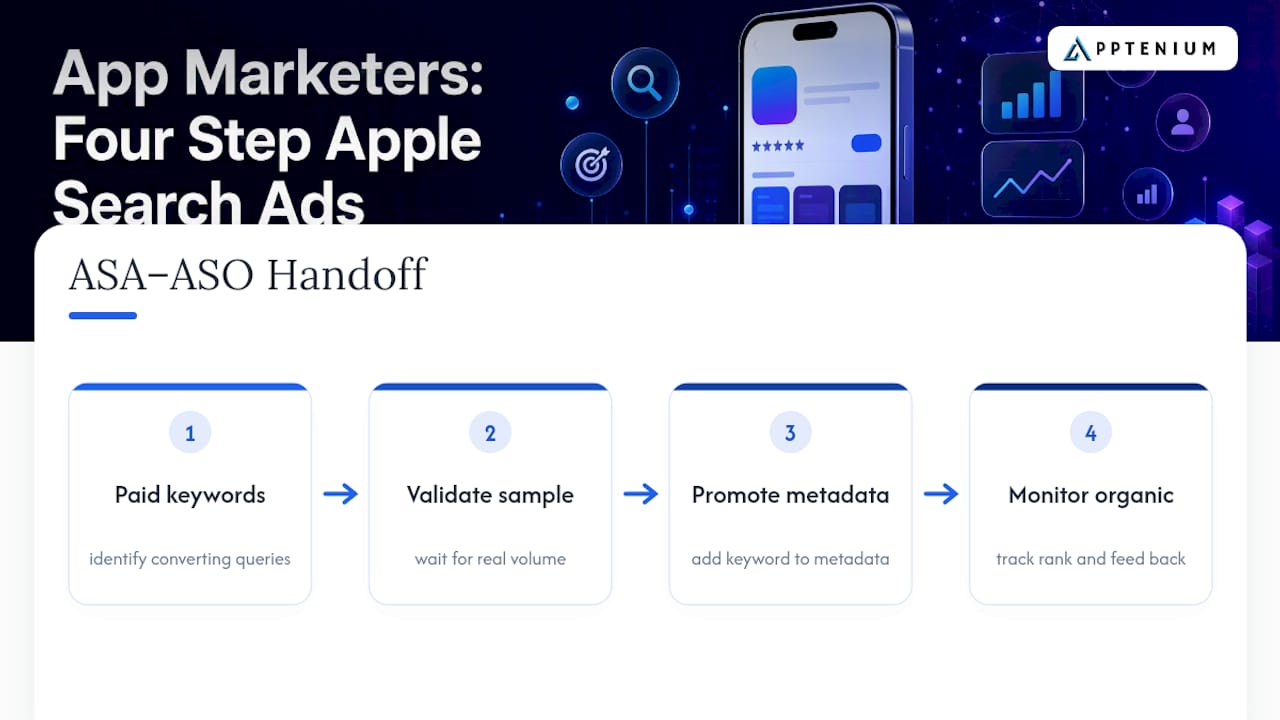
The second common trap is impatience with sample size. I’ve seen teams promote a keyword to metadata after 15 taps because the conversion rate looked good, then get confused three weeks later when organic rank didn’t move. Fifteen taps tells you almost nothing. Wait for real volume before you trust a number enough to act on it.
The third trap, mixing Search Match with explicit keyword campaigns in the same ad group, sounds like a minor technical detail until you try to figure out which keyword actually drove a spike in installs and realize your data can’t tell you.
What actually shortens this feedback loop is having your ASO scanning, keyword tracking, and performance data sitting in one place instead of scattered across a spreadsheet, an ad console, and a separate analytics tool. That’s the practical argument for integrated tooling: not that it does anything ASA and App Store Connect can’t do individually, but that it removes the friction between seeing a signal and acting on it, which is exactly the gap where most of these mistakes happen.
— Mike
Run the ASA→ASO Loop Without Juggling Five Tools
The workflow benefits from tools that combine ASO scanning, keyword tracking, competitor intelligence, and performance reporting from various analytics platforms into a single dashboard instead of multiple tabs. That matters most in the validation step, where you need to see a keyword’s ASA conversion data next to its current metadata position without exporting a single spreadsheet.

Every stage of the workflow above aligns with features typical of comprehensive ASO platforms. Discovery improves with AI-powered listing recommendations that highlight potential metadata gaps. Validation accelerates when keyword tracking updates automatically rather than manually. Metadata updates become safer when you can assess their impact on ranking promptly.
Apptenium offers a Free plan for teams running a limited number of scans a month, and a Pro plan at $9.99 per month for unlimited scans and the full recommendation engine. If you’re managing more than one app or you’re tired of stitching ASA reports to your ASO decisions by hand, check the feature breakdown and start on the plan that fits your current scan volume.
Sources
The claims and benchmarks in this guide draw on Apple’s own advertising and developer documentation first, followed by independent ASO industry analysis for benchmarks and workflow patterns Apple doesn’t publish directly.
Apple’s own documentation should always be your first stop for current specs, since placement rules and bidding mechanics do shift between iOS releases.
FAQ
What Is Apple Search Ads?
Apple Search Ads is Apple’s official advertising platform for promoting apps within App Store search results, the Search tab, the Today tab, and product pages. It runs on a cost-per-tap bidding model and, for Advanced accounts, gives you keyword-level targeting plus Custom Product Page assignment by ad group.
How Do You Find the Right ASO Keywords?
The most reliable method is mining your Apple Search Ads Search Terms report for phrases with strong tap-through and conversion rates, then promoting only the ones with sufficient sample size into your title, subtitle, and keyword field. This turns paid data into a validated organic keyword list instead of guesswork, following the same discovery-to-metadata loop covered above.
How Much Do Apple Search Ads Cost?
Cost-per-tap varies widely by category and competition, but a workable discovery-phase budget starts around $15 to $40 per day. Costs generally trend down as your Quality Score improves, and industry data shows CPT drops of 20 to 35 percent once metadata catches up to your best-converting keywords.
What Keywords Should You Target in Apple Search Ads?
Start with a mix of Search Match terms and broad match candidates during your discovery phase, since these surface real user language you likely haven’t guessed. Validate each candidate against a meaningful tap sample before committing it to a Category, Competitor, or Brand campaign with tighter, exact-match targeting.
Can a Tool Like Apptenium Help With the ASA→ASO Loop?
Yes. Apptenium consolidates ASO scanning, keyword tracking, and competitor intelligence with performance data from Firebase and Google Analytics, which shortens the gap between seeing an ASA signal and acting on it in your metadata. Pricing details for the Free and Pro plans are listed on the site.