80 Character Play Store Short Description Templates for ASO Teams
80 Character Play Store Short Description Templates for ASO Teams
The Play Store short description is the 80-character field that sits directly under your app’s title in search results and on your listing page, and Google Play enforces that limit strictly. It’s indexed for search, second only to the title in ranking weight, and it’s often the deciding line a user reads before tapping install. Your job with that strict 80-character limit: lead with your primary keyword, then close with a clear, human benefit.
TL;DR:
- The short description’s primary keyword should appear within the first 40 to 50 characters to maximize search relevance and user engagement.
- Google enforces an exact 80-character limit, including spaces and punctuation, and violating this rule risks rejection or truncation in search results.
- Using accurate, verifiable claims and avoiding misleading, promotional, or keyword-stuffed language is critical to compliance and effective conversion.
- Localize descriptions for each market by hiring native copywriters and focusing on regional search terms rather than translating English text directly.
- Updating the short description is fast and cost-effective through Play Console’s independent publishing, making it ideal for ongoing testing and optimization.
Table of Contents
- Where the Play Store Short Description Appears (and Why It Drives Conversions)
- Google Play’s Official Rules for Short Description Length and Content
- What Formula Should You Use to Write a Short Description?
- How Should You Localize a Short Description for Different Markets?
- How Do You Test and Update a Short Description?
- What Are the Most Common Short Description Mistakes?
- Publish Checklist and Ready-to-Adapt Templates
- What Actually Moves the Needle on Short-Description Performance
- Write, Test, and Track Short Descriptions With Apptenium
- Sources
- FAQ
Where the Play Store Short Description Appears (and Why It Drives Conversions)
Your short description doesn’t live in one quiet corner of the Play Store. It shows up in the search results card, right below your app icon and title, and it reappears at the top of your full store listing before the “Read more” expansion. Both placements happen before a user has scrolled, clicked, or invested any real attention, which is exactly why this field carries so much weight.
Google’s own Play Console guidance describes the short description as a quick synopsis meant to spark interest and explain your app’s core purpose, and it confirms the field surfaces in listing and search contexts alike. That dual placement means you’re writing for two different mental states at once: a searcher scanning results for relevance, and a browser who’s already on your page deciding whether to keep reading.
The indexing weight matters more than most teams realize. According to Play Console’s best-practices documentation, the short description ranks as the second most heavily indexed text field on your entire listing, trailing only the app title itself. That puts it well ahead of your long description, your screenshots’ alt text, or anything buried further down the page.
What this means practically:
- Google’s algorithm weighs your short description almost as heavily as your title when matching search queries.
- Users scanning search results use it to judge relevance in under two seconds.
- A short description that repeats your title wastes indexing real estate you could use for a second keyword.
- Vague copy (“The best app for you”) tells the algorithm nothing and tells the user even less.
Here’s the tension every ASO team eventually runs into: optimizing purely for keywords produces copy that reads like a search query, not a sentence. Optimizing purely for persuasion produces copy that a human loves but the algorithm can’t parse for relevance. The winning short description does both at once. It opens with the term users actually search for, then pivots to the outcome that term delivers. “Budget tracker & bill planner” tells the algorithm what you are. Adding “for stress-free saving” tells the human why they should care.
Treat this field as a pitch, not a label. You have one sentence’s worth of space to convince a stranger you solve their exact problem, and the algorithm is grading your word choice at the same time the human is.
Google Play’s Official Rules for Short Description Length and Content
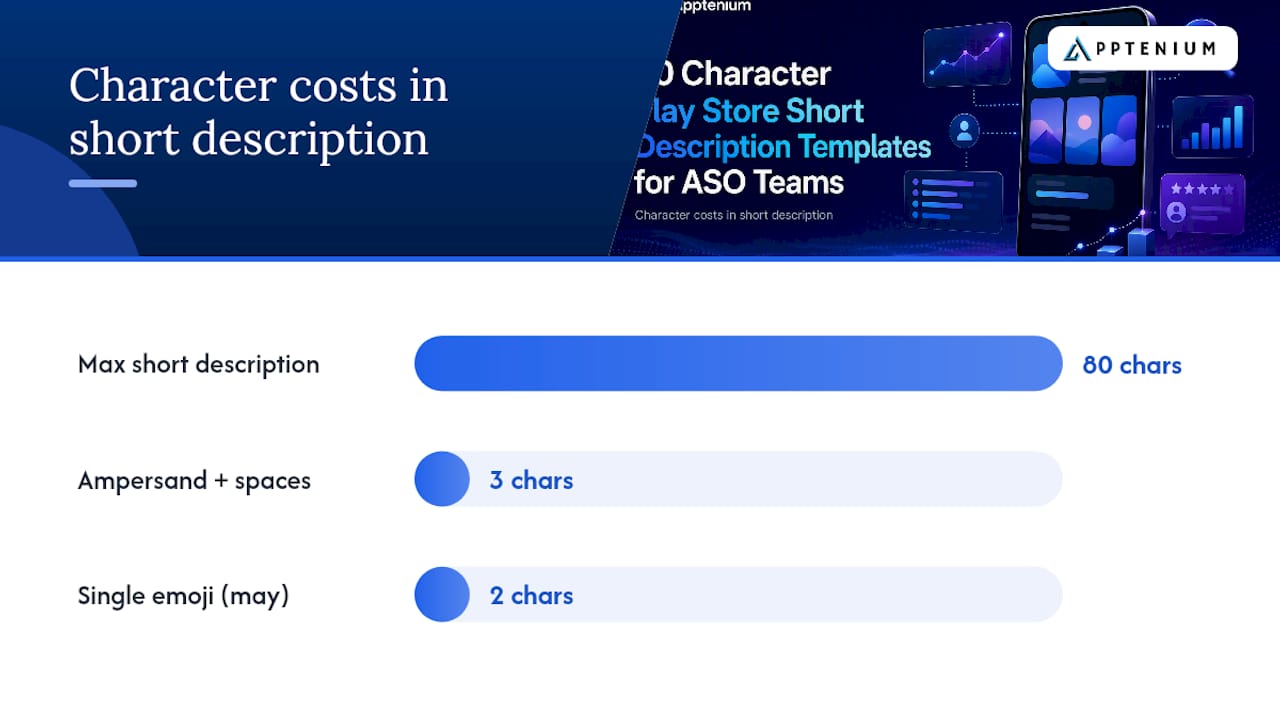
The 80-character ceiling isn’t a suggestion. Play Console enforces it at the character level, and once you hit the limit, the field simply stops accepting input. That count includes every space and every punctuation mark, so “Fast & Easy Notes” costs you three characters more than “Fast Easy Notes” once you factor in the ampersand and spaces around it.
Google’s store listing and promotion policy goes further than length, though. It defines a set of content rules that will get your listing rejected or your app suspended if you ignore them, regardless of how compelling the copy sounds.
Here’s what the policy explicitly prohibits in your short description:
- Misleading claims about functionality. You can’t describe features your app doesn’t actually have.
- Store-performance claims. Phrases like “#1 App” or “Top Rated” are barred unless you can substantiate them with verifiable, current data.
- Promotional pricing language. Mentioning a sale, a discount percentage, or a limited-time price is not allowed in this field.
- Manipulative formatting. Excessive punctuation, emoji spam, or characters designed to game the display are flagged during review.
- Irrelevant keyword stuffing. Listing unrelated terms just to catch search traffic violates the spirit of the policy even when each word is technically accurate.
Capitalization gets less explicit treatment, but Google’s own examples favor sentence case with selective capitalization on your app name or core feature, not full title case on every word. Trademark symbols (™) and copyright marks (©) are generally fine to include since they’re accurate brand identifiers, not manipulative formatting.
Special characters deserve a specific warning. A character-limit reference from Applyra notes that emoji and certain symbols can consume more of your character budget than they visually appear to, since some render as multi-byte characters behind the scenes. A single emoji might cost you two characters instead of one, which matters enormously when you’re already fighting for space inside an 80-character window.
The practical takeaway: draft your short description assuming every character counts against you, verify the live count in Play Console before submitting, and skip emoji entirely unless you’ve confirmed the exact character cost. Policy violations here don’t just get your copy rejected. Repeated violations can trigger account-level enforcement, which is a far more expensive mistake than losing a few words to caution.
What Formula Should You Use to Write a Short Description?
Every high-performing short description follows some version of the same skeleton: primary keyword + secondary keyword or feature + benefit. The order matters because Google’s indexing and human attention both front-load, meaning the first words carry more weight than the last.
A workable formula looks like this:
- Lead with the single keyword your app most needs to rank for.
- Follow with a secondary term or your core feature, phrased naturally rather than as a tag.
- Close with the outcome or feeling the user gets, not a repeated feature list.
- Cut anything that duplicates your title word-for-word.
- Count your characters in Play Console, not in a text editor, since some symbols cost more than they look like they should.
Here’s that formula applied across categories, with the “before” version showing the vague, generic copy teams often start with:
Utility app (file manager) Before: “The best app for managing your files easily.” (46 characters, no real keyword) After: “File manager & cleaner. Free up space in seconds.” (51 characters)
Productivity app (habit tracker) Before: “An app that helps you build better habits.” (44 characters) After: “Habit tracker & daily planner for lasting routines.” (54 characters)
Ecommerce app (resale marketplace) Before: “Buy and sell used items near you easily.” (42 characters) After: “Buy & sell secondhand fashion, furniture, and more.” (54 characters)
Game app (puzzle) Before: “A fun and addictive puzzle game for everyone.” (47 characters) After: “Match puzzle game. Relaxing brain teasers, no timers.” (55 characters)
Finance app (budgeting) Before: “This app makes budgeting simple for anyone.” (44 characters) After: “Budget tracker & bill planner for stress-free saving.” (55 characters)
Fitness app (workout planner) Before: “Get in shape with personalized workout plans.” (48 characters) After: “Home workout planner. Build strength, no gym needed.” (55 characters)
Notice each “after” version leads with a term someone would actually type into the Play Store search bar, not a marketing phrase. That’s the keyword-priority allocation at work: your rarest, most specific term goes first because it does the heaviest lifting for both search relevance and differentiation from competitors using broader words.
Avoiding title duplication matters more than teams expect. If your title already says “Habit Tracker,” repeating “habit tracker” in your short description wastes character space Google could otherwise index for a second, distinct term. Use the short description to add a keyword your title doesn’t cover, not to restate one it already does.
Pro Tip: Draft five variants of your short description before picking one. Read each aloud. If it sounds like something a search engine wrote instead of a person, rewrite it until it doesn’t. The algorithm rewards relevance, but the human decides whether to tap install, and only one of those two forgives awkward phrasing.
How Should You Localize a Short Description for Different Markets?
Localization isn’t translation. A short description that’s grammatically correct in a new language but structurally identical to the English original usually reads stiff, and stiff copy converts worse regardless of accuracy.
Google’s own guidance recommends localizing short descriptions per market rather than running a single translated string across every locale, and the reasoning holds up under scrutiny. Search behavior differs by language and region. The keyword a German user types isn’t a literal translation of the English query; it’s whatever term that market actually searches. A short description translated word-for-word can lose its keyword relevance entirely even while remaining accurate.
Here’s what localization done right actually involves:
- Hire native copywriters for each target market, not just translators. A translator preserves meaning; a copywriter preserves persuasion.
- Research each locale’s actual search terms before writing, since the highest-volume keyword in English rarely maps directly to the highest-volume keyword in Japanese or Portuguese.
- Rebuild the sentence structure per language rather than forcing the English word order into a new language’s grammar.
- Re-verify the character count in each localized version, since some languages expand and others compress relative to English.
That last point deserits its own attention. An Applyra reference on platform character limits notes that translated copy can run longer or shorter than the English source depending on the language pair, and that shift can push a perfectly sized English short description over the 80-character ceiling once it’s rendered in German or Finnish, languages known for longer compound words.
Because of that expansion risk, prioritize your most important words toward the front of every localized version, not just the English original. Industry practitioners commonly point to the first 40 to 50 characters as the segment most likely to survive truncation across devices and display contexts, which means your core keyword and primary benefit need to land inside that opening stretch in every language you support, not just English.
Pro Tip: When a localized short description runs long, cut connecting words and adjectives before you cut nouns. “Budget tracker for saving money” survives better as “Budget tracker, save money” than as a version that keeps every word but drops the keyword.
How Do You Test and Update a Short Description?
Short descriptions are one of the fastest levers in your entire ASO toolkit because updating one doesn’t require shipping a new binary. Play Console’s own documentation confirms metadata changes like this go live independently of app version updates, which means you can revise, resubmit, and see the change reflected without waiting on a build, a code review, or an app store review cycle for functionality.
That speed makes short-description copy the ideal testing ground for value-proposition experiments. Here’s a practical approach:
- Isolate one variable per test. Change either the keyword order or the benefit phrasing, never both at once, or you won’t know which change moved the needle.
- Use Store Listing Experiments to run true A/B splits, showing different short-description variants to segments of incoming traffic rather than guessing from before-and-after comparisons.
- Run the test long enough to gather a meaningful sample. A quick glance after a few days tells you almost nothing; give the experiment enough traffic and time before drawing conclusions.
- Track impressions, installs per impression, and install conversion rate separately. A variant that raises impressions but tanks conversion rate isn’t a win.
- Roll the winning variant into your live listing, then start your next single-variable test rather than declaring victory permanently.
Watch this metric hierarchy closely: impressions tell you if you’re being found, install conversion rate tells you if your copy is working once you are. A short description can be technically well-optimized for search and still underperform on conversion if the benefit language doesn’t resonate, which is exactly why testing beats guessing.
One caution on measurement: don’t overreact to early swings. Experiment platforms need a real observation window to separate genuine performance differences from daily traffic noise, and practitioners generally recommend giving a test several weeks rather than a few days before trusting the result, with the exact timeline depending on how much traffic your listing gets.
What Are the Most Common Short Description Mistakes?
Most short-description failures fall into one of two buckets: policy violations that get flagged, or ASO patterns that pass review but quietly underperform. Both are fixable once you know what to look for.
Here’s what shows up most often, and what to write instead:
- Fake accolades. “#1 Rated App” or “Award-Winning” without verifiable proof violates store listing policy outright. Replace with a specific, honest feature claim: “5-star rated budgeting tool” only if that rating is real and current.
- Time-limited promotions. “50% off this week only” doesn’t belong in a field Google treats as evergreen metadata. Move pricing language to your listing’s promotional graphics instead, where it belongs and where policy allows it.
- Keyword stuffing. “Notes, planner, to-do, tasks, reminders, organizer app” reads like a tag cloud, not a sentence, and it tanks both readability and trust. Pick your two strongest terms and build a real sentence around them.
- Emoji overload. A string of emoji might grab a glance, but it burns character budget fast and risks formatting flags. One emoji, used deliberately, rarely causes problems; five in a row usually does.
- Title duplication. Repeating your app name and its main function verbatim from the title wastes indexing space you could spend on a second keyword. Say something your title hasn’t already said.
- Vague benefit language. “The app you need” or “Simplify your life” tells the algorithm and the user nothing concrete. Name the specific outcome instead: “track spending in seconds,” not “manage your money better.”
If Play flags your metadata during review, the remediation path is straightforward: open the specific rejection reason in Play Console, rewrite only the flagged element rather than the entire description, and resubmit. Because short-description edits don’t require a new binary, this correction cycle is usually fast, often measured in a single review pass rather than a full release cycle.
Publish Checklist and Ready-to-Adapt Templates
Before you hit publish, run your short description against this checklist:
- Character count confirmed at 80 or under, verified inside Play Console itself.
- Primary keyword appears in the first 40 to 50 characters.
- No duplication of the app title’s exact wording.
- No promotional pricing, fake accolades, or unverifiable performance claims.
- Emoji and special characters checked against actual character cost, not visual appearance.
- Benefit or outcome stated in plain, human language, not vague filler.
- Localized versions rewritten for each market’s actual search terms, not translated line-by-line.
Now the templates. Each one is a fill-in-the-blank frame sized comfortably within a strict 80-character limit, built around the keyword-plus-benefit formula covered earlier.
- “[Core function] app. [Specific benefit], no [common pain point].” Example: “Meditation app. Fall asleep faster, no subscription required.”
- “[Primary keyword] & [secondary feature] for [outcome].” Example: “Invoice maker & expense tracker for freelancers.”
- “[Action verb] your [object] with [core feature].” Example: “Organize your recipes with smart grocery lists.”
- “[Category] game. [Gameplay hook], [reassurance].” Example: “Word puzzle game. Quick daily challenges, no ads forced.”
- “The [core function] app for [specific audience].” Example: “The workout planner app for busy parents.”
- “[Primary keyword], [secondary keyword], and [benefit] in one app.” Example: “Budgeting, saving, and financial clarity in one app.”
- “[Feature] made simple: [core benefit].” Example: “Language learning made simple: real conversations fast.”
- “[Core function] & [secondary function], built for [use case].” Example: “Task manager & focus timer, built for remote teams.”
Pro Tip: After drafting any of these, reread only the first 40 to 50 characters in isolation. If that fragment alone doesn’t communicate what your app does, move your strongest words further left before you touch anything else.
What Actually Moves the Needle on Short-Description Performance
Most ASO advice treats the short description like a keyword container: stuff the right terms in, watch rankings climb. That framing misses what actually separates a functional short description from one that converts. The character limit isn’t the hard part. The hard part is writing a sentence that satisfies an algorithm’s pattern matching and a stranger’s three-second attention span using the exact same strict 80-character limit, with zero room for either audience to feel like an afterthought.
Here’s what I’d tell any small ASO team deciding where to spend a limited week of effort: fix your short description before you touch your screenshots or your long description. It’s the highest-leverage, lowest-cost edit available to you, precisely because it updates without a new binary and reindexes fast. Nothing else in your listing offers that combination of visibility and speed.
Prioritization matters here more than most guides admit. If your install conversion rate is weak but your impressions are healthy, your short description is very likely part of the problem, since it’s the last piece of text standing between a search result and a tap. If impressions themselves are low, the issue usually sits upstream in your title and keyword field, and no amount of short-description polishing will fix a discovery problem. Diagnose which side of that split you’re on before you start rewriting.
On cadence: test one short-description variable every few weeks, not every few days. Impatience is the most common reason small teams abandon experiments that were actually working. Give a test real time to separate signal from noise, log what you tried and why, and treat each iteration as a permanent asset rather than a one-off tweak you’ll forget by next quarter.
The teams that win at this long-term aren’t the ones with the cleverest single sentence. They’re the ones who treat their short description as a living experiment they revisit deliberately, not a field they filled in once during launch week and never opened again.
— Mike
Write, Test, and Track Short Descriptions With Apptenium
Everything covered here, from character counting to keyword front-loading to running Store Listing Experiments, gets faster and more reliable when you’re not doing it by hand across scattered spreadsheets and screenshots. Some ASO platforms give app teams one workspace for exactly this work: run an ASO scan on your current listing, get AI-generated recommendations for your short description’s keyword order and benefit phrasing, and track how your target keywords are ranking before and after each change.

The platform pulls in performance data from Firebase and Google Analytics alongside your ad network numbers, so when you test a new short-description variant, you’re not just watching impressions in isolation. You’re seeing whether that variant actually moved installs and revenue. Apptenium’s ASO features cover competitor keyword tracking too, which matters when you’re deciding which term to lead with in a crowded category.
If you want to see where your current short description stands before you rewrite it, run a free ASO scan with no credit card required. It’s the fastest way to find out whether your first 40 characters are pulling their weight or quietly costing you installs.
Sources
- Add preview assets to showcase your app - Play Console Help
- App Store & Google Play Character Limits (2026 Reference) | Applyra
FAQ
What Is the Character Limit for a Google Play Short Description?
The Google Play short description is capped at a strict 80-character limit, including every space and punctuation mark, and Play Console enforces this limit at the input level.
What Is the Google Play Store?
The Google Play Store is Google’s official distribution platform for Android apps, games, and digital content, where developers publish listings that include a title, short description, long description, and visual assets for users to discover and download.
How Do I Use the Play Store to Find Apps?
Users search the Play Store by typing keywords or app names into the search bar, then scan results where each app’s icon, title, and short description appear together to help decide which listing to open.
Is the Google Play Store Necessary for Android Apps?
Yes, for most developers targeting Android users, since it’s the default and most widely used distribution channel on the platform, though some regions and device manufacturers support alternative app marketplaces.
Can I Update My Short Description Without Releasing a New App Version?
Yes, short-description edits go live through Play Console independently of your app’s binary, which is exactly why they’re ideal for rapid A/B testing compared to changes that require a full release.