Daily Competitor Rank Tracking for ASO Teams: CPP, Velocity, Edits
Daily Competitor Rank Tracking for ASO Teams: CPP, Velocity, Edits
The fastest way to track competitor rankings is daily automated rank collection per keyword and locale, timestamped and stored so you can spot movement before it costs you install share. Layer in alerts for metadata edits and Custom Product Page or Custom Store Listing changes, and you get early warning plus the context to act. The outcome you’re after isn’t a dashboard full of numbers. It’s a prioritized list of what to fix on your own listing this week.
TL;DR:
- Tracking 15 to 25 keywords per app across key locales provides optimal coverage without creating excessive noise or alert fatigue.
- Monitoring 2 to 3 main competitors per keyword ensures relevant data while avoiding diluting attention on less significant rivals.
- Automating daily rank collection with multi-day averaging helps distinguish meaningful shifts from daily fluctuations, reducing false alarms.
- Weekly checks of metadata and rating trends prevent overreacting to temporary rank swings caused by competitor updates or testing.
- Integrating paid ad data and Custom Product Page variations gives deeper insight into competitive strategies beyond organic rankings.
Table of Contents
- How to Track Competitor Rankings: Manual, API, or ASO Platform?
- A Step-by-Step Workflow for Competitor Rank Tracking
- Which Metrics Actually Deserve Your Attention?
- Why Platform-Specific Signals Like CPP Matter
- Running This Workflow Inside Apptenium
- Your One-Week Quick-Start Checklist
- What I’ve Learned Watching Competitor Ranks
- Automate Competitor Tracking Without the Tool Sprawl
- Sources
- FAQ
How to Track Competitor Rankings: Manual, API, or ASO Platform?
You have three real paths, and the right one depends on how many apps and keywords you’re watching. Pick the wrong one and you’ll either waste hours on spreadsheets or overpay for automation you don’t need yet.
Manual checks work fine at small scale. Search your target keywords on a clean device, screenshot the results, and log positions in a spreadsheet. It’s tedious, but if you’re tracking five keywords for one rival, it’s a reasonable starting point before you invest in anything else.
API-driven automation is where things scale. Pulling ranks through an API lets you collect country-specific positions on a schedule, timestamp every fetch, and rebuild historical trends without touching a screen. This is the approach Sonar’s rank-tracking guide recommends for teams that need repeatable, defensible data.
Commercial ASO platforms bundle this automation with historical charts, keyword-difficulty scores, and side-by-side competitor views, which is what makes them worth the subscription once you’re managing more than one app or a handful of rivals, according to Mobile App Wiki’s competitor-analysis guide.
Most agencies land on a hybrid: automated daily pulls for the keywords that matter most, with manual spot checks to verify anomalies before reacting.
- Manual: low cost, high effort, fine for under 10 keywords
- API/automation: scales cleanly, gives you timestamps and locale splits
- ASO platforms: adds historical context, alerts, and metadata monitoring on top of raw ranks
- Hybrid: automate the bulk, verify outliers manually before you act
A Step-by-Step Workflow for Competitor Rank Tracking
Building a repeatable process matters more than picking a fancy tool. Here’s the sequence that keeps competitor rank tracking useful instead of noisy.
- Pick your keyword sets. Split them into primary (terms you already rank for), gap (terms competitors own that you don’t), and aspirational (high-volume terms you’re building toward). Track 15 to 25 keywords per app across the locales that matter, a range Sonar suggests as the sweet spot between coverage and manageable noise.
- Choose 2 to 3 competitor apps per keyword. More than that dilutes your attention. Pick the apps that consistently show up in your target keyword’s top 10, not just the biggest names in your category.
- Capture the right fields on every fetch. Log position, store (Apple App Store or Google Play), country, exact timestamp, and surrounding search-result context (are there ads above the fold, is a new app appearing). Skipping timestamp precision is the most common mistake teams make when they later try to explain why a rank moved.
- Normalize and smooth the data. Raw daily positions bounce around for reasons that have nothing to do with competitor strategy. Apply a rolling 3 to 7 day average before drawing conclusions, and calculate velocity (the rate of change over that window) rather than reacting to a single day’s number.
- Set alert rules tied to real thresholds, not every single-position wobble. A competitor entering the top 10 for one of your primary keywords, or a rating shift of more than a few tenths of a point in a week, are worth a notification. A one-position dip that reverses the next day isn’t.
- Respond with a plan, not a reflex. If a rival’s rank climbs and holds for several days, check their metadata for changes first. If nothing changed there, check whether they launched a Custom Product Page or an ad campaign around that keyword.
Pro Tip: Give new entrants a stabilization window before you react. Rankings can swing plus or minus 2 to 5 positions in the first week or two after a competitor launches or updates, and that volatility settles on its own, according to Sonar’s data on ranking behavior. Chasing every early swing wastes your team’s time.
The goal of this workflow isn’t to watch every number move. It’s to build a record clean enough that when something real happens, you can tell the difference between signal and noise within a day, not a week.
Which Metrics Actually Deserve Your Attention?
Not every metric earns a place on your dashboard. Some deserve a daily check, others a weekly glance, and a few will just generate false alarms if you watch them too closely.
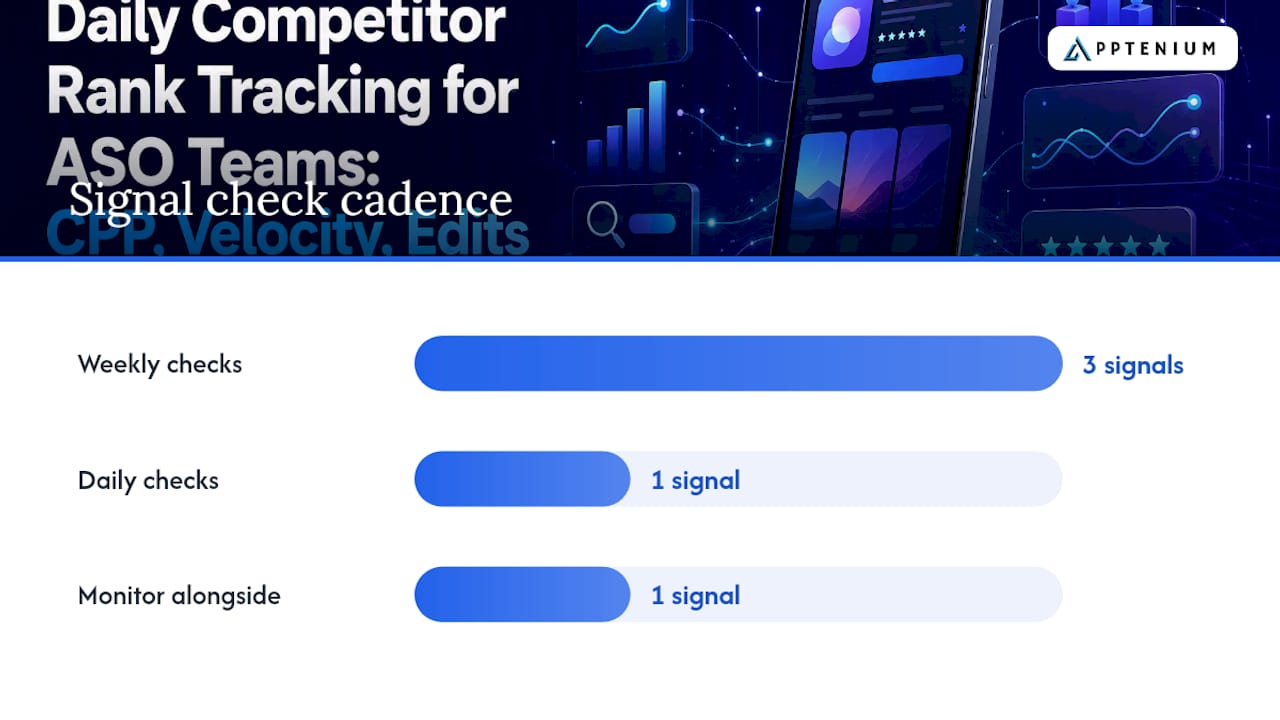
Keyword rank is your most granular signal and the noisiest. Check it daily, but only act on moves confirmed across a 3 to 7 day rolling average. Chart or category rank shifts more slowly and reflects broader momentum. A weekly check usually catches everything meaningful. Download velocity, the rate of change in install volume, often front-runs a rank climb by several days and is worth monitoring alongside rank rather than instead of it. Rating trend matters because a sudden drop or spike frequently precedes or follows a competitor’s feature update or bug release. Metadata changes (title, subtitle, keyword field, screenshots) deserve a weekly review since edits here are often the actual cause behind a rank shift you noticed days earlier.
New competitor entries into the top 10 for a tracked keyword and multi-day rating swings are two of the most reliable triggers worth building an alert around, a pattern Sonar’s tracking research backs up directly.
- Keyword rank: daily check, act only on multi-day confirmed moves
- Chart/category rank: weekly check, reflects broader momentum shifts
- Download velocity: monitor alongside rank, often leads it by days
- Rating trend: weekly check, flags feature updates or quality issues early
- Metadata edits: weekly review, usually the root cause of a rank move
Mapping each signal to a response keeps your team from just collecting data for its own sake. A metadata edit from a rival triggers a review of your own listing copy. A download-velocity spike triggers a check of their ad spend and app store search ads. A rating slide triggers nothing on your end except maybe a note. Overreacting to a competitor’s temporary dip is its own kind of mistake.
Why Platform-Specific Signals Like CPP Matter
Standard rank trackers miss the signals that actually explain conversion-rate shifts. Apple’s Custom Product Pages and Google Play’s Custom Store Listings let competitors run targeted creative variants outside the main listing, and those variants rarely show up in a basic keyword tracker.
This matters because Apple allows multiple CPP variations per app, and Google Play supports a similar range of Custom Store Listing variants, according to Business of Apps’ ASO guide. A competitor running five or six CPP variants isn’t guessing. They’re actively testing which screenshots, headlines, or feature callouts convert best for specific segments, and that testing often precedes a broader metadata overhaul.
Paid campaign behavior tells a parallel story. Watching which keywords a competitor bids on through Apple Search Ads or Google App Campaigns reveals which terms they consider worth defending, a signal ASOtext’s competitive ASO guide treats as essential context alongside organic rank data.
- Check for new CPP or Custom Store Listing variants monthly, since they change less frequently than ranks
- Compare screenshot and headline variants across visits to infer what segment they’re testing
- Cross-reference paid keyword targeting with organic rank gains to separate paid lift from real ASO improvement
- Treat a sudden CPP rollout as a leading indicator that a broader listing update is coming
Running This Workflow Inside Apptenium
Apptenium was built to run this exact workflow without stitching together three separate tools. Its competitor intelligence module handles the daily rank pulls and flags new entrants automatically, while its ASO scanning layer catches metadata edits the moment a rival changes a title, subtitle, or screenshot set.
Where it saves real time is the connection between rank data and outcomes. Apptenium integrates with Firebase and Google Analytics, so a rank gain or drop can be checked against actual download and revenue movement instead of sitting as an isolated number, which is the correlation Similarweb’s guide to app rank tracking points to as the difference between watching ranks and acting on them.
A practical starting setup:
- Track 15 to 25 keywords per app, matched to your primary, gap, and aspirational lists
- Set alert thresholds for top-10 entries and multi-day rating swings, not single-position noise
- Add dashboard widgets for download velocity next to keyword rank so both surface together
- Let the AI recommendations translate a detected rank drop into a specific listing task, like rewriting a subtitle or swapping a screenshot
Your One-Week Quick-Start Checklist
You don’t need a quarter-long rollout plan. Here’s what to have running by the end of this week.
- Choose 10 to 25 keywords across your priority locales, split into primary, gap, and aspirational groups.
- Pick 2 to 3 competitor apps per keyword, based on who actually shows up in the top 10, not who you assume is the biggest threat.
- Turn on daily automated rank pulls, or if you’re not there yet, schedule a fixed weekly manual check with screenshots.
- Build three alert rules: top-10 competitor entry, rating swing over a set threshold, and metadata change detection.
- Link your alerts to a response playbook so the team knows what to do, not just that something moved.
- Connect rank data to Firebase or Google Analytics so you can tell whether a rank change actually shifted installations.
- Plan your own metadata updates on a 4 to 6 week cadence, avoiding reactive edits after every competitor blip.
What I’ve Learned Watching Competitor Ranks
Manual checks feel rigorous until you’re three weeks in and realize you have gaps in the data from the one week nobody had time to log positions. Automation fixes that, but it introduces a new failure mode: alert fatigue. Teams that alert on every single-position move burn out within a month and start ignoring notifications entirely, including the ones that matter.
The other trap is metadata churn. Watching a competitor tweak their listing constantly can pressure you into reactive edits of your own, and constant changes make it impossible to isolate what’s actually working. Measure twice, edit once.
— Mike
Automate Competitor Tracking Without the Tool Sprawl
Running this workflow by hand across spreadsheets, screenshot folders, and a separate analytics login is exactly the fragmentation that eats a marketer’s week. Apptenium consolidates the pieces this guide just walked through, ASO scanning, competitor intelligence, keyword tracking, and Firebase or Google Analytics integration, into one dashboard, so a rank change and its revenue impact show up next to each other instead of in three different tabs.

Its AI recommendations take that a step further by turning a detected rank drop or a competitor’s metadata edit into a specific, prioritized task on your own listing, rather than leaving you to guess what to change. For SMBs and startups building this process from scratch, the Apptenium plan for smaller teams includes a free tier with limited scans so you can test the workflow before committing to unlimited tracking. Start by adding your first set of competitor apps and keywords, and let the daily scan run for a week before you touch a single line of metadata.
Sources
- App Store Ranking Tracker: How to Track Keyword Rankings | Sonar Blog
- Competitive ASO — ASO Wiki | ASOtext
- App Ranking Tracker: Monitor App Store Keyword Ranking | Similarweb
FAQ
How Often Should I Check Competitor App Rankings?
Check keyword ranks daily and metadata weekly. Daily automated collection with a rolling multi-day average is the standard cadence for catching real movement without reacting to daily noise.
How Many Keywords Should I Track Per Competitor?
Track 15 to 25 keywords per app and monitor 2 to 3 competitors per keyword for context, a range that balances coverage against manageable alert volume.
What’s the Difference Between a CPP and a Custom Store Listing?
A Custom Product Page is Apple’s App Store feature for testing targeted creative variants (up to 70 per app), while a Custom Store Listing is Google Play’s equivalent. Both let competitors run segmented conversion tests outside their main listing.
Is It Legal to Track a Competitor’s App Store Rankings?
Yes. Rank, rating, and metadata data are all publicly visible in the app stores, so monitoring them doesn’t raise the legal issues that scraping private or gated data would.
Can Apptenium Track Competitor Metadata Changes Automatically?
Yes. Apptenium’s competitor intelligence and ASO scanning tools flag metadata edits and rank shifts automatically, then convert them into prioritized suggestions through its AI recommendations feature.
What Should I Do When a Competitor Enters the Top 10?
Wait for a multi-day confirmed position before reacting, since new entrants often see swings of 2 to 5 positions that settle within one to two weeks, then check their metadata and ad activity for the actual cause.