iOS App Store ASO: 3 Shifts and an 8–12 Week Roadmap for Developers

iOS App Store ASO: 3 Shifts and an 8–12 Week Roadmap for Developers
Your highest-return work on iOS App Store Optimization right now is threefold: sharpen your title, subtitle, and 100-character keyword field; add targeted screenshot text; and improve retention. Do this before touching anything else: audit your title and subtitle for wasted characters, rebuild your keyword field with zero duplication, overlay your top three screenshots with intent-driven phrases, and pull your D1/D7/D30 retention and crash-free numbers. Everything else in ASO is secondary to those four moves.
TL;DR:
- Focus on optimizing the title, subtitle, keyword field, and screenshot text, as these are the main signals weighted by Apple’s search algorithm.
- Use behavior metrics like retention rates and crash-free sessions, which now have a stronger influence on rankings than listing content alone.
- Research keywords based on real user language, validate them through direct search, and update them every four to six weeks to stay competitive.
- Treat screenshot overlay text as a ranking factor by tailoring captions to user intent and testing creative variations for maximum impact.
- Use comprehensive tools to track all key metrics, from rank movement to behavior signals, and follow a disciplined schedule to implement and measure ASO improvements.
Table of Contents
- How Does App Store ASO Work on iOS?
- What Are the Exact Rules for iOS Metadata and the Keyword Field?
- How Do You Research and Prioritize Keywords for iOS?
- How Do Screenshots and Icons Affect Ranking and Conversion?
- How Do Custom Product Pages Fit Into an ASO Strategy?
- Which Metrics Actually Move App Store Rankings?
- What’s the Fastest Path From Audit to Results?
- How Apptenium Fits Into This Workflow
- The Editorial Take: What Most ASO Advice Gets Backwards
- Get Your iOS App Store Listing Working Harder
- Sources
- FAQ
How Does App Store ASO Work on iOS?
Apple’s search algorithm reads five text surfaces, and it does not read your long description at all. That single fact trips up more developers than any other misconception in app store ASO iOS work. If you’ve spent hours polishing paragraph three of your description hoping it will lift a keyword ranking, that time is effectively wasted for search purposes, even if it still helps conversion once a user is already reading the page.
Apple indexes the App Title (30 characters), the Subtitle (30 characters), the hidden Keyword Field (100 characters), screenshot caption text through optical character recognition, and Custom Product Page metadata tied to keyword linking. Each surface carries different weight, and the hierarchy roughly follows this order:
- Title carries the most relevance weight of any single field, which is why your primary keyword belongs there, not buried in the keyword field.
- Subtitle ranks close behind and is where most apps waste an opportunity by repeating the title instead of adding new terms.
- Keyword field matters but functions more like fuel for phrase-matching than a direct ranking lever on its own.
- Screenshot text (OCR) became a confirmed indexed surface in mid-2025, and it now carries real ranking weight, not just conversion value.
- Custom Product Page metadata, when linked to keywords, can surface in organic search, something almost no one exploited until recently.
The bigger shift for iOS app optimization is behavioral. App Store ranking now leans harder on what happens after the tap, not just what the listing says. Post-install behavior, including Day 1, Day 7, and Day 30 retention, session frequency, and redownload rate, plays a larger role in ranking than it did even two years ago. An app with a mediocre listing but strong retention can now outrank a beautifully optimized page attached to an app that leaks users in the first week.
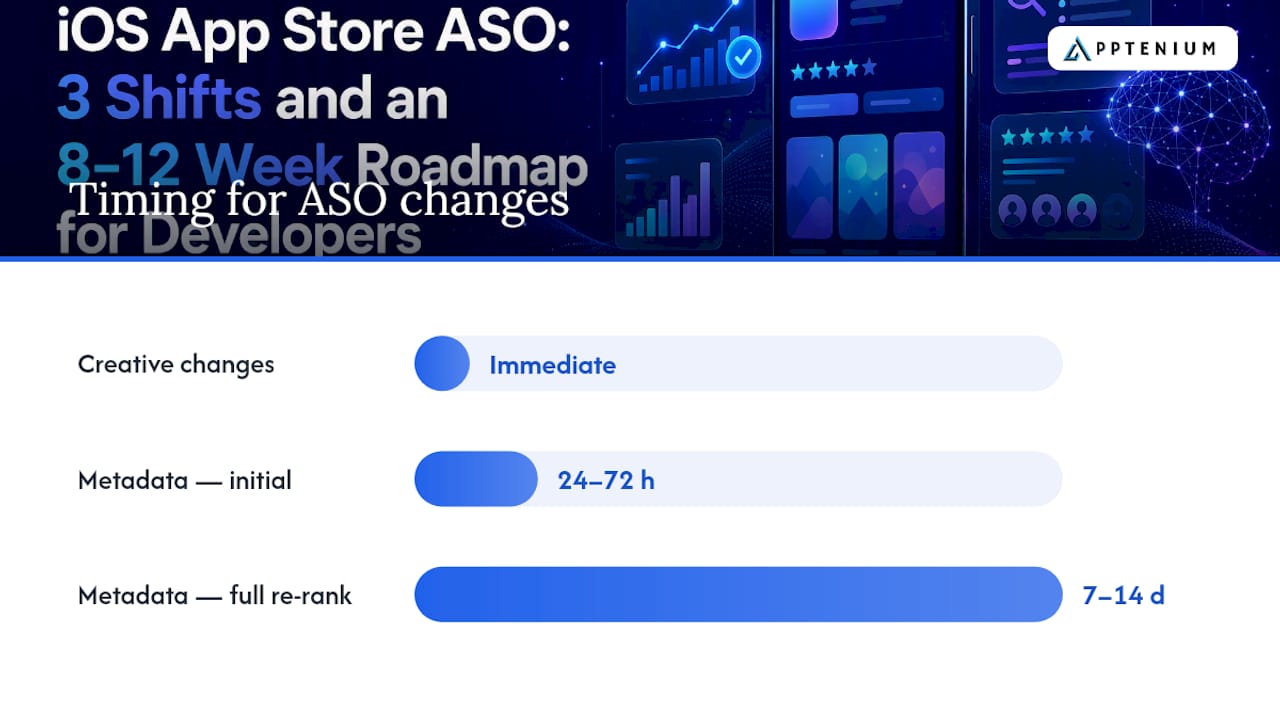
Timelines matter for planning your experiments. Metadata changes typically produce an initial rank shift within 24 to 72 hours, with fuller re-ranking playing out over 7 to 14 days. Creative changes work differently: a new screenshot set affects your conversion rate almost immediately, then compounds into ranking improvements over the following days and weeks as Apple’s algorithm registers the change in install behavior.
With millions of apps competing across major app stores, the margin between an app that gets discovered and one that doesn’t often comes down to these mechanics rather than raw product quality. Two apps solving the same problem, built to similar standards, can see wildly different install volumes based purely on how well one team understands these five surfaces.
What Are the Exact Rules for iOS Metadata and the Keyword Field?
Your title has 30 characters, your subtitle has another 30, and neither should waste a single one on filler words like “app” or “best.” Structure your title as brand name plus one high-value keyword phrase, and use the subtitle for your second and third priority phrases, ideally ones that describe a distinct benefit or use case rather than restating the title.
Here’s where most listings bleed value: the 100-character keyword field. Apple treats this field as comma-separated, with no spaces after commas, which sounds trivial but actually changes how many terms you can fit. Every space you skip is a character you can spend on another word.
The formatting rules, precisely:
- Separate terms with commas, never spaces after them (
budget,tracker,expense,financebeatsbudget, tracker, expense, finance). - Use single words rather than full phrases when possible. Apple’s algorithm recombines your individual keywords with your title and subtitle terms, so
meal,plan,recipe,grocerycan match searches like “meal plan app” even though you never typed that exact phrase. - Never repeat a word already in your title or subtitle. Apple de-duplicates across indexed fields, so if “budget” is in your title, typing it again in the keyword field wastes characters you could spend on a new term entirely.
- Skip plural forms of singular keywords you’ve already included. Apple’s matching handles basic plurals, so “recipe,recipes” is usually redundant.
- Avoid your own brand name in the keyword field. It’s already indexed from your title.
Pro Tip: Build your keyword field in a spreadsheet before you touch App Store Connect. Count characters as you go, because a field that looks fine at a glance is often two or three characters over the limit once commas are accounted for, and Apple will silently truncate the overflow.
One tactic most teams never use: localization as keyword inventory expansion. Adding a supported locale gives you an entirely separate 100-character keyword field for that language, and in certain cases, additional localizations can influence ranking in your primary storefront too, not just the localized one. If your app serves English-speaking users in the US, UK, and Canada, consider whether British English spelling variants or regional terms deserve their own localization rather than assuming one English field covers everyone.
A quick template for your next metadata pass: pull your current title and subtitle, list every word in a spreadsheet, cross off duplicates between the two fields, then check that against your keyword field for a third round of overlap. Most apps find 10 to 15 wasted characters in that exercise alone, enough for two or three new keyword phrases.
How Do You Research and Prioritize Keywords for iOS?
Keyword research for app store ASO iOS starts with your users’ own words, not a tool’s suggestion list. Support tickets, App Store reviews, and social mentions contain the exact phrases real people use to describe the problem your app solves, and those phrases are often nothing like your internal product vocabulary.
- Mine user language first. Read your last 100 App Store reviews and support tickets, and log every distinct phrase someone uses to describe why they downloaded or what they needed. Social listening tools such as social listening platforms can widen this net if your review volume is thin.
- Expand with an ASO keyword tool. Once you have a seed list from real user language, run it through a keyword research tool to surface related terms, search volume estimates, and difficulty scores you wouldn’t find manually.
- Validate in-store, not just in the tool. Search each candidate keyword directly in the App Store and screenshot the top 10 results. This step gets skipped constantly, and it’s the one that actually tells you whether a keyword is winnable.
- Map the promises in those top 10 listings. What does each competitor’s title, subtitle, and first screenshot claim? If eight of the top 10 promise “no ads” and yours doesn’t, you’ve learned something about intent that no keyword tool would surface.
- Score each keyword on a simple matrix. Rank by estimated volume against how closely the top-ranked apps match your own feature set. A high-volume term dominated by apps ten times your size is a poor first target; a moderate-volume term where the top results are weak or outdated is where you win faster.
- Set a swap cadence. Revisit your keyword field every four to six weeks, replacing your lowest performers with new candidates from the pipeline you just built, rather than treating the field as a one-time setup task.
The competition mapping step in particular separates teams that guess from teams that know. If you screenshot the top 10 for your target term and notice every single competitor emphasizes speed in their first screenshot, that’s a signal about what searchers actually care about, not just what ranks.
How Do Screenshots and Icons Affect Ranking and Conversion?
Screenshot overlay text is no longer just a conversion tool. Since Apple confirmed OCR indexing on screenshot text in mid-2025, your screenshot captions now function as a ranking surface, which means the words you overlay on your images carry real search weight, not just persuasive value.
That changes what you should write. Treat your first three screenshots as relevance surfaces, and write captions around the actual intent phrases searchers use, not your internal feature names. If your team calls a feature “Smart Sync” internally but users search for “automatic backup,” your screenshot caption should say “automatic backup,” not “Smart Sync.” This is one of the clearest applications of treating creatives as relevance surfaces rather than pure design decisions.
Sequencing and captioning rules that matter:
- Lead with your single strongest value proposition in screenshot one; most users scanning search results never scroll past it.
- Keep each caption to five to seven words, large enough to read at thumbnail size on a phone screen.
- Cover a distinct benefit or feature in each of the first three screenshots rather than three variations on the same point.
- Reserve screenshots four through ten for depth, social proof, or secondary features, since fewer searchers reach that far.
- Test icon variations alongside screenshots. Icons drive the first split-second judgment before any text gets read.
Pro Tip: Run your screenshot set through a plain-text extraction, and read only the words your captions contain, ignoring the images entirely. If that word list wouldn’t tell a stranger what your app does, your OCR-indexed text isn’t pulling its weight.
Apple’s own Product Page Optimization tool lets you A/B test screenshot sets, icons, and preview videos against your current live page, splitting traffic and reporting conversion differences. A recommended testing cadence runs experiments in two to four week windows with clear conversion gates, measuring not just the immediate install lift but the downstream D7 and D30 retention of users who arrived through each variant, before you promote a winner. A screenshot set that boosts installs but attracts users who churn fast isn’t actually a win.
How Do Custom Product Pages Fit Into an ASO Strategy?
Custom Product Pages used to be a paid-traffic tool exclusively, something you built to match a specific ad campaign’s messaging. That changed when Apple enabled keyword linking to CPPs in July 2025, and later expanded the CPP limit per app. CPPs linked to keywords can now surface in organic search results, not just when someone clicks a paid ad or campaign link.
That’s a meaningful shift for anyone doing iOS app optimization seriously. You can now build a Custom Product Page tuned to a specific keyword cluster, link it to those terms, and have it appear as an organic search result variant for users who searched that exact intent, rather than always showing them your default listing.
CPP adoption remains low across the app store, which means early adopters see a real conversion advantage simply because their CPP matches searcher intent more tightly than a generic default page ever could. If you sell a fitness app that serves both runners and weightlifters, a CPP built around “running tracker” keywords with running-specific screenshots will convert a running-intent searcher better than a default page trying to speak to both audiences at once.
A practical CPP workflow:
- Pick one tightly defined keyword cluster from your prioritized research list, ideally one where intent is clear and distinct from your primary audience.
- Build a CPP with a title, screenshots, and preview video tuned specifically to that cluster’s language and use case.
- Link the CPP to your target keywords in App Store Connect so it becomes eligible to surface organically for those searches.
- Run it for at least two to four weeks before judging conversion, giving Apple’s algorithm time to register the behavioral data.
- Compare conversion rate and D7 retention between the CPP traffic and your default page traffic for the same keyword.
Most teams treat CPPs as a paid-media afterthought. Treating them as an organic surface, tied to your keyword research instead of your ad campaigns, is one of the more underused levers in app store ASO iOS work today.
Which Metrics Actually Move App Store Rankings?
Five metrics matter more than everything else combined: conversion rate, D1/D7/D30 retention, crash-free session rate, rating velocity, and keyword rank movement. Track these weekly, because they’re the inputs Apple’s algorithm reads and the outputs your experiments should be judged against.
Crash-free rate deserves more attention than most ASO guides give it. Top-performing apps commonly report 99.9%+ crash-free sessions, and moving from roughly 96% to 99% can meaningfully boost both retention and lifetime value. That’s not a rounding error. A crash rate that seems small on paper can be quietly capping your retention numbers no matter how good your metadata looks.
Here’s where to read each metric and what threshold to watch for:
| Metric | Where to check it | What to watch for |
|---|---|---|
| Conversion rate (impressions to installs) | App Store Connect analytics | Sudden drops after an iOS update or metadata change |
| D1/D7/D30 retention | Firebase, App Store Connect, or your analytics stack | D1 retention is a common healthy signal for most consumer app categories |
| Crash-free session rate | Crashlytics or MetricKit | Below 99% is worth investigating before you spend on new keywords |
| Rating velocity | App Store Connect ratings dashboard | Sudden negative spikes after a release, which often precede rank drops |
| Keyword rank movement | A dedicated ASO tracking tool | Weekly movement of more than five to ten positions on priority terms |
For the tool stack itself, you generally need four categories working together: a store keyword tracker to watch rank movement, an analytics integration such as Firebase or Google Analytics to connect installs to downstream behavior, a crash reporter like Crashlytics or Apple’s own MetricKit for stability data, and an A/B testing layer through App Store Connect’s Product Page Optimization for creative experiments. Running these as four disconnected tabs is how most teams lose track of what actually moved a ranking after a change.
Rating velocity earns its place on this list because ratings and reviews function as a trust signal that compounds. A steady stream of positive reviews after a release tends to correlate with healthier retention numbers too, since users who bother to rate an app positively are often the same users sticking around past week one.
What’s the Fastest Path From Audit to Results?
Sequence matters more than most checklists admit. Fixing your keyword field before your app crashes for one in ten sessions is optimizing the wrong end of the funnel.
- Week 1: Triage. Pull your current crash-free rate, D1 retention, and conversion rate before changing anything. If crash-free is below 99% or D1 retention is unusually low for your category, fix that first; metadata changes on top of a leaky product just accelerate churn.
- Weeks 2 to 3: Metadata rebuild. Rewrite your title, subtitle, and keyword field using the deduplication and localization rules from your research. Ship it and start the clock, since initial rank shifts show up within 24 to 72 hours.
- Weeks 3 to 5: Screenshot and icon test. Launch a Product Page Optimization experiment with new OCR-optimized screenshot text while your metadata settles. Run it a full two to four weeks before deciding on a winner.
- Weeks 5 to 7: CPP build. Select your best-validated keyword cluster and build a linked Custom Product Page around it, then let it run long enough to gather real organic traffic.
- Weeks 7 to 9: Measurement gate. Compare conversion, D7 retention, and keyword rank movement against your week 1 baseline. Kill or iterate on anything that didn’t move the needle.
- Weeks 9 to 12 and ongoing: Maintenance cadence. Swap keywords every four to six weeks, refresh screenshots quarterly or after major feature releases, and keep crash-free rate above 99% as a non-negotiable floor.
| Phase | Focus | Decision gate |
|---|---|---|
| Triage | Crash-free rate, retention baseline | Fix stability before touching metadata |
| Metadata | Title, subtitle, keyword field | Rank check at day 3 and day 14 |
| Creative | Screenshots, icon, video | Conversion lift plus D7 retention comparison |
| CPP | Organic keyword-linked page | Conversion versus default page over 2 to 4 weeks |
| Maintenance | Ongoing swaps and refreshes | Recurring 4 to 6 week keyword review |
How Apptenium Fits Into This Workflow
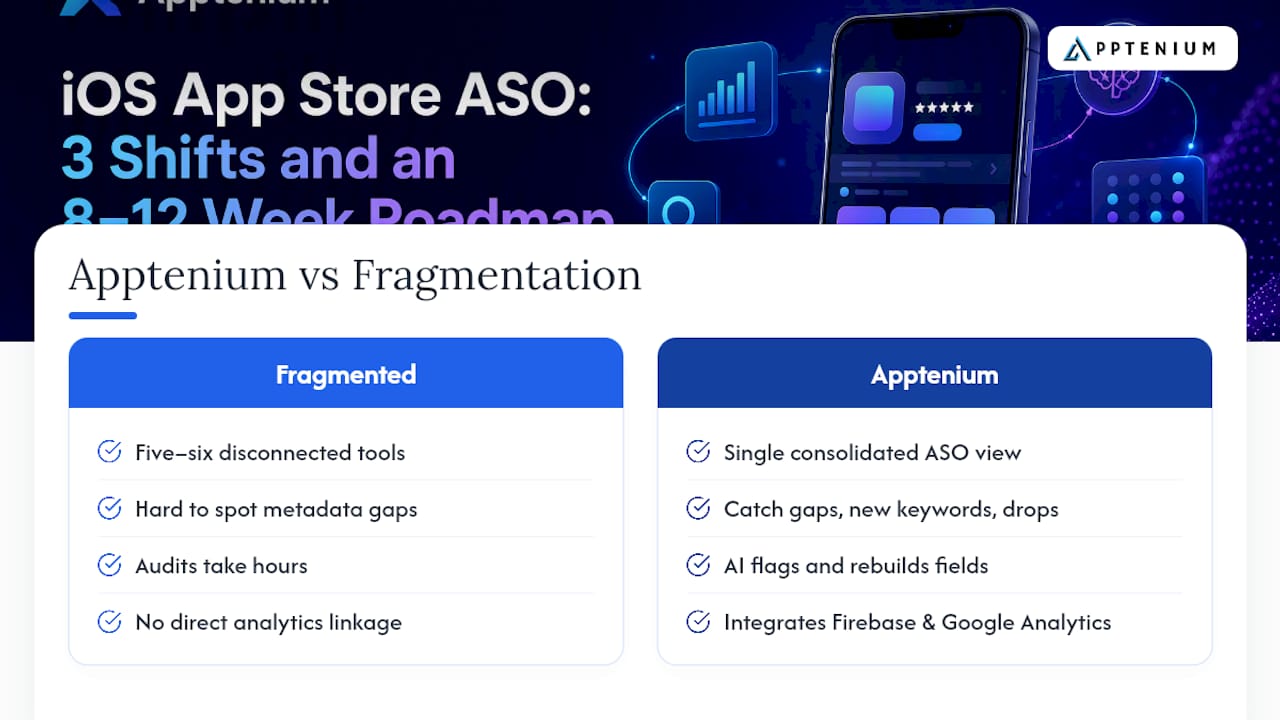
Running the roadmap above by hand across five or six disconnected tools is exactly the fragmentation problem that slows most ASO teams down. Apptenium consolidates ASO scanning, competitor intelligence, and keyword tracking into a single view, so you can catch a metadata gap, a competitor’s new keyword, or a ranking drop without switching between four dashboards.
The platform’s AI-powered recommendations flag underperforming title and subtitle structures and suggest keyword field rebuilds based on the same deduplication logic covered above, which shortens the audit step from hours to minutes. Because it integrates with Firebase and Google Analytics, you can connect keyword rank movement directly to downstream retention and revenue data rather than guessing whether a metadata change actually improved the metrics that matter.
For teams running the CPP and screenshot testing cycle described earlier, having competitor intelligence and keyword tracking in one place also makes it easier to spot when a rival launches a new Custom Product Page or shifts their keyword targeting, so your own experiment calendar can respond faster than a quarterly review would allow.
The Editorial Take: What Most ASO Advice Gets Backwards
Most ASO content still treats the keyword field as the main event and screenshots as an afterthought for design teams to handle later. That ordering is backwards for 2026. The keyword field is fuel, not fire. Screenshot text is now indexed, retention is now a ranking input, and a listing with perfect metadata attached to an app that churns half its users by day seven will keep losing to a rougher listing backed by a product people actually keep using.
The conventional checklist approach also underrates sequencing. Fix stability, then messaging, then creative, then CPPs, in that order.
If you take one thing from this roadmap, prioritize retention data over rank-tracking screenshots. Rank position is a lagging indicator. Retention is the leading one Apple is already reading.
— Mike
Get Your iOS App Store Listing Working Harder
There are tools available that provide a single dashboard for the entire workflow this article just walked through, so you don’t need to toggle between a keyword tracker, a crash reporter, and a spreadsheet to figure out whether last week’s metadata change actually helped.

For SMBs and startups managing ASO without a dedicated growth team, Apptenium’s ASO scanning and AI recommendations catch keyword field waste, weak subtitle structure, and screenshot gaps in one pass, then connect those fixes to your Firebase or Google Analytics data so you can see whether a change actually moved retention, not just rank. If you’re currently comparing platforms, see how the feature set stacks up for smaller teams before committing. Run a free scan of your current listing today and see exactly which of the five indexed surfaces is costing you installs.
Sources
- App Store product page documentation — Apple Developer
- The iOS App Store Keywords Field: A Complete 2026 Guide — AppDrift
- How To Increase App Store Rankings in 2026 — Moburst
- Number of apps available in leading app stores — Statista
FAQ
What Is App Store Optimization (ASO)?
App Store Optimization is the practice of improving an app’s visibility and conversion rate within app store search results and browse surfaces, primarily through metadata, keywords, creative assets, and post-install behavior signals like retention.
How Do You Do ASO for an iOS App?
Start by optimizing the five indexed surfaces Apple reads (title, subtitle, keyword field, screenshot text, and Custom Product Page metadata), then validate keyword choices against real user language, test creatives through Product Page Optimization, and monitor retention and crash-free rate as ongoing health signals.
What Does ASO Stand for in Apps?
ASO stands for App Store Optimization, the process of improving how easily an app is discovered and how effectively its listing converts views into installs.
What Is the App Store on iOS?
The App Store is Apple’s official marketplace for downloading iOS apps, and it functions as a search engine in its own right, indexing specific text fields and creative surfaces to rank apps for relevant search queries.
How Long Does It Take to See ASO Results on iOS?
Metadata changes typically show an initial rank shift within 24 to 72 hours, with a fuller re-ranking playing out over 7 to 14 days, while creative changes affect conversion immediately and compound into ranking effects over the following weeks.