90 Day App Store Suggestions Workflow for App Marketers With One Tool
90 Day App Store Suggestions Workflow for App Marketers With One Tool
App store suggestions are the ASO-generated recommendations that guide changes to your title, subtitle, keyword field, descriptions, icon, and screenshots. The right move is simple in concept: gather candidate keywords and listing changes, prioritize them by opportunity, then validate every change with a real store experiment before you commit to it. Do this consistently and your app climbs search results while converting more of the people who find it.
TL;DR:
- Prioritize long-tail keywords with moderate search volume and low competition to achieve faster ranking wins for smaller apps and teams.
- Focus on fixing icon and screenshot captions first, ensuring they are short, keyword-rich, and OCR-readable to boost discoverability and conversions.
- Conduct A/B tests on creative assets like icons and screenshots for at least 90 days, tracking key metrics such as impressions, clicks, and installs to validate changes.
- Use localized listings and custom store pages to target different markets; they offer additional ranking opportunities without affecting the primary listing.
- Manage the entire ASO process with an integrated platform like Apptenium to streamline keyword research, gap analysis, and performance tracking efficiently.
Table of Contents
- What Do App Store Suggestions Actually Cover?
- How Do You Generate Candidate Keyword Suggestions?
- How Do You Prioritize and Place Keyword Suggestions?
- How Do You Test and Measure Suggestion Changes?
- A 90-Day Checklist and the Mistakes That Waste It
- Run This Workflow Without Switching Between Five Tools
- Sources
- FAQ
What Do App Store Suggestions Actually Cover?
App store suggestions target specific fields, and each field carries different weight depending on the platform. Getting this wrong means optimizing text nobody’s search algorithm ever reads.
On iOS, three fields do the heavy lifting. Your title and subtitle carry the most ranking weight, and the 100-character keyword field remains critical for capturing long-tail traffic that won’t fit in visible text, according to LaunchShots’s App Store Optimization guide. Google Play works differently: it indexes the title, short description (80 characters), and the full 4,000-character long description, with ASOMobile’s keyword research guide recommending natural language throughout rather than a keyword list.
Beyond text, your creative surfaces matter just as much:
- App icon — often the first conversion signal a searcher sees
- Screenshots — now indexed via OCR on Apple’s platform, meaning caption text inside the image itself can influence discoverability
- Preview videos — support conversion, especially for feature-rich or visually driven apps
- Localized listings and Custom Product Pages / Custom Store Listings — let you target entirely different keyword clusters for different audiences without touching your primary listing
That last point is easy to overlook. A localized German listing isn’t just a translation exercise. It’s a second shot at ranking for terms your English listing never touches.
How Do You Generate Candidate Keyword Suggestions?
Before you can prioritize anything, you need a wide net of raw material. Most teams stop at “what would someone type,” which leaves obvious opportunities on the table.
Start with these seed sources:
- Product features — every core function is a potential keyword, not just the marketing name for it
- User reviews and support tickets — customers describe your app in their own words, often surfacing phrases you’d never brainstorm internally
- Analytics events — Firebase or Google Analytics event names sometimes mirror the exact language users search for a solution
- Store autocomplete — type partial terms into the App Store and Play Store search bars and note what they suggest
- Apple Search Ads Keyword Suggest and Search Match — Apple’s own tool for surfacing relevant terms, prioritized by Search Popularity, according to Apple Ads’s keyword best practices
Once you have seeds, expand them. The alphabet method (typing “a,” “b,” “c” after your core term into autocomplete) surfaces variations you’d miss manually. Long-tail mining and systematic review-phrase mining round out the list. A workflow used by many ASO practitioners starts with 15 to 20 seed terms, expands to 50 to 100 candidates through these methods, then scores each one for prioritization, per Sonar’s keyword research guide.
Pro Tip: Run your discovery campaigns on Search Match or broad match first. Let Apple’s algorithm surface which search terms actually convert, then promote the winners into your exact-match metadata instead of guessing upfront.
How Do You Prioritize and Place Keyword Suggestions?
Not every keyword deserves your limited character count. The opportunity matrix balances two variables: search volume against ranking difficulty, and the sweet spot sits at moderate volume with lower competition.
Apple’s Search Popularity (SP) score, translated by many ASO tools into a 0 to 100 volume scale, works as a reliable proxy for iOS demand, according to Sonar’s guide. Chasing high-volume head terms feels productive, but niche indie apps and small teams typically see faster, more reliable wins by owning 10 to 20 long-tail targets early rather than fighting for broad terms against established competitors, per LaunchShots.
Platform mapping rules matter just as much as scoring:
- Never repeat a word already in your iOS title inside the keyword field. Apple indexes title and keyword field together, so repetition wastes precious characters.
- On Google Play, aim for a recommended keyword density percentage for your primary term within the long description, written in natural language rather than a stuffed list, according to ASOMobile.
- Write screenshot captions with OCR readability in mind. Short, keyword-rich text that a scanner can parse cleanly beats a clever tagline that’s visually stylish but text-light.
Prioritize conversion-first fixes before cosmetic keyword tweaks. Screenshot captions influence both OCR indexing and tap-through conversion simultaneously, which often produces faster ranking movement than title-only edits, per AppLaunchFlow’s ASO workflow guide. Build your final checklist from candidates that score well on both volume and difficulty, then cap it at 20 keywords maximum. Anything longer stops being a priority list.
How Do You Test and Measure Suggestion Changes?
A suggestion is a hypothesis until you validate it in a real experiment. Both major platforms give you the tools to do that without guessing.
Apple’s Product Page Optimization lets you A/B test up to three treatment variants of your icon, screenshots, or preview video, with results reported directly in App Analytics; tests can run up to 90 days and include confidence metrics so you know when a result is real, not noise, according to Apple Developer’s documentation. Google’s Store Listing Experiments work on a similar principle for Play Store creative assets.
Your primary KPIs across any test:
- Impressions — are more people seeing your listing at all
- Tap-through rate — does your icon or first screenshot earn the click
- Conversion to install — does the full page close the deal
- Downloads and post-install retention — do the users you’re attracting actually stick around
Change one element per test treatment where possible. Testing multiple variables at once muddies which change actually drove the result and stretches the time needed to reach statistical confidence, per Apple Developer’s guidance. Run tests on a multi-week cycle, promote winners into your live metadata, then start the next hypothesis.
A 90-Day Checklist and the Mistakes That Waste It
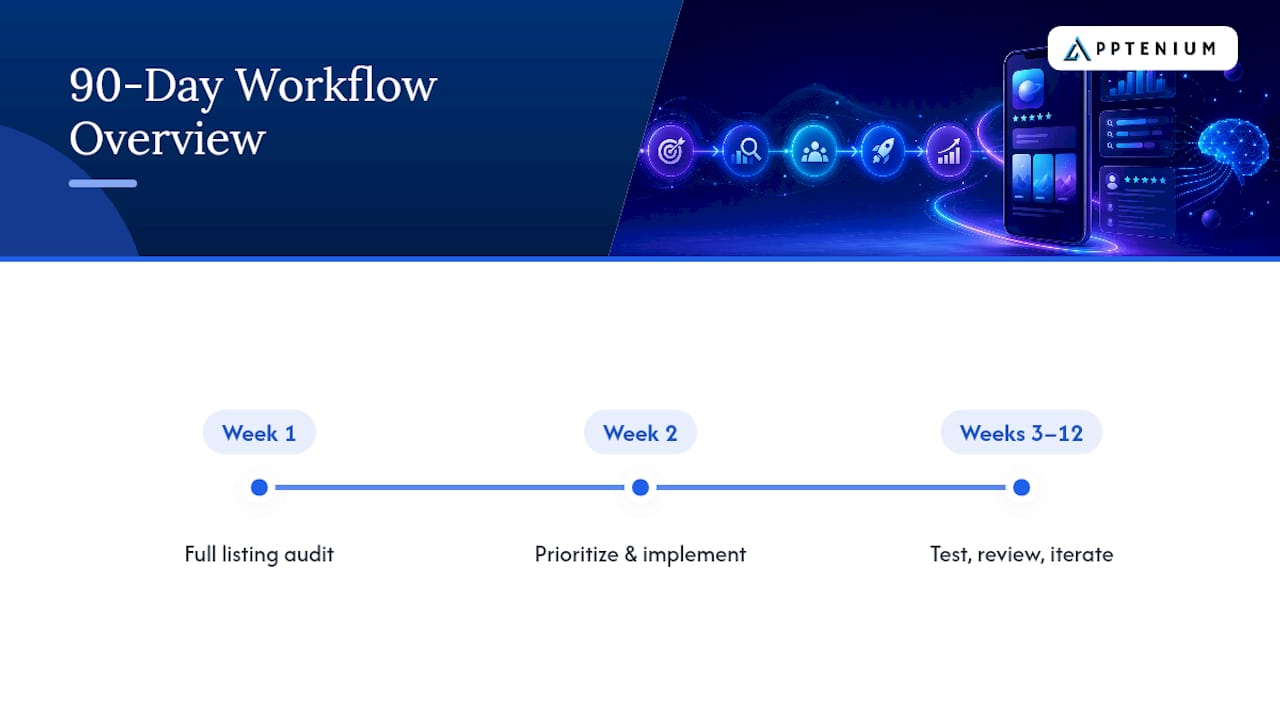
If you take one structure from this guide, make it this: week 1 is a full audit of your current listing, week 2 is prioritizing and implementing your top candidates, and weeks 3 through 12 run your tests, review results, and iterate on what wins.
The mistakes I see most often all share one root cause: impatience. Teams chase head terms because they sound impressive, ignore screenshot OCR and localization because they feel secondary, and change five things in one test because waiting for clean data feels slow. Each shortcut costs more time than it saves.
Your fastest legitimate wins: fix your icon and first screenshot caption, make sure that caption is OCR-readable, and run one Custom Product Page or Custom Store Listing experiment before you touch anything else. Small, sequenced moves compound faster than a full relaunch.
— Mike
Run This Workflow Without Switching Between Five Tools
Apptenium is the alternative to juggling separate keyword trackers, competitor spreadsheets, and analytics dashboards. Everything in this guide, from seed collection to prioritization to post-test monitoring, runs through one integrated platform instead of five disconnected ones.

Apptenium’s ASO scanning flags metadata and keyword gaps automatically, its AI recommendations turn those gaps into copy-ready fixes, and its keyword tracking and competitor intelligence keep tabs on how your changes perform against the field. Because it connects with Firebase, Google Analytics, and ad networks, you’re not cross-referencing conversion data by hand after every test cycle. If you want to see where your current listing stands before you build your candidate list, run a free scan with the ASO scanner or check the Free and Pro plans for current pricing details.
Sources
Apple’s keyword best practices cover Search Match and keyword prioritization directly from the source. The Product Page Optimization documentation walks through setting up and reading A/B tests. For readers new to match types and discovery campaigns, GetVoucher’s search marketing fundamentals course fills in the basics this guide assumes you already know.
- App Store keywords best practices — Apple Ads
- Product page optimization — Apple Developer
- App Store Optimization 2026: The Complete Indie Guide — LaunchShots
FAQ
What Is the Difference Between the iOS Keyword Field and a Play Store Description?
The iOS keyword field is a hidden 100-character space used only for indexing, invisible to users. Google Play has no equivalent hidden field. Instead, it indexes your visible title, short description, and long description, so Play Store copy has to work as both marketing text and keyword content at once.
How Many Keywords Should I Actually Prioritize at Once?
Cap your active target list at 10 to 20 keywords chosen for a strong balance of search volume and low difficulty. Trying to chase dozens of terms simultaneously spreads your character budget too thin and makes test results harder to read.
Does Screenshot Text Really Affect App Store Ranking?
Yes. Apple now indexes screenshot caption text through OCR, meaning the words inside your screenshot images can influence discoverability, not just human readability. Write captions that are short, keyword relevant, and easy for a scanner to parse.
How Long Should a Product Page Optimization Test Run?
Apple’s Product Page Optimization tests can run up to 90 days, with App Analytics reporting confidence metrics so you know when a result is statistically reliable rather than random variance. Shorter tests on low-traffic apps often need the full window to reach confidence.
Can Apptenium Help Me Run This Entire Workflow?
Apptenium combines ASO scanning, AI-generated listing suggestions, keyword tracking, and competitor intelligence in one platform, with integrations for Firebase, Google Analytics, and ad networks. You can start with a free scan or move to the Pro plan at $9.99 per month for unlimited scanning and full feature access.