Quarterly Title Tests That Win: App Title Keywords & Tracking
Quarterly Title Tests That Win: App Title Keywords & Tracking
Put one high-opportunity keyword in your app title, and front-load it if your brand has no recognition yet. Coordinate the subtitle and keyword field so nothing repeats, and treat the title itself as a tested asset, not a launch-day decision. Because a title change requires a store submission, every version deserves a real hypothesis before you ship it.
TL;DR:
- Prioritize opportunity over volume when selecting keywords, focusing on mid-volume terms with less competition that your app can realistically rank for.
- For new apps, lead with keywords in the title, while established brands should keep the name first to maximize recognition and conversions.
- Use the title, subtitle, and keyword field strategically by avoiding duplication and filling each with complementary, relevant terms within their respective character limits.
- Regularly test and localize titles and keywords every quarter, adjusting one variable at a time based on data from impressions, conversions, and rank tracking tools.
- Revisit and optimize your app title regularly as part of a structured ASO process, treating it as a dynamic asset with ongoing testing rather than a one-time setup.
Table of Contents
- App Title Keywords: A Quick Checklist To Fix First
- How Do You Choose The Primary Keyword For Your Title?
- Where Do Keywords Belong: Title, Subtitle, Or Keyword Field?
- Formatting Rules And Mistakes That Waste Your Title
- How Often Should You Localize And Test Title Keywords?
- Changing Your App Name Without Breaking Anything
- What Should You Track After A Title Update?
- What Ten Years Of Title Testing Actually Teaches You
- Turning This Into A Repeatable Testing Process
- Sources
- FAQ
App Title Keywords: A Quick Checklist To Fix First
Before you touch the title, run through what actually moves rankings. Most listings lose visibility from the same handful of avoidable errors.
- Confirm you’re inside the 30-character limit on Apple’s App Store, and check where your title actually truncates on smaller device screens.
- Verify your primary keyword is present, and positioned where it carries weight rather than buried at the end.
- Make sure the subtitle adds a complementary phrase instead of repeating title words.
- Check the Apple keyword field: comma-separated, no spaces after commas, no duplicated terms.
- Strip out banned words, ALL CAPS, emojis, and any claim that overstates what the app does.
Pro Tip: Run a search for your title’s exact wording in your subtitle and keyword field. If the same word shows up twice, you’re wasting indexed characters that could carry a new term instead.
Apple’s own product page resources confirm that title, subtitle, and keyword field are indexed together, so duplication anywhere in that trio is a real cost, not a cosmetic issue.
How Do You Choose The Primary Keyword For Your Title?
Start with opportunity, not volume. A term with huge search demand but a wall of entrenched competitors will rarely move your ranking; a mid-volume term with a soft competitive field often will.
Run a keyword opportunity scan in an ASO tool, then shortlist your top three head-term candidates. For each one, ask honestly whether your app has the reviews, install base, and metadata strength to break into page-one results within a testable window. Pick the term you can realistically win, not the one with the biggest number attached to it.
Where you place that term next to your brand name depends on how well-known your brand already is:
- New or low-brand-awareness apps: go keyword-first. A searcher scanning results has no reason to recognize your name, so the term doing the work needs to lead.
- Apps with strong brand recognition: stay brand-first. Recognition itself drives tap-through, and burying your name behind a keyword can actually cost conversions.
- Mid-tier apps building awareness: test both. Run a brand-first variant against a keyword-first variant and let the data settle the argument.
Example patterns: a new budgeting app might read “Budget Tracker: Expense Planner,” leading with the term. A recognized brand might run “Acme: Budget & Expense Tracker,” leading with the name and folding the keyword in afterward. This lines up with Apple’s own guidance that effective keyword use improves both search relevance and ad matching, not just organic rank.
Where Do Keywords Belong: Title, Subtitle, Or Keyword Field?
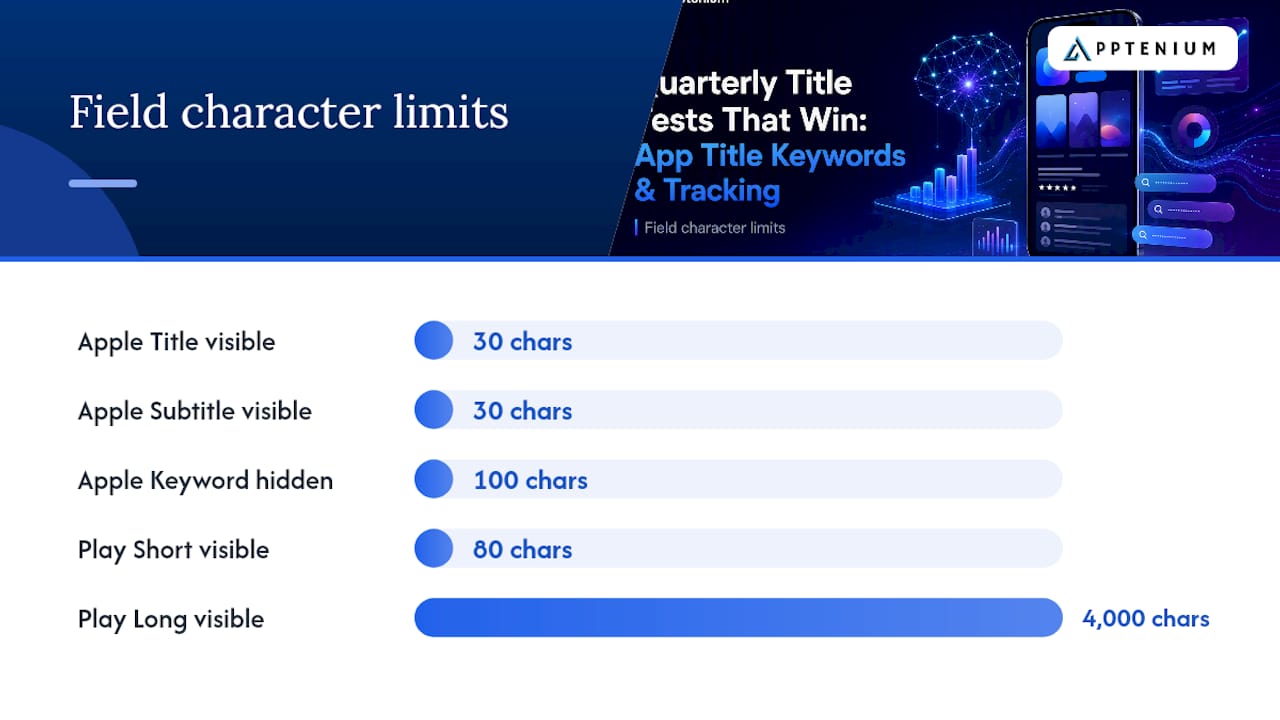
Apple treats the title, subtitle, and hidden keyword field as one combined index, which means the real question isn’t “where’s the best spot” but “how do I avoid wasting any of the three.” Here’s the character math and what goes where.
| Field | Platform | Character limit | Best use |
|---|---|---|---|
| Title | Apple App Store | 30 | One head-term keyword plus brand |
| Subtitle | Apple App Store | 30 | Complementary long-tail phrase |
| Keyword field | Apple App Store | 100 | Hidden secondary and synonym terms |
| Title | Google Play | 30 | Brand plus primary keyword |
| Short description | Google Play | 80 | Readable keyword-rich pitch |
| Long description | Google Play | 4,000 | Secondary keywords in context |
Apple’s system rewards combinatorial matching. A word in your title and a word in your subtitle can form a search-matchable phrase without you ever repeating either term, which is exactly why ASO field-limit guidance treats subtitle as an extension of the title rather than a restatement of it.
The keyword field is unindexed but still counted by Apple’s search algorithm, so use those 100 characters for synonyms, misspellings users actually type, and terms that would look clumsy in visible copy.
Google Play works differently. There’s no hidden keyword field, so your secondary terms need to live inside the short and long descriptions in language that still reads naturally to a human. Keyword density matters less there than coherent, benefit-driven copy that happens to contain your target terms.
Formatting Rules And Mistakes That Waste Your Title
Small formatting choices decide whether your keyword field actually earns its 100 characters or bleeds them on redundancy.
- Never add a space after a comma in Apple’s keyword field. “fitness,tracker” indexes correctly; “fitness, tracker” wastes a character on nothing.
- Use root forms instead of tense or plural variants. Apple’s matching engine already accounts for basic pluralization, so “run” covers “running” and “runner” without you spending characters on all three.
- Swap “and” for an ampersand where space is tight. It reads the same and saves two characters every time.
- Choose your separator deliberately. A colon reads as brand-then-descriptor; a hyphen reads as two equal terms. Pick the one that matches how you’re positioning the app.
- Avoid banned terms, competitor names in public-facing fields, ALL CAPS, emojis, and stacking five keywords in a row with no grammar holding them together.
Pro Tip: Once a month, copy your title, subtitle, and keyword field into one document and scan for repeated words. It takes two minutes and it’s the single fastest way to catch wasted characters.
Keyword field formatting guidance backs this up directly: comma-separated, no spaces, root forms only.
How Often Should You Localize And Test Title Keywords?
Localize the title, subtitle, and keyword field for every App Store locale where you see real demand. A literal translation rarely performs as well as a locale-specific keyword chosen from that market’s own search behavior.
On cadence, run quarterly title experiments as a baseline, with faster micro-tests in your highest-traffic markets where search trends shift quicker than a quarter allows. Industry practice generally favors quarterly review because search behavior and competitor positioning both drift enough in that window to justify a fresh look.
Change one variable per test: the title’s first word, the subtitle phrase, or a keyword-field addition. Testing all three at once tells you something changed, not what caused it.
Judge results against:
- Search impressions for your target term
- Store visits attributable to that keyword
- Tap-through rate from impression to visit
- Install conversion once a user lands on the page
Compare cohorts across matched time windows, not raw totals, since seasonal traffic swings can make a flat title look like a winner or a strong title look like a dud.
Changing Your App Name Without Breaking Anything
Renaming an app touches more than marketing copy, so plan the mechanics before you plan the words.
- Know which fields are editable without a new version and which require a full submission. Store name and subtitle are typically editable in App Store Connect metadata; deeper display or project naming changes tend to need review.
- Understand bundle ID limits. You cannot change the bundle ID for an existing app, and a name change paired with major functionality changes can push you toward submitting an entirely new app rather than updating the current one.
- Baseline your metrics before the change ships, roll out in stages where possible, and write release notes that explain the shift to existing users.
- Coordinate marketing so paid campaigns and organic listings don’t display conflicting names mid-transition.
Apple’s developer forums document these editable-field boundaries directly, and they’re worth checking before you commit to a rename.
What Should You Track After A Title Update?
A title change only counts as a win if you can point to the numbers that prove it. Track keyword ranking position, search impressions, store visits, tap-through rate, installs, and conversion rate, in that rough order of diagnostic value.
Set a baseline period of at least two to four weeks before the change, then compare it to an equal-length test window after. Shorter windows get noisy fast, especially for apps with modest daily traffic.
- Use App Store Connect and Google Play Console for platform-native impression and conversion data.
- Use Apptenium to consolidate keyword rank tracking, search visibility, and store performance in one dashboard instead of checking three separate tools.
- Revert a title change if ranking drops and conversion doesn’t recover within one full test window.
- Document every experiment, including the losers. A failed title test still tells you something about how your audience searches.
Pro Tip: Keep a running log of every title variant you’ve tested, including the ones that failed. Six months later, that log becomes your fastest reference for what your audience actually responds to.
What Ten Years Of Title Testing Actually Teaches You
Most developers treat the app title like a tagline: write it once, feel good about it, move on. That instinct is backwards. The title is closer to a headline in paid search: it needs the same iteration discipline, and most teams under-invest in testing it because a store submission feels heavier than it is.
One pattern shows up again and again. A team leads with brand name because it feels more “professional,” then wonders why organic installs stall. The fix is almost never a redesign. It’s swapping which word comes first.
Treat your title as a dynamic asset with a testing calendar, not a decision you make once at launch and never revisit.
— Mike
Turning This Into A Repeatable Testing Process
Everything in this guide, from keyword opportunity scoring to cohort-based test windows, depends on having clean data you can actually act on without stitching together three separate dashboards.

Apptenium is built around exactly that gap. Its ASO scanner flags title, subtitle, and keyword-field issues in a single pass, so the checklist earlier in this guide takes minutes instead of a manual audit. Keyword tracking watches your ranking movement after every title change, and the AI-powered recommendations surface which terms are worth testing next based on your actual competitive field, not guesswork. Because Apptenium pulls in Firebase and Google Analytics data alongside store metrics, you get impressions, installs, and revenue impact in one view instead of reconciling exports from three platforms.
If you’re ready to run your next title experiment with real tracking behind it, start with the ASO features built for SMBs and startups and see what a consolidated keyword dashboard actually looks like.
Sources
For platform-level rules straight from the source, review Apple’s App Store product page resources and its keyword best-practices guide. For field limits and indexing mechanics across both major stores, see this complete ASO keyword guide. For hands-on tooling, explore Apptenium’s ASO scanner.
FAQ
What Are Popular Keywords For App Titles?
Popular title keywords tend to describe the core function plainly, like “tracker,” “planner,” or “editor,” combined with the category term users actually search, such as “budget” or “photo.” The strongest choice is rarely the highest-volume word; it’s the one you can realistically rank against.
How Do I Title An App For Best Search Visibility?
Lead with your highest-opportunity keyword if your brand has little recognition, or lead with your brand name if it already drives recognition, then use the remaining characters for a complementary term. Keep the whole title under Apple’s 30-character limit so nothing truncates on smaller screens.
What Are The Parts Of An App Listing Called?
The core metadata fields are the title, subtitle, and hidden keyword field on Apple’s App Store, and the title, short description, and long description on Google Play. Apple indexes all three of its fields together, while Google Play relies on readable description copy instead of a hidden field.
What Are The Trending Keywords For App Titles Right Now?
Trending terms shift by category and season, so the more useful move is checking your own competitive field through a keyword opportunity scan rather than chasing a generic trending list. Tools like Apptenium’s keyword tracking show which terms are gaining search volume specifically within your app’s category.
How Often Should I Change My App Title?
Quarterly is a reasonable default cadence for a full title test, with faster micro-tests in high-traffic markets where search behavior shifts sooner. Each change should test one variable at a time so you know exactly what drove the result.