ASO for Games: 90 Day Playbook to Win With Subgenre Keywords
ASO for Games: 90 Day Playbook to Win With Subgenre Keywords
ASO for games means optimizing your store listing and creative so the right players find your game and tap install once they see it. The single highest-leverage move is claiming a precise subgenre or play-pattern keyword (like “offline puzzle” instead of “puzzle”) and building your icon, screenshots, and video around that exact promise. Everything else, including tools like Apptenium for tracking the results, supports that one decision.
TL;DR:
- Play-pattern keywords like “offline” or “one-tap” often outperform genre terms in traffic and competition, and should be prioritized in keyword research and validation.
- Visual assets such as icons and screenshots drive most conversions, with icons needing to clearly communicate genre at thumbnail size, and screenshots highlighting core gameplay and progression.
- Consistent monitoring of retention metrics, crash rates, and keyword rankings is essential, with bi-weekly, monthly, and quarterly reviews to optimize performance and adapt to algorithm updates.
- Localization efforts should focus on translating copy in top markets first and developing custom product pages around high-opportunity keywords, especially in non-English regions.
- Ongoing testing of creative assets and store listing elements should be integrated into regular sprints, with set thresholds for success based on conversion uplift and retention stability.
Table of Contents
- Why Game ASO Is Different From App ASO
- Keyword Research for Games: Build, Validate, and Prioritize
- Creative Assets and Conversion: Icon, Screenshots, and Video
- Retention and Technical Quality as Ranking Signals
- Localization and Custom Product Pages: Extend Reach by Market
- Soft Launch and Testing Workflow: A Four-Week Matrix
- Ongoing ASO Cadence: What to Monitor and How Often
- A Practical Workflow: Mapping the Playbook to Apptenium
- How Monetization Choices Feed Back Into ASO
- Competitor Analysis Beyond Keywords
- Why Reviews and Ratings Shape Game Rankings
- How Influencer Campaigns and Social Media Affect ASO
- App Store Algorithm Updates and Game Rankings
- The Author’s Take: ASO Has to Live Inside Your Sprint Cycle, Not Beside It
- Start Your First ASO Experiments With Apptenium
- Sources
- FAQ
Why Game ASO Is Different From App ASO
Utility app users search with a problem in mind. Someone typing “invoice generator” already knows what they want and just needs the app that solves it fastest. Game players don’t work that way. They browse charts, scroll “games like Candy Crush” collections, and search by genre and subgenre far more than by any specific need.
That single behavioral difference reshapes the entire optimization priority list. When a player searches “roguelike deckbuilder” or “idle tycoon,” they’re not solving a problem. They’re browsing a category and deciding, in seconds, which listing looks like it belongs to that category. According to Phiture’s mobile games ASO guide, players browse and search by genre, subgenre, and “games like X” patterns, and creative assets carry more conversion weight than text metadata as a result.
That shifts your priorities in three concrete ways:
- Your keyword strategy has to map to how players categorize games mentally, not how you’d describe your game’s features in a pitch deck.
- Your icon and screenshots do most of the conversion work. A player deciding between ten similar-looking icons in a search results grid makes that decision visually, often before reading a word of your subtitle.
- Text-only optimization, the kind that works well for productivity or finance apps, underperforms for games because visual distinctiveness communicates genre fit faster than copy does.
Platform mechanics compound this. On iOS, Apple indexes your title, subtitle, keyword field, and now the caption text inside your screenshots through optical character recognition, along with metadata tied to Custom Product Pages. Google Play, by contrast, indexes your full description, which means long-tail phrases and repeated terms inside that description block still carry real ranking weight on Android. Treating both stores with the same keyword file is one of the most common mistakes game teams make, and it costs visibility on whichever platform gets the leftover strategy.
Keyword Research for Games: Build, Validate, and Prioritize
Start broader than you think you need to, then narrow with data. A workable keyword file for a game draws from four seed sources: the genre taxonomy the app stores themselves use, the specific mechanics your game features (turn-based, tower defense, match-3), competitor listings from games with install counts close to your own, and autocomplete or Search Ads suggestion data from the stores directly.
Once you have raw candidates, sort them into four categories:
- Genre keywords — broad category terms like “RPG” or “tycoon game” that carry high search volume but also brutal competition from established titles.
- Play-pattern keywords — terms describing how the game is played, such as “offline,” “one-tap,” “idle,” or “turn-based.” According to ASOZen’s mobile game keyword research, a keyword taxonomy for games should separate genre, play-pattern, theme, and competitor-anchor language, because play-pattern terms like “offline” or “one-tap” often convert better while facing lower competition.
- Theme keywords — setting or aesthetic descriptors like “medieval,” “space,” “farm,” or “zombie,” which help players self-select into games matching their taste.
- Competitor and anchor keywords — direct references to comparable titles, the language behind “games like X” discovery, which taps into an existing, proven demand pool.
Play-pattern keywords deserve outsized attention because they do double duty. They tend to have a better traffic-to-competition ratio than genre terms, and because they set an accurate expectation for what the player is about to download, they also protect retention. A player motivation and archetype framework can help you map which play patterns actually match the people most likely to stick around, rather than just chasing the biggest search volume.
Validating a keyword before you commit to it takes two steps. First, calculate a rough traffic-to-competition ratio: how much search interest a term gets against how many established, high-download competitors already rank for it. Second, run an honest ability-to-rank test by checking whether your current download velocity and review count are anywhere near the games currently occupying page one for that term. A keyword with strong volume but ten competitors with 500,000+ reviews each is not a keyword you can win this quarter.
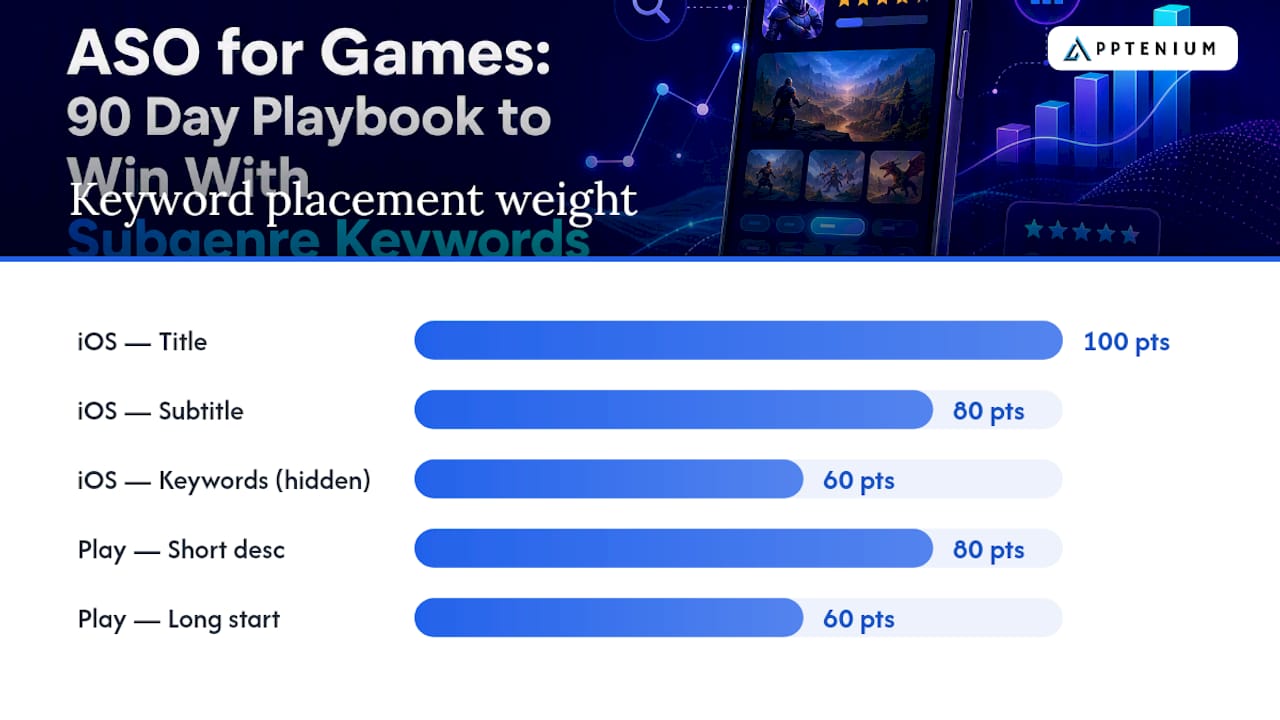
Platform placement rules matter as much as term selection. On iOS, your title and subtitle carry the most keyword weight, followed by the dedicated keyword field that never displays publicly. On Google Play, your short description and the first few lines of your long description do the heaviest lifting, since Google indexes that full text rather than relying on a hidden field.
Pro Tip: Build one master keyword sheet with four columns, one per keyword type, and force yourself to fill in at least three play-pattern terms before you add a single broad genre term. Teams that start with genre keywords almost always end up competing with titles ten times their size.
Creative Assets and Conversion: Icon, Screenshots, and Video
Your icon has to communicate genre at thumbnail size, often smaller than a fingernail, in a search results grid competing against a dozen other icons doing the same thing. Bright, high-contrast color blocking and a single recognizable character or object outperform detailed illustrations that turn into visual noise once compressed down to 60 pixels wide. Test your icon by shrinking it to that size yourself before you ship it. If you can’t tell the genre from six feet away, neither can a player scrolling on their phone.
Screenshots follow a formula that works across almost every successful game listing:
- The first frame shows the actual core gameplay loop, not a splash screen, not a logo animation frame, and not a cinematic cutscene.
- Overlay captions need to be short, high-contrast, and sized to survive compression, since Apple’s OCR system reads that caption text as part of its ranking signal. A caption like “No ads, offline” does double duty: it’s readable by the algorithm and it answers a real objection a player has before downloading.
- Later frames should answer retention questions before the player even asks them: how progression works, what makes level 20 different from level 1, and what keeps someone coming back on day three.
Preview video helps, but only under specific conditions. Keep it under 30 seconds, and treat the first three seconds as the entire pitch, since that’s roughly how long you have before a scrolling thumb moves on. Because autoplay on most surfaces starts muted, the visual pacing has to sell the game without relying on sound or dialogue. Video tends to lift installs most for games with a strong visual hook, fast-paced action or satisfying physics, and least for slower strategy or puzzle titles where a static screenshot already communicates the loop just as well.
None of this should be a guess. Run native A/B tests directly through each store’s own experimentation tools rather than trusting third-party split-testing platforms that don’t reflect real search and browse traffic. Track three metrics side by side: tap-through rate on your icon and screenshots, install conversion rate on the product page itself, and day-one retention for the cohort that came through each variant. A screenshot set that lifts conversion but tanks D1 retention isn’t a win. It’s borrowed installs you’ll lose within 24 hours.
Pro Tip: Run your screenshot test and your video test separately, never simultaneously. If both change at once and conversion moves, you’ll never know which asset actually drove it.
Retention and Technical Quality as Ranking Signals
Store algorithms don’t just reward good metadata anymore. They reward games that keep people playing. Retention and engagement metrics, including day-one, day-seven, and day-thirty retention along with session frequency, have grown in weight as ranking factors, according to LaunchShots’ 2026 ASO guide, which also notes that conversion rate itself now functions as a ranking signal rather than just a business metric.
That creates a feedback loop worth understanding: better creative drives more installs, more installs (if retention holds) drive better engagement data, and better engagement data drives higher organic rank, which drives more installs. Break the loop at the retention stage, through weak onboarding or a confusing tutorial, and the whole cycle stalls regardless of how good your screenshots look.
Technical quality sits underneath all of it. A high crash rate or excessive Application Not Responding events suppress visibility directly, independent of how compelling your listing is, because both app stores treat instability as a signal that the app shouldn’t be recommended widely. Triage crash fixes by frequency and by where in the funnel they occur. A crash on first launch is catastrophic for both ratings and retention. A crash buried in a rarely used settings menu can wait.
A few things worth watching as you tie experiments to product health:
- Track redownload rate alongside first-time installs. A high redownload rate on an older title often signals players who churned and came back, which stores read differently than fresh acquisition.
- Segment retention by acquisition source before you draw conclusions. Organic search installs and paid UA installs almost never retain at the same rate.
- Never ship a creative change and a major game update in the same week. You’ll lose the ability to isolate which one moved your numbers.
The core discipline is measuring conversion and retention together, not sequentially. A listing variant that wins on tap-to-install but loses on day-one retention should be rolled back, even if the install number looks good in a weekly report.
Localization and Custom Product Pages: Extend Reach by Market
Localization for games goes beyond translating your subtitle. Full scope means translating title, subtitle, keyword field or description text, and, where budget allows, the screenshots themselves, since a screenshot with English-only overlay text in a non-English market quietly tells the player this game wasn’t built with them in mind.
A practical order of operations:
- Localize copy first for your top five markets by current or projected install volume, since copy changes are cheap and fast to test.
- Localize creative assets, including screenshot overlays and preview video captions, only for markets where copy localization is already showing conversion lift, since creative localization costs more in design time.
- Build Custom Product Pages around your highest-opportunity keyword clusters rather than trying to build one for every market or keyword you can think of.
CPPs became a genuine organic ranking surface as of the most recent Apple platform updates, with keyword linking that lets specific traffic land on a page tailored to the search term that brought them there, per AppsTemple’s breakdown of the App Store search algorithm. Vendor data from AppFollow’s 2026 games playbook points to roughly a 56% conversion rate on keyword-linked CPP traffic compared to around 42% on default product pages for adopters, a gap large enough to justify the setup time.
Start with two to three CPPs mapped to your top keyword clusters rather than exhausting Apple’s full quota on day one. The most common localization pitfall is treating every market identically: a play-pattern term that converts well in one region can flop in another where the genre language simply works differently.
Soft Launch and Testing Workflow: A Four-Week Matrix
Soft launches exist to answer one question before you spend real budget: does this listing convert and retain, not just one or the other. A compact four-week cadence covers the ground most game teams need:
- Week one — validate your core keyword set and baseline icon against one or two alternate concepts, using low-cost markets with app store behavior similar to your primary target.
- Week two — test screenshot ordering and overlay copy while holding the icon steady from whichever variant won week one.
- Week three — test preview video presence versus screenshots-only, since video isn’t always a net positive and this is the week to find out.
- Week four — retest your winning combination against a fresh control to confirm the lift holds before you commit budget to a wider push.
Market selection matters more than most teams give it credit for. Pick soft-launch markets with app store behavior and competitive density reasonably close to your real target market. Testing exclusively in a market with far less competition than your home market will make every variant look better than it will perform later. According to Game Growth Advisor’s ASO guide for mobile games, native store experiments like Apple’s product page optimization tools and Google Play Experiments are free, essential tests that measure real conversion impact before that global push.
Set your decision thresholds before you start testing, not after you see the numbers. A reasonable bar: keep a variant only if it shows a clear conversion uplift over control while holding day-one retention flat or better, and roll back anything that lifts installs but drops D7 retention by a meaningful margin. Chasing conversion alone during soft launch is the fastest way to scale a leaky bucket.
Ongoing ASO Cadence: What to Monitor and How Often
ASO for games isn’t a launch task you finish and move past. It’s a maintenance rhythm, and the teams that treat it that way consistently outperform the ones that revisit their listing twice a year.
A workable schedule breaks into three tiers:
- Bi-weekly, check keyword rank movement and conversion rate on your current listing variant, since small ranking shifts are easier to diagnose while they’re fresh.
- Monthly, run a new creative test, whether that’s a screenshot refresh, a new icon variant, or an updated video, since creative fatigue is real and conversion tends to erode on a static listing over time.
- Quarterly, revisit your localization coverage and CPP strategy, since new markets and new keyword clusters emerge as your player base shifts.
Your dashboard should center on rank position, impression volume, click-through rate, tap-to-install conversion, day-seven retention, and crash rate, tracked together rather than in isolation. Prioritize changes by expected impact, not by whichever idea is loudest in a team meeting that week. Constant, unfocused tweaking without a hypothesis behind each change creates noisy data and makes it nearly impossible to tell which adjustment actually worked.
A Practical Workflow: Mapping the Playbook to Apptenium
Turning this playbook into a weekly habit is easier with a system that surfaces gaps automatically instead of relying on manual audits every time. A practical workflow looks like this:
- Run an ASO scan to surface title, subtitle, and keyword field gaps, along with screenshot OCR opportunities you might be missing entirely.
- Track your validated keyword set over time to confirm whether the play-pattern and theme terms from your research are actually moving in rank, not just sitting on a spreadsheet.
- Connect Firebase and Google Analytics data to your listing experiments so a conversion lift from a new screenshot set gets checked against real retention numbers before you call it a win.
- Review competitor listings and chart position changes on a recurring basis rather than only when a rival suddenly jumps past you.
Mike, who covers ASO and mobile marketing strategy for Apptenium, built this playbook around the same principle that runs through every section above: creative and keyword decisions only matter if you can measure what happens to the players who install because of them.
How Monetization Choices Feed Back Into ASO
Your monetization model shapes your ASO strategy more than most teams realize. A game leaning heavily on rewarded video ads needs screenshots and description copy that set accurate expectations about ad frequency, because a mismatch between what the listing promises and what the player experiences shows up fast in reviews and in early churn, both of which quietly damage your ranking signals.
In-app purchase heavy titles face a different challenge: the listing has to communicate value and fairness without looking predatory, since “pay to win” callouts in reviews spread quickly and directly suppress conversion for every player who reads them afterward. Screenshot frames that show progression as achievable through play, not purely through spending, tend to protect both conversion and long-term retention.
Ad format choice also affects session length and frequency, which loop directly back into the D1/D7 retention signals covered earlier. A game with aggressive interstitial ads every 90 seconds will show weaker retention numbers than a comparable title with lighter ad pacing, even if both have identical core gameplay. That retention gap becomes a ranking gap over time. Before you finalize a monetization model, test it against a retention benchmark, not just an ARPDAU target, since a model that maximizes near-term revenue while quietly eroding D7 retention will cost you organic visibility within a few months.
Competitor Analysis Beyond Keywords
Keyword overlap tells you almost nothing about why a competing game converts better than yours. The deeper analysis happens in creative and community.
Pull up your three closest competitors’ screenshot sets side by side and look at what story each one tells across five frames. Are they leading with core loop, or with a cinematic hook? Is progression shown explicitly, or implied? Small creative choices, like whether a competitor shows a boss fight in frame two versus frame four, often explain conversion gaps that keyword data alone can’t.
Community engagement is the other blind spot most competitor audits skip entirely. Check how actively a rival responds to reviews, what they’re posting on social channels, and whether they’re running visible influencer or creator partnerships. A game with a smaller install base but an active, responsive community presence often shows stronger retention than a larger competitor coasting on paid acquisition alone, and that retention gap eventually shows up in relative store ranking.
Track competitor listing changes over time rather than as a one-time snapshot. A live rankings dashboard makes it easier to spot when a rival shifts creative or climbs a chart, which usually signals they just ran a test worth understanding.
Why Reviews and Ratings Shape Game Rankings
Review volume and average rating function as a trust signal both to the algorithm and to a player scanning search results in the seconds before deciding to tap install. A 3.6 star rating next to a competitor’s 4.5 star rating creates an instant, almost unconscious bias, regardless of how good your creative looks.
Responding to reviews, especially negative ones, does more than manage reputation. It signals active development to both players and, indirectly, to the platforms themselves, since apps that appear abandoned tend to lose visibility over time. Prioritize responses to reviews mentioning crashes, ad frequency complaints, or monetization frustration, since those three categories drive the most churn when left unaddressed.
In-app review prompts need careful timing. Asking for a rating immediately after a frustrating level or a crash guarantees a bad review. Asking right after a satisfying win, a level completion, or a meaningful progression moment captures players at their most positive, and that timing difference alone can shift your average rating meaningfully over a few months without changing anything else about the game.
How Influencer Campaigns and Social Media Affect ASO
External marketing doesn’t optimize your listing directly, but it changes the traffic quality hitting that listing, which changes how the algorithm reads your performance. A well-targeted influencer campaign that sends players who genuinely match your genre tends to convert and retain well, reinforcing the exact signals covered earlier in this guide.
A campaign that sends a broad, mismatched audience purely for reach numbers does the opposite. Those installs convert poorly and churn fast, and that data gets folded into your overall conversion and retention metrics, quietly dragging down the very signals the store uses to decide how much organic visibility you deserve.
Social media momentum, particularly short-form video showing actual gameplay, tends to prime search behavior directly. When a clip goes viral, search volume for your game’s name spikes immediately, and a well-optimized brand keyword and consistent visual identity between the clip and your store listing capture that spike instead of losing it to confusion or a mismatched creative.
App Store Algorithm Updates and Game Rankings
Both major stores update ranking factors regularly, and games tend to feel those updates faster than utility apps because game discovery leans so heavily on browse and chart behavior rather than direct search. When Apple expanded OCR indexing to screenshot text and opened CPPs as an organic surface, games with well-designed, caption-heavy screenshots gained visibility almost overnight relative to competitors still running plain screenshots with no text at all.
The practical response to any algorithm shift isn’t panic or a complete listing overhaul. It’s checking whether your current creative and keyword strategy already aligns with the platform’s stated direction, since stores have been consistently rewarding retention, engagement, and visual clarity for several update cycles now, not chasing novelty. Teams that already build around genre-accurate creative and honest play-pattern keywords tend to absorb algorithm changes with minor adjustments, while teams that were gaming outdated tactics, like keyword stuffing a hidden field, see sharper drops when those tactics stop working.
The Author’s Take: ASO Has to Live Inside Your Sprint Cycle, Not Beside It
Most game teams treat ASO as a pre-launch checklist item, something you finish once and revisit only when downloads slump. That approach misreads what makes this work compound. A screenshot test run in isolation from your product roadmap will always underperform one that’s coordinated with a retention fix shipping the same week, because conversion and retention move together whether you plan for it or not.
The teams getting this right assign real ownership across product, user acquisition, and creative, rather than letting ASO become an orphaned task nobody’s sprint goals ever mention. Build a lightweight checklist into launch day, then force yourself back to it at 30 and 90 days: keyword ranks, conversion trend, D7 retention, crash rate. Skip that discipline and you’ll keep rediscovering the same gaps every quarter.
— Mike
Start Your First ASO Experiments With Apptenium
Some ASO platforms replace the spreadsheet-and-guesswork approach many solo developers and small studios default to, unifying ASO scanning, keyword tracking, and competitor intelligence in one place instead of juggling three separate tools to answer one question about your listing.

Two experiments from this guide are worth running in your first week. Start with a free ASO scan to surface title, subtitle, and screenshot OCR gaps against the play-pattern keyword set you just built. Then set up keyword tracking to watch whether your validated terms actually move in rank once you ship the fix. Certain free plans cover a limited number of scans monthly, enough to test this workflow before committing to anything. The Pro plan runs $9.99 per month for unlimited scans, AI-powered listing recommendations, and integration with Firebase and Google Analytics, so you can tie your conversion tests directly to retention data rather than guessing at the connection. If you’re comparing platform options for a small team, the Apptenium feature breakdown walks through how the scanning, tracking, and analytics pieces fit together. Head to the pricing page and start your first scan today.
Sources
The claims in this guide draw on a handful of sources worth bookmarking if you want to go deeper. Phiture’s mobile games ASO guide covers genre browsing behavior and creative weighting in more depth. AppsTemple’s breakdown of the App Store search algorithm explains OCR indexing and CPP mechanics directly from platform-level analysis. LaunchShots’ indie ASO guide is useful for understanding how retention became a ranking factor. ASOZen’s keyword research breakdown offers a clear framework for building genre and play-pattern keyword sets, and creative teams may also find value in West Valley Digital’s marketing blog for cross-discipline visual best practices.
FAQ
What Does ASO Stand For?
ASO stands for App Store Optimization, the practice of improving a game or app’s visibility and conversion rate within app store search and browse results. For games specifically, that means optimizing keywords, icon, screenshots, and video against genre and play-pattern search behavior rather than problem-based search terms.
What Is the Difference Between ASO and SEO?
SEO optimizes for visibility on web search engines like Google, while ASO optimizes for visibility inside app store search and browse surfaces like the Apple App Store and Google Play. Both rely on keyword relevance and user signals, but ASO weighs conversion elements like icon and screenshots far more heavily because app stores are largely visual, browse-driven environments.
How Much Does ASO Cost?
ASO costs vary widely depending on whether you handle it in house or hire an agency, since dedicated ASO agencies typically charge monthly retainers well beyond what most indie teams budget for. Apptenium offers a free tier with limited monthly scans and a Pro plan at $9.99 per month for unlimited scans and AI-powered recommendations, making a structured ASO workflow accessible without an agency contract.
What Does ASO Stand For in Apps?
In the context of apps and games, ASO stands for App Store Optimization, the same term used across both categories. The core difference in application is that game listings lean more heavily on visual creative and play-pattern keywords, while utility app listings lean more on problem-solving search terms and feature descriptions.
How Often Should I Update My Game’s ASO Strategy?
Check keyword ranks and conversion rate every two weeks, run a new creative test monthly, and revisit localization and Custom Product Page strategy quarterly. This cadence keeps your listing responsive to algorithm shifts and creative fatigue without introducing so much change that you can’t tell which adjustment actually worked.