Avoid the 90 Day Trap: Google Play Pre Registration for Developers

Avoid the 90 Day Trap: Google Play Pre Registration for Developers
Google Play pre-registration lets you publish a store listing before your app launches, so interested users can sign up early. Once you release to production, every pre-registered user gets a push notification, and on eligible devices the app installs automatically. If you’re planning a coordinated launch with real marketing behind it, this is the mechanism that turns anticipation into day-one installs.
TL;DR:
- Pre-registration campaigns are most valuable for teams with a confirmed launch date and marketing budget, not for organic discovery-focused strategies.
- Ensure your store listing, promotional assets, and reward system are fully prepared before activating pre-registration to avoid delays or technical issues.
- Campaigns typically last 3 to 6 weeks, with a maximum of 90 days per country, requiring careful timing, especially when adding new markets later.
- Google Ads pre-registration campaigns optimize for target cost per pre-registration and only run in eligible countries, so regional checks are essential.
- Tracking post-launch success requires analyzing both Play Console and Google Ads data, understanding that discrepancies are normal and Play Console data is more authoritative.
Table of Contents
- What Is Google Play Pre-Registration and Who Needs It?
- Pre-Registration Checklist Before You Flip the Switch
- How Do You Set Up Pre-Registration in Play Console?
- How Long Should a Pre-Registration Campaign Run?
- How Do You Promote Pre-Registration With Google Ads?
- What Happens on Launch Day and How Do You Measure It?
- What Separates a Strong Pre-Registration Campaign From a Wasted One?
- How ASO Tools Help You Optimize a Pre-Registration Listing
- Is Pre-Registration Worth Setting Up for Your Next Launch?
- Try Apptenium Before Your Next Launch Window Opens
- Sources
- FAQ
What Is Google Play Pre-Registration and Who Needs It?
Pre-registration is Google Play’s built-in system for capturing demand before your app exists on the store. You publish a listing, run promotion against it, and every sign-up becomes a qualified lead who’s already committed to trying your app. No separate landing page, no email capture form, no manual reminder campaign.
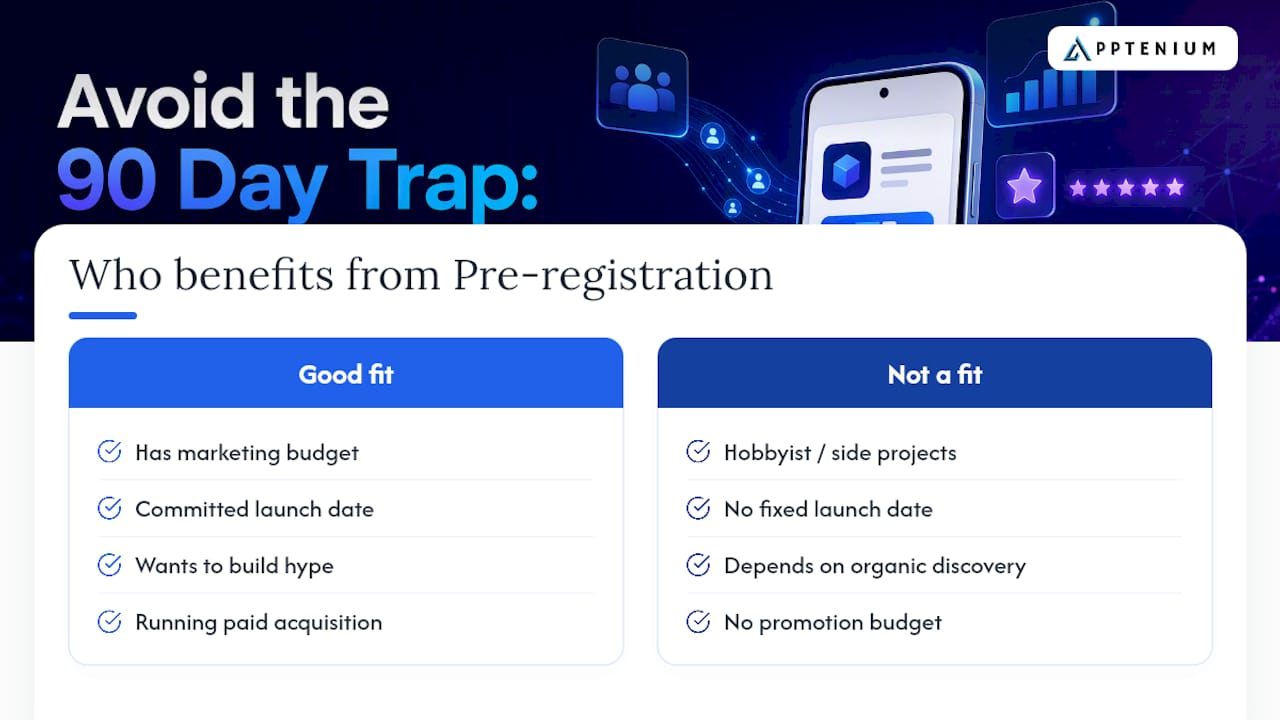
The people who benefit most aren’t hobbyist developers pushing a side project. It’s teams with a real marketing budget, a launch date they can commit to, and a reason to build hype, think competitive game studios, apps riding a media wave, or brands relaunching with a redesign. If your install strategy depends on organic discovery alone, pre-registration adds limited value. If you’re running paid acquisition and want a running start on launch-day rankings, it’s one of the more efficient tools Play Console gives you for free.
The rest of this guide walks through eligibility, timing, promotion, and the measurement quirks that trip up even experienced teams.
Pre-Registration Checklist Before You Flip the Switch
Before enabling pre-registration in Play Console, confirm you can check off every item below:
- Upload a working build to a release track and finalize your store listing copy, screenshots, and video.
- Choose your target countries and confirm device compatibility for auto-install.
- Decide whether to offer a pre-registration reward and set up the managed product if so.
- Pick a launch date that fits inside the 90-day campaign window for every country you select.
- Prepare promotional assets: the official pre-registration badge, deep links, and localized creative for each market.
Skip any of these and you risk delaying your campaign start or, worse, launching with a broken reward system.
How Do You Set Up Pre-Registration in Play Console?
Eligibility comes first. You need a build uploaded to a release track before Play Console will let you enable pre-registration, and certain regions and app categories are excluded from the program, including some pre-registration advertising restrictions in specific markets. Child-directed apps also face extra scrutiny. Check your eligibility status in Play Console before you build a marketing plan around a launch date.
Here’s the setup sequence:
- Roll out a build to a test track. Verify functionality before promotion begins, since fixing bugs mid-campaign wastes the momentum you’re trying to build.
- Create your pre-registration listing. This generates a unique store listing URL you’ll use across every ad and social post.
- Select countries and regions. Each country runs its own independent 90-day clock, so add markets deliberately rather than all at once.
- Configure supported devices. Your app manifest determines which devices qualify for auto-install, so double-check minimum API levels and hardware requirements.
- Set up a reward, if you want one. You get exactly one managed product for the entire lifetime of the campaign, and it can’t be edited or deleted once created.
Pro Tip: Create your reward’s managed product days before you flip on pre-registration, not the same afternoon. If the product isn’t active yet, you’ll either delay your campaign start or launch without the incentive that was supposed to drive sign-ups.
How Long Should a Pre-Registration Campaign Run?
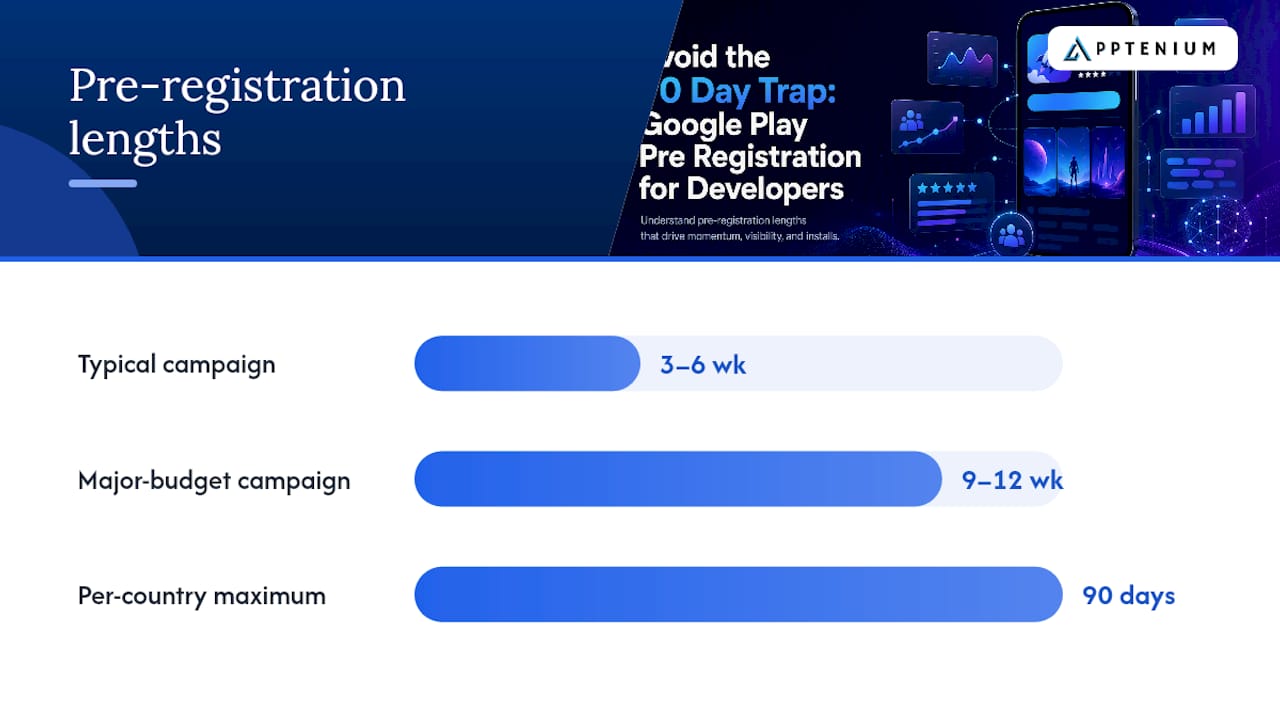
Google’s own guidance points to a 3 to 6 week window for most campaigns, stretching to 9 or 12 weeks for titles with major marketing budgets or high pre-launch expectations. Every country you select gets its own 90-day maximum, and that clock doesn’t pause.
A few scheduling realities to plan around:
- Miss the 90-day deadline in any country and your campaign there simply expires, no extension available.
- Adding a new country later starts a fresh 90-day window for that market alone, not a shared countdown.
- Engineering and marketing need a shared, locked launch date before pre-registration goes live, not a “we’ll firm it up later” target.
If your production timeline is genuinely uncertain, wait to enable pre-registration rather than gamble on a deadline you might miss.
How Do You Promote Pre-Registration With Google Ads?
Google Ads runs a dedicated App campaign subtype built specifically for pre-registration, and it revolves around one number: target cost-per-pre-registration, or tCPpre. You set that target, Google’s algorithm optimizes bidding toward it, and the campaign automatically stops serving in any country once your app goes live there.
These campaigns can run across Google Play, YouTube in-stream, and the Display Network, which means your creative needs to work across very different formats, from a five-second skippable pre-roll to a static banner.
Beyond paid media, don’t underestimate owned channels:
- Place the official pre-registration badge on your website, press kit, and social profiles, it’s a recognized visual cue that signals “this is real and coming soon.”
- Use deep links in every external placement so a tap goes straight to your Play Store listing, not a generic search result.
- Localize creative and listing copy per market rather than running one global asset everywhere; a screenshot with English UI text in a Japanese-language ad campaign undercuts trust before the tap even happens.
One detail worth flagging early: campaigns only serve in countries where pre-registration is actually available, so double check regional eligibility before allocating ad spend to a market that won’t run.
A partner breakdown on pre-registration momentum makes a similar point about early sign-up volume compounding into launch-day visibility, which lines up with what Google’s own docs describe about day-one ranking advantages.
What Happens on Launch Day and How Do You Measure It?
When your app goes live, Play Store sends a push notification to every pre-registered user, and eligible devices auto-install the app without any tap required. That’s the payoff for everyone who signed up.
A few mechanics affect what you’ll actually see in your reports:
- Testers with a build already installed from a test track won’t receive the launch notification, since Play Console assumes they’ve already got the app.
- Segment test-account installs out of your analytics before calculating organic launch-day lift, or you’ll understate real performance.
- Expect a gap between Google Ads pre-registration conversions and your Play Console pre-registration count. Ads tracks conversions tied to ad clicks and impressions; Play Console records the store-side tally directly, and the two rarely match exactly.
- Treat Play Console’s count as your authoritative number and Google Ads conversions as a paid-channel diagnostic, not a duplicate ground truth.
Watch your Google Ads conversion action reports and your Play Console acquisition reports side by side for the first week after launch, that’s where discrepancies show up fastest.
What Separates a Strong Pre-Registration Campaign From a Wasted One?
The teams that get real launch-day lift from pre-registration treat it as an active testing window, not a passive waiting room. Here’s what tends to separate the two outcomes:
- Localize everything, not just the ad copy. Store listing metadata, screenshots, and video previews should match the language and cultural context of each target country, not just the top three markets you care most about.
- Run listing experiments during the campaign window. Pre-registration traffic is real user attention; use it to test icon variants or screenshot ordering before your bigger paid push begins.
- Verify the reward’s managed product is active before you flip the switch. A dead reward link at sign-up kills trust before your app even exists.
- Keep your analytics segmented from day one. Separate testers, organic sign-ups, and paid traffic so your post-launch numbers actually mean something.
- Never launch pre-registration against an unstable build. A crash-prone test version erodes confidence in reviews before you’ve shipped the real thing.
Pro Tip: Pull your pre-registration listing’s keyword impressions weekly, not just at launch. Early shifts in search visibility often predict how your app will rank once it goes live, and catching a slump three weeks out gives you time to fix it.
How ASO Tools Help You Optimize a Pre-Registration Listing
Your pre-registration listing is a live asset, and it deserves the same scrutiny as your post-launch page. Apptenium’s ASO scanning flags weak metadata, thin descriptions, and underused keyword slots while your campaign is still running, not after you’ve already lost search visibility. Keyword tracking shows you early search trends before install volume gives you a clearer signal. And because Apptenium integrates with Firebase and Google Analytics, you can reconcile your pre-registration numbers against actual post-launch installs instead of guessing where the gap came from.
Is Pre-Registration Worth Setting Up for Your Next Launch?
Pre-registration earns its setup time when you have a firm launch date and a real promotion budget behind it, not as a box to check for its own sake. Skip it if your timeline is still shifting; the 90-day clock punishes uncertainty. If you do run it, treat the listing as a live testing ground, not a waiting room, and watch your keyword data the whole way through.
— Mike
Try Apptenium Before Your Next Launch Window Opens
Running a pre-registration campaign without visibility into your listing’s keyword performance is a gamble you don’t need to take. Apptenium gives you ASO scanning, competitor tracking, and keyword monitoring in one dashboard, so you can catch a weak screenshot or a missed keyword cluster while your campaign is still live, not three weeks after launch when it’s too late to fix.

Some ASO platforms pull data from Firebase and Google Analytics directly, giving a clearer read on how pre-registration sign-ups actually convert into real installs, instead of reconciling two mismatched dashboards by hand. If you want a quick read on where your listing stands right now, scan your listing with Apptenium’s free tools and see what it flags before you spend another dollar on promotion.
Sources
- Build awareness for your apps with pre-registration - Play Console Help
- Pre-registration | Google Play Console
FAQ
What Is Pre-Registration in Google Play?
Pre-registration is a Google Play feature that lets developers publish a store listing before release, allowing users to sign up in advance and receive a push notification with auto-install on eligible devices when the app launches.
Can I Pre-Register for Games on Google Play?
Yes, games are among the most common pre-registration campaigns on Google Play, and the process works the same way as any other app category, subject to regional and content eligibility.
How Do I Register for an App on Google Play?
Open the app’s pre-registration listing on Google Play and tap the pre-register button; no account setup is required beyond being signed into your existing Google Play account.
How Can I Check My Pre-Registered Games on Google Play?
Open the Google Play Store app, go to your account menu, and check your library or notification settings, where pre-registered titles appear until they launch and trigger the auto-install.
How Long Does a Pre-Registration Campaign Typically Run?
Most campaigns run for 3 to 6 weeks, though titles with larger marketing pushes sometimes extend to 9 or 12 weeks, and every campaign is capped at 90 days per country.