How to Run an ASO Audit That Actually Fixes Your Rankings

How to Run an ASO Audit That Actually Fixes Your Rankings
An ASO audit is a structured review of your app’s store listing, metadata, visuals, and performance signals, designed to find exactly what’s blocking downloads. It works best as a checklist, not a vague gut check. Your first move: paste your live store URL into a scanner or open a written checklist and start scoring each field.
Within minutes, you should have three things:
- A baseline score or grade for your current listing
- A prioritized list of fixes, ranked by impact
- Clear next steps: what to change first, and what to leave alone
That’s the entire premise of a good audit. Everything below explains how to make each of those three outputs sharper.
Key Takeaways
An effective ASO audit combines a scored checklist, prioritized fixes ranked by impact and effort, and a recurring cadence tied to real performance data.
| Point | Details |
|---|---|
| Run a baseline scan first | Score your listing before changing anything so you can measure what actually worked. |
| Prioritize by impact, confidence, effort | Conversion blockers like title keywords and first screenshots usually outrank cosmetic fixes. |
| Set a fixed cadence | Run a quick checklist before every release and a full audit quarterly to prevent ranking decay. |
| Log hypotheses with dates | Every backlog item needs an owner, a metric, and a verification date, or it never ships. |
| Use a connected tool for scale | Apptenium pairs ASO scanning and keyword tracking with Firebase and Google Analytics integrations to keep audits tied to real performance data. |
Authoritative Checklists and Deeper Reading
For readers who want to go deeper than this workflow, these checklists are worth bookmarking:
- ASOhack’s 30 point audit checklist for a fast, repeatable release-cycle review
- BoostYourApp’s 50 point store listing audit for the most granular metadata and visual breakdown
- AppLaunchFlow’s audit checklist and scoring framework for building an evidence-based backlog
Table of Contents
- What Does an ASO Audit Checklist Cover?
- How Do You Perform an ASO Audit Step by Step?
- How Do You Prioritize ASO Audit Findings?
- How Apptenium Supports Audits: Proof Points and Workflow Integration
- What Mistakes Undermine Most ASO Audits?
- How Do You Interpret Audit Results and Decide What’s Next?
- What Do Successful ASO Audits Look Like in Practice?
- How Do You Turn Audit Findings Into an Ongoing ASO Strategy?
- How Do You Choose an ASO Audit Tool?
- What Busy App Teams Get Wrong About ASO Audits
- Run Your Next ASO Audit With Apptenium
- Sources
- FAQ
What Does an ASO Audit Checklist Cover?
A real app store listing audit inspects every field a shopper sees before they tap “Get” or “Install,” plus a few they never see but that still shape ranking. Skip one, and you’re optimizing half the listing while the other half quietly loses installs.
Here’s the compact version of what belongs on your checklist:
- Title and subtitle. Your title carries the most keyword weight on both platforms, and your subtitle (iOS) or short description (Google Play) is prime real estate that most apps waste on branding instead of search terms.
- iOS keyword field. This hidden 100-character field never displays to users but directly feeds Apple’s search algorithm, so every character needs to earn its place.
- Descriptions. Google Play indexes your full description for keywords; Apple does not, which changes how you write each one.
- Icon and first three screenshots. These decide whether a search impression becomes a product page view, and whether that view becomes an install.
- Ratings, reviews, and support signals. Star rating, review velocity, and how you respond to complaints all factor into both trust and, on Google Play, ranking.
- Localization. A checklist run once in English misses issues in your top five non English markets, where translated keywords and screenshots often lag behind.
- Analytics evidence. Pull impressions, product page views, and conversion rate by locale before you touch anything, so you have something to measure against later.
BoostYourApp’s 50 point store listing audit treats metadata and visuals as the two primary levers for both ranking and conversion, which lines up with what most experienced ASO teams already know: text gets you found, visuals get you installed.
Pro Tip: Screenshot captions are now indexed for search relevance on both major stores, so write them with your target keywords woven in naturally, not stuffed in like a tag list.
How Do You Perform an ASO Audit Step by Step?
Start with data, not opinions. Pull impressions, product page views, installs, and conversion rate segmented by locale and device before you change a single word. Without that baseline, you won’t know if a fix actually worked or if traffic just fluctuated on its own.
From there, the workflow splits into two compatible paths:
Manual checklist path:
- Review title, subtitle, and keyword field against your target keyword list
- Check description structure and keyword placement
- Evaluate icon and screenshots against three competitor listings
- Confirm ratings and review response cadence
- Verify localized assets in your top markets
Tool-assisted path:
- Paste your store URL into an ASO scanner for an automated read
- Export the prioritized fix list it generates
- Connect Firebase or Google Analytics so performance data flows in automatically
- Re-score after implementing changes
Score each checklist item on a simple 0 to 3 scale (0 = missing, 3 = fully optimized) or a 0 to 100 composite if you want finer granularity. ASOhack’s 30 point audit checklist takes about 30 minutes the first time through and roughly 10 minutes on repeat runs, which makes it realistic to actually stick to.
Give every change a verification window of 7 to 21 days before you judge results. Shorter windows on low-traffic apps produce noise, not signal.
How Do You Prioritize ASO Audit Findings?
Not every finding deserves equal attention. Score each one on impact (how much it could move installs), confidence (how sure you are it will work), and effort (how long it takes to ship). AppLaunchFlow’s guidance on scoring issues by impact, confidence, and effort produces a backlog you can actually work through instead of a wall of unranked notes.
Conversion blockers almost always outrank cosmetic fixes. A weak title keyword or a confusing first screenshot costs you installs on every single impression you’re already getting. A slightly stale app preview video costs you far less by comparison.
For each backlog item, capture:
- Hypothesis: what you believe will change and why
- Metric: the exact number you’ll track
- Guardrail: the metric that must not get worse
- Owner: who ships it
- Verification date: when you’ll check results
Test conversion-critical elements (screenshots, icon) individually when you have enough traffic to run a clean experiment. Roll out metadata changes globally when traffic is too thin to test, or when the fix is an obvious error rather than a hypothesis.
| Priority Signal | What It Means |
|---|---|
| High impact, high confidence | Ship first, verify fast |
| High impact, low confidence | Test before rolling out globally |
| Low impact, any confidence | Batch into a later cycle |
Platform Differences: Quick Checks for App Store vs Google Play
Running the same checklist identically on both stores wastes effort, because the two platforms weight fields differently.
On the App Store, remember your 100 character keyword field is invisible to users but critical to search, and your title and subtitle combine to form your strongest ranking signal. Product Page Optimization lets you test different screenshots and icons against live traffic segments.
On Google Play, your description is fully indexed, so keyword placement in the first few sentences matters more than it does on iOS, and your short description carries real search weight. Play’s experiments feature lets you A/B test store listing variants directly.
Across both stores, don’t repeat the same keyword across title, subtitle, and keyword field. Once a keyword is indexed, repeating it wastes character space you could use for a new term. Also check screenshot file sizes and counts. Both stores enforce limits, and rejected updates delay your entire release.
How Apptenium Supports Audits: Proof Points and Workflow Integration
Apptenium builds the audit workflow described above into a single dashboard instead of a spreadsheet and three browser tabs. Its ASO scanner reads your live listing, generates a scored report, and pairs it with competitor intelligence and keyword tracking so you can see how your fixes stack up against rivals over time.
A typical workflow looks like this:
- Scan your listing to get a baseline score and prioritized fix list
- Export the findings into your backlog with impact and effort already flagged
- Connect Firebase and Google Analytics so install and revenue data update automatically
- Re-scan after each release to confirm the fix moved the number you targeted
The platform’s feature set also includes AI-generated suggestions for title, subtitle, and description copy, which speeds up the “what do I change it to” step that most checklists leave you to figure out alone.
Pro Tip: Run your first scan before you touch anything. A pre-change baseline is the only way to prove your audit actually worked.
What Mistakes Undermine Most ASO Audits?
The most common mistake is treating an audit as a one-time event. Metadata decays. Competitors update their screenshots, Apple and Google tweak their algorithms, and a listing that scored well six months ago can be quietly losing ground today.
The second mistake is changing too many things at once. If you rewrite your title, replace your screenshots, and update your icon in the same release, you’ll have no idea which change moved your conversion rate, or whether one change canceled out another.
Teams also frequently skip localization. A checklist run only against the English language listing misses keyword gaps and outdated screenshots in Spanish, Portuguese, or Japanese markets that might represent a meaningful share of installs.
Another frequent error: auditing metadata while ignoring reviews and ratings. A 3.2 star rating undermines even a perfectly optimized title, because shoppers who reach your product page still bounce at the review section.
Finally, many teams collect findings and never assign an owner or a verification date. A backlog full of “we should fix this” items with no accountability tends to sit untouched for months, which defeats the entire purpose of running the audit in the first place. Every fix needs a name attached and a date to check back.
How Do You Interpret Audit Results and Decide What’s Next?
A completed audit gives you a score, but the number itself isn’t the point. What matters is the pattern behind it. If your discovery signals (title, keyword field, description) score well but conversion signals (screenshots, icon) score poorly, you’re likely getting found in search but losing shoppers once they land on your page. That calls for a visual refresh, not a keyword rewrite.

The reverse pattern, strong visuals but weak keyword coverage, suggests your listing converts well for the traffic it gets, but you’re simply not showing up in enough searches. That calls for keyword research and metadata work, not a new screenshot set.
Cross-reference your audit score against your actual funnel data. If product page views are healthy but installs lag, the problem sits in your screenshots or app preview video. If impressions are low despite solid metadata, you may be missing high-volume keywords entirely, or facing tougher competition than your current keyword set can handle.
Turn every low score into one dated action. Not “improve screenshots,” but “replace screenshot two with a benefit-led caption by [date], verify conversion rate 14 days later.” Vague findings die in a backlog; specific ones with dates get shipped.
Recheck your highest-impact items first. A single fixed title keyword can lift impressions within days, while a screenshot redesign might take a full release cycle to show up in the data.
What Do Successful ASO Audits Look Like in Practice?
The pattern across well-run audits is consistent: teams that treat the audit as a recurring habit, not a one-off project, see steadier gains than teams chasing a single big overhaul.
A typical successful cycle looks like this. A team scores their listing, finds their title buries the primary keyword behind branding, and their first screenshot leads with a splash screen instead of a feature benefit. They fix the title first, since it’s low effort and high confidence. They rewrite the first screenshot with a clear headline and benefit statement, then track conversion rate for 14 days before touching anything else.
The result isn’t usually dramatic overnight, it’s compounding. Small, verified fixes stack over several release cycles, and the listing that scored a 40 out of 100 six months ago is scoring a 75 today, with organic installs climbing alongside it.
The common thread among portfolios that treat ASO seriously is cadence. Running audits before every release, after major competitor changes, and quarterly for live listings prevents the slow decay that happens when a listing simply sits untouched while the market moves around it. Apps that skip this rhythm tend to notice their ranking slide only after it’s already cost them several months of installs.
How Do You Turn Audit Findings Into an Ongoing ASO Strategy?
A single audit is a snapshot. The value compounds when you fold its findings into a repeating cycle instead of filing the report away after the fixes ship.
Set a cadence and stick to it. AppDrift recommends a monthly keyword review paired with weekly ASO score checks, which keeps your metadata current without demanding a full audit every week. Reserve the complete checklist run for quarterly reviews or ahead of major releases.
Keep your evidence sheet alive between audits. Every hypothesis, metric, and verification date you logged during the last cycle becomes the starting point for the next one. If a screenshot test underperformed, that finding informs your next visual decision instead of getting rediscovered from scratch.
Watch competitor listings continuously, not just during scheduled audits. A rival’s screenshot overhaul or keyword shift can erode your ranking within weeks, and catching it early gives you time to respond before it costs you a full quarter of installs.
Finally, treat your audit checklist itself as something to revise. Screenshot caption indexing, Play experiments, and Product Page Optimization all became relevant checklist items only in the past few audit cycles. A checklist that hasn’t changed in a year is probably missing something the platforms have already updated.
How Do You Choose an ASO Audit Tool?
The right tool depends on how much of the process you want automated versus manual. A handful of criteria separate the useful tools from the ones that just generate a pretty score.
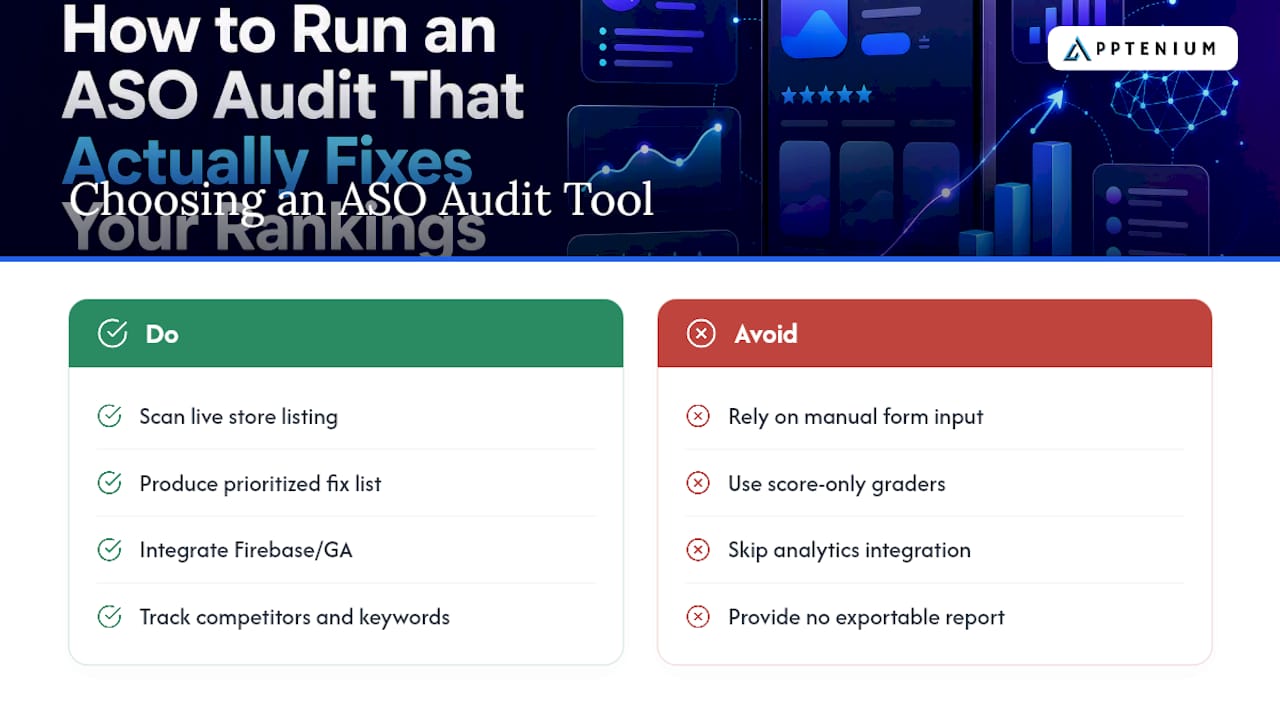
Look for a tool that scans your actual live listing, not just a form you fill in by hand. It should generate a prioritized fix list, not just flag problems without ranking them. Integration with Firebase and Google Analytics matters if you want your audit findings connected to real install and revenue data rather than store-side estimates alone.
Competitor visibility is another differentiator. Knowing your own score means little without a benchmark against the two or three apps you’re actually competing against in search results. Keyword tracking over time also separates a one-time grader from a tool built for the recurring cadence audits actually require.
Apptenium was built around this exact set of criteria: ASO scanning, keyword tracking, and competitor intelligence in one dashboard, with AI-generated recommendations that turn a raw score into specific copy suggestions. For teams choosing between a standalone grader and a full workflow platform, the deciding factor usually comes down to whether you want to run audits in isolation or connect them to the analytics you already track.
Whatever you choose, verify it lets you export findings into a format your team can actually act on. A scanner that hands you a number with no next steps just adds one more thing to interpret manually.
What Busy App Teams Get Wrong About ASO Audits
Most advice on ASO audits treats them like a one-time cleanup project, something you do before a big launch and then forget. That framing undersells what makes an audit valuable. The real payoff comes from the compounding effect of small, verified fixes shipped on a fixed schedule, not from one exhaustive overhaul.
The conventional advice also overweights metadata and underweights visuals. Plenty of teams will rewrite their title three times before they touch a single screenshot, even though the first three screenshots typically carry more conversion weight than any keyword tweak. If your audit checklist doesn’t force you to evaluate visuals with the same rigor as text, it’s incomplete.
What the research actually supports is a checklist that’s short enough to run before every release and detailed enough to run quarterly without missing anything. Teams that skip the lightweight version because they’re “saving it for the real audit” are the ones who let ranking quietly decay for months.
If you take one thing from this: build the evidence sheet habit before you build the perfect checklist. A dated hypothesis with an owner attached beats a beautifully organized list of problems nobody ever assigns to anyone.
Run Your Next ASO Audit With Apptenium
Apptenium replaces the spreadsheet-and-scanner combo most teams cobble together with one dashboard that scans your listing, tracks your keywords, and watches your competitors at the same time. Instead of exporting a static report and manually cross-referencing it against Firebase or Google Analytics, Apptenium connects that performance data directly, so your audit findings and your real install numbers live in the same place.

That matters most for the prioritization step this article walks through. AI-generated recommendations turn a raw audit score into specific copy suggestions for your title, subtitle, and description, cutting out the guesswork of “what do I change this to.” For SMB teams and startups running audits without a dedicated ASO specialist, that gap between finding a problem and knowing how to fix it is usually where momentum stalls.
Start with a free scan of your live listing through Apptenium’s ASO scanner to see your baseline score and prioritized fix list today, or review the full feature set to see how keyword tracking and analytics integrations fit into your ongoing audit cadence.
Sources
- The Indie ASO Audit Checklist (2026) | ASOhack
- ASO Audit Checklist 2026: App Store & Google Play Review | AppLaunchFlow
- ASO Checklist: The Complete 50-Point Store Listing Audit | BoostYourApp
FAQ
What Is the Difference Between ASO and SEO?
ASO optimizes your presence inside app store search results (App Store and Google Play), while SEO optimizes your presence in web search engines like Google. Both rely on keyword research and conversion optimization, but ASO also weighs visual assets like screenshots and icons far more heavily than SEO does.
What Tools Are Used for ASO?
ASO tools typically combine a listing scanner, keyword tracker, and competitor intelligence dashboard, often paired with analytics integrations like Firebase or Google Analytics. Apptenium combines all three into one platform, alongside AI-generated recommendations for metadata improvements.
How Does ASO Actually Work?
ASO works by aligning your app’s metadata, keywords, and visuals with what shoppers search for and what convinces them to install once they land on your page. Improvements in either discovery (getting found) or conversion (getting installed after being found) can move your organic ranking and download volume.
How Often Should I Run an ASO Audit?
Run a quick checklist before every release, and a full audit quarterly or after a major competitor change. This cadence, recommended across multiple ASO checklists, prevents metadata from going stale between larger review cycles.
What Should I Fix First After an ASO Audit?
Prioritize items with high impact and high confidence, typically title keyword placement and your first three screenshots, since these affect discovery and conversion on every impression your listing already receives.