Firebase Revenue Events: What to Log and How to Verify

Firebase Revenue Events: What to Log and How to Verify
Firebase revenue events are the Analytics events that carry money: in_app_purchase for store transactions, purchase for ecommerce-style orders, and ad_impression for ad income. Some fire automatically once your app is linked to the stores and to AdMob. Others you must log yourself, with a correct value and currency, or the revenue never reaches your reports. This guide shows which is which, how to implement each on Android, iOS and Unity, and how to catch duplicates and zeros before they distort your numbers. Once the events are clean, a unified view such as Apptenium’s app analytics puts downloads, revenue and ad performance next to your listing work.
TL;DR
in_app_purchaseis collected automatically for Apple App Store and Google Play transactions, including initial subscriptions. Paid-app purchase revenue and refunds are not measured automatically.ad_impressionis automatic for AdMob, but for mediation platforms such as AppLovin or ironSource you log it yourself with a numericvalueand a three-lettercurrency.- Never log manually what is already tracked automatically. The SDK does not de-duplicate manually logged purchase events, so you double-count revenue.
- Validate with DebugView before release, the Realtime report after release, and BigQuery export for a sample of days.
- Total revenue in Google Analytics 4 combines purchases, subscriptions and ads minus refunds, so one broken event skews the headline number.
Table of Contents
- What Firebase collects on its own
- Event names and parameters that report revenue correctly
- Implementing purchase and subscription events
- Measuring ad revenue
- Test and troubleshoot before the numbers matter
- Where revenue shows up in Google Analytics 4
- Seeing revenue next to your ASO work
- Our perspective
- FAQ
- Sources
What Firebase collects on its own
Analytics for Firebase ships with a set of automatically collected events, meaning events the SDK logs without extra code. Google’s automatically collected events reference lists the revenue-related ones.
In-app purchases. The in_app_purchase event fires when a user completes a purchase processed by the App Store or Google Play, including an initial subscription. It arrives with product_id, price, value, currency, quantity, subscription, free_trial and introductory_price. Analytics ignores purchases flagged as invalid, test or sandbox, which is why your own test buys will not appear in production reports.
What it does not measure. According to the same reference, Analytics does not automatically measure revenue from paid-app purchases (the one-time price of downloading the app) or refunds. If refunds matter to your net revenue, read our guide to where subscription refunds show up.
Ad events. ad_impression is triggered automatically for publisher events from AdMob through the Google Mobile Ads SDK, or from Ad Manager. The reference notes that the default integration passes no value or currency with it, and that the event is not exported to BigQuery. ad_click, ad_exposure, ad_query and ad_reward are also collected automatically.
Google’s App campaign measurement help confirms the split: first_open and in_app_purchase need no additional code, while anything beyond that is implemented with event logging through the SDK.
The practical rule: before you write a line of logging code, check whether the event already exists. Most revenue mistakes come from logging something twice, not from forgetting to log it.
Event names and parameters that report revenue correctly
Two purchase events exist, and they are not interchangeable. Firebase’s event reference describes them as follows.
| Event | Typical use | Required parameters | Other parameters |
|---|---|---|---|
in_app_purchase |
Store purchases and subscriptions | currency, value |
free_trial, price, price_is_discounted, product_id, product_name, quantity, subscription |
purchase |
Ecommerce-style orders with line items | currency, value |
affiliation, coupon, end_date, item_id, items, shipping, start_date, tax, transaction_id |
ad_impression |
Ad revenue per impression | currency, value |
Ad platform, source, format |
Firebase’s ecommerce guide states that a purchase is measured by logging a purchase event with one or more items, and that it differs from the automatically reported in_app_purchase. Use in_app_purchase semantics for store transactions and purchase only when you sell something outside the store flow, such as physical goods or a web checkout inside the app.
Formatting value and currency
This is where silent zeros come from. Firebase’s ad revenue documentation says:
currencymust be a three-letter ISO 4217 code, such asUSD.valuemust be numeric (double or long), with a dot as the decimal separator. Examples of valid values are 1000.01, 0.001 and 1.00.- Both are needed for Google Ads to process the event correctly.
The Unity class reference adds that a non-numeric value, a missing currency, or an invalid currency code on a conversion event causes that conversion to be omitted from reporting. Sending "4,99 €" as a string, or leaving currency out, does not produce an error. It produces missing revenue. The subscription parameter takes 1 for true and 0 for false.
Implementing purchase and subscription events
Android
Firebase’s Android guide says automatic tracking needs Analytics SDK v17.3.0 or later (Firebase Android BoM v25.2.0 or later), and purchases are measured as soon as your Firebase app is linked to Google Play. No custom code is required.
If you sell outside the Play Store and want those purchases in Analytics, you log them manually with the IN_APP_PURCHASE event, passing ITEM_NAME, VALUE and CURRENCY. That needs SDK v23.2.0 or later (BoM v34.10.0 or later).
iOS
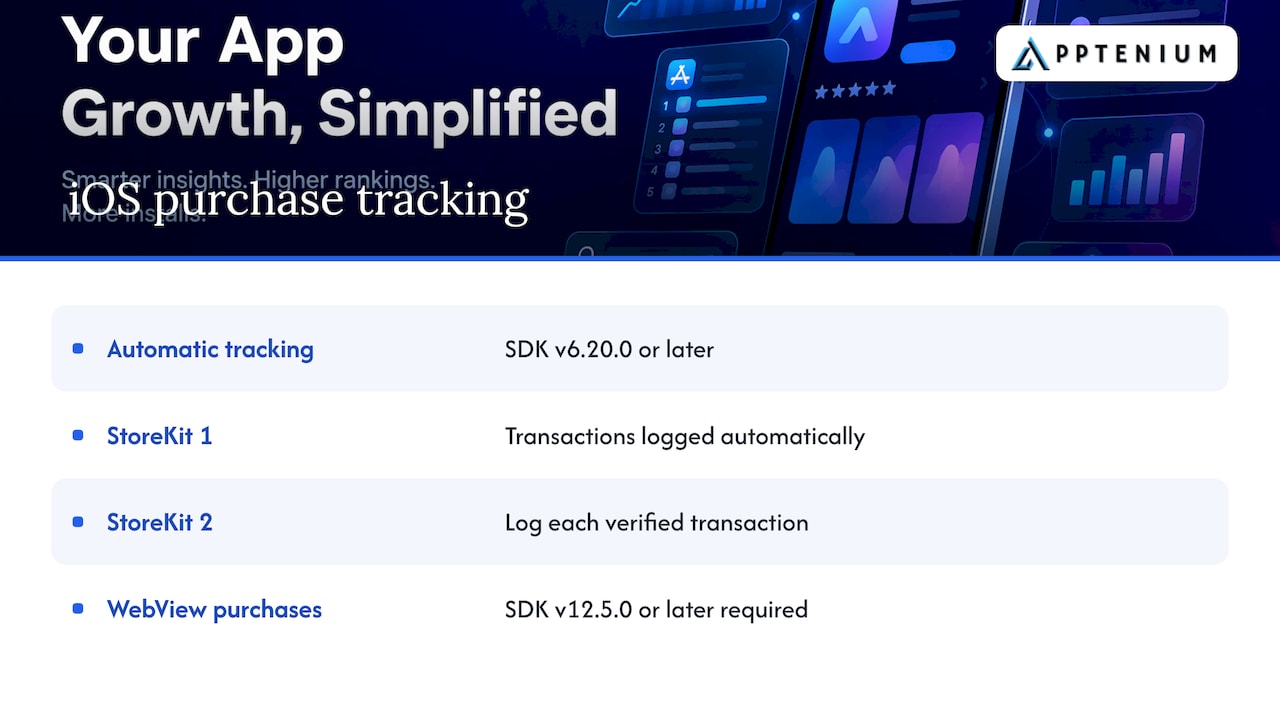
Per Firebase’s in-app purchase guide, automatic tracking requires SDK v6.20.0 or later, and StoreKit 1 transactions are logged for you. With StoreKit 2, you log each verified transaction with Analytics.logTransaction(transaction). Manual logging of purchases made in a WebView requires SDK v12.5.0 or later.
Subscription revenue is the most common gap on iOS, because the SDK version decides whether it is captured at all. Our walkthrough of Firebase subscription tracking starts with that version check.
Unity
The Unity guide states that Google Play transactions are tracked automatically after linking Google Play, and StoreKit 1 transactions on iOS are tracked automatically. StoreKit 2 transactions must be logged with FirebaseAnalytics.LogAppleTransactionAsync(transactionId), which requires Firebase Unity SDK v13.12.0 or later. The guide warns against manually logging purchases that are already tracked automatically, because that double-counts revenue.
A pre-flight checklist
- Confirm the Firebase app is linked to Google Play and, for iOS, note whether your purchase flow uses StoreKit 1 or StoreKit 2.
- Check your SDK version against the thresholds above.
- Decide which purchases are automatic and which need manual logging. Write the list down.
- Log manual events only for the second group, with a numeric
valueand ISOcurrency. - Keep event names consistent. Firebase’s event logging documentation notes names are case-sensitive, so two names that differ only in case create two separate events, and an app supports up to 500 distinct event types.
Measuring ad revenue
Ad income is often the largest revenue line for free apps, and it is the one most likely to be mismatched. Firebase’s ad revenue guide requires an ad_impression event whenever a user sees an ad, carrying details such as ad platform, source, currency and value.
- AdMob: link the AdMob app to Firebase and Analytics, and measurement is automatic.
- Other mediation platforms: with AppLovin or ironSource, you use the platform’s impression-level revenue data to log
ad_impressionyourself. - Prerequisites: Android SDK v17.6.0 or later, or Apple platforms SDK v6.34.0 or later.
If you run paid acquisition against these numbers, the formatting rules above matter twice, since the same event feeds Google Ads. Our guide on unifying Firebase and Google Ads covers how the two connect, and a primer on Google Ads campaign setup helps if you are building the campaign side from scratch.
Why AdMob and Firebase clicks differ
Ad clicks and revenue rarely match across consoles. The default automatic ad_impression carries no value or currency and is not exported to BigQuery, so a BigQuery query will not reproduce it. Treat each system as measuring slightly different things, choose one as the source of truth for revenue, and compare trends rather than expecting identical totals.
Test and troubleshoot before the numbers matter
Firebase’s own validation guidance for ad revenue is a three-stage routine that works for purchases too:
- During development, use DebugView. It shows test events and their parameters as they arrive. On Android you enable it by setting the debug property for your package name, and on iOS through a launch argument in the Xcode scheme.
- After release, use the Realtime report. The Event count by Event name card lets you inspect
ad_impressiondetails from the last 30 minutes. - For depth, use BigQuery export. Pull a sample of days of events and look for zero or not-set values.
A green event name is not a pass. Open the event and confirm that value and currency are present and correct. For a deeper look at queries and costs, see our BigQuery app analytics guide. If the same checks are new to you in Google Analytics 4, a walkthrough of Google Analytics 4 reporting checks shows how to inspect incoming data for gaps.
Common failure patterns
| Symptom | Likely cause | Fix |
|---|---|---|
| Revenue is exactly double | A manual in_app_purchase log on top of automatic tracking |
Remove the manual call for automatically tracked purchases |
| Purchases appear with zero revenue | Missing currency, or value sent as a formatted string |
Send a number and an ISO 4217 code |
| iOS subscriptions missing | SDK older than v6.20.0, or StoreKit 2 transactions not logged | Update the SDK, call Analytics.logTransaction |
| Test purchases absent | Sandbox and test purchases are ignored by design | Verify with DebugView and real production data |
| Ad revenue inflated | Mediation data logged manually while AdMob is also linked | Pick one collection route per ad source |
| Two similar events in reports | Event names differ only in case | Standardize naming |
Where revenue shows up in Google Analytics 4
Firebase’s reports documentation explains that the reports in the Firebase console are identical to those in the linked Google Analytics property, and the dashboard summarizes engagement and revenue for linked apps.
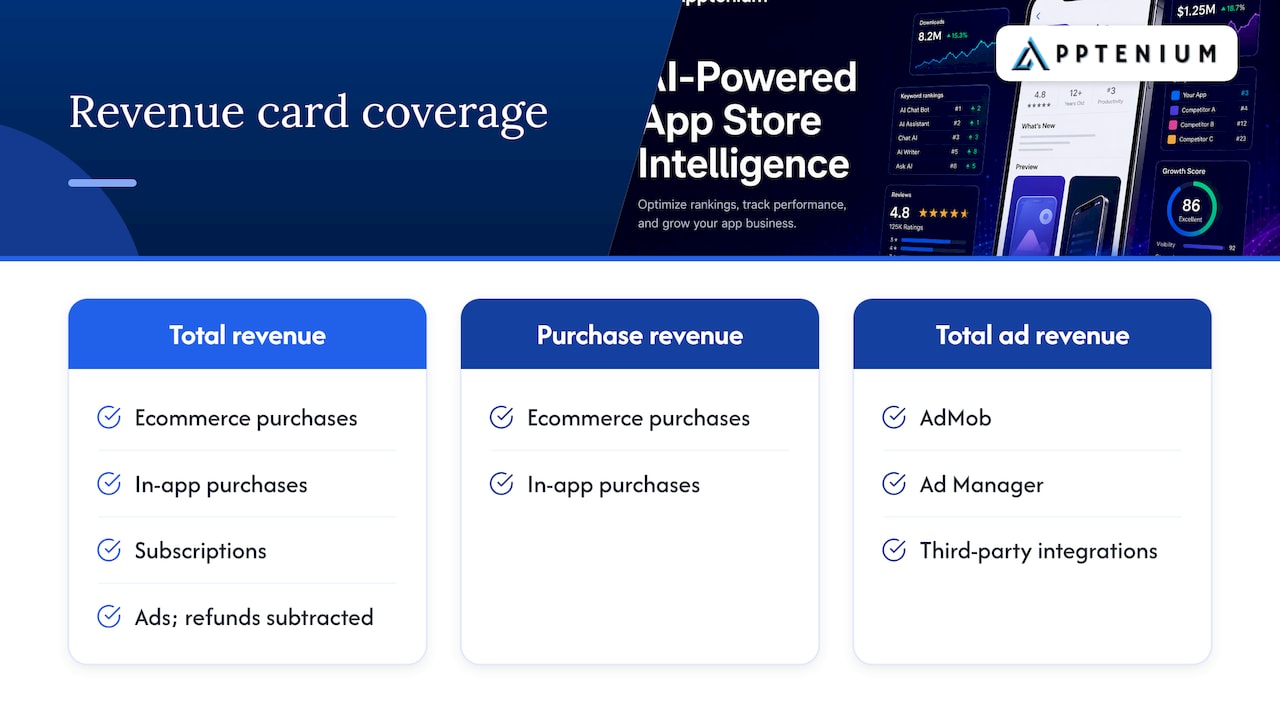
In Google’s Firebase overview report help, the Total revenue card is described as revenue from ecommerce purchases, in-app purchases, subscriptions and ads, minus refunds. A separate Purchase revenue card covers ecommerce and in-app purchases, and a Total ad revenue card draws on AdMob, Ad Manager or third-party ad_impression integrations. That is why one mislogged event moves the headline figure: it feeds more than one card.
Seeing revenue next to your ASO work
Clean events answer “how much did we earn.” They do not tell you which listing change or keyword moved installs. Apptenium is an ASO platform that integrates data from Firebase, Google Analytics and ad networks, so downloads, revenue, subscriptions and ad monetization sit in one place with keyword tracking and AI listing recommendations. That removes the tool sprawl of checking several dashboards. Our guide to unifying app analytics into one view shows the approach.
The Free plan includes a limited number of scans per month, and Pro is $9.99 per month. See the pricing page for what each includes.
Our perspective
Most teams treat revenue events as an engineering task and revenue reporting as a marketing task. The trouble starts in the gap between them. An event that fires with a missing currency looks fine in a test and wrong in every report built on it.
We built Apptenium around the idea that fragmented analytics is the real cost. When purchase data lives in one tool, ad income in another and keyword ranks in a third, nobody can tie a listing change to its effect on revenue. Pulling Firebase, Google Analytics and ad network data into one view, beside ASO scanning and keyword tracking, is designed to make that link visible.
Our advice is to settle the event plumbing once, write down which events are automatic and which are manual, and then spend your time on what the numbers tell you about your listing and your keywords. Accurate revenue events are the foundation, and an organized view of them is what makes them useful for ASO decisions.
Mike
FAQ
Does Firebase track in-app purchase revenue automatically?
Yes, in most cases. The Analytics SDK logs in_app_purchase for App Store and Google Play transactions, including initial subscriptions, once the app is linked to the store and the SDK meets the minimum version. StoreKit 2 transactions on iOS need to be logged with Analytics.logTransaction.
What is the difference between purchase and in_app_purchase?
in_app_purchase is the automatically reported store event with parameters such as product_id and subscription. purchase is the ecommerce event you log yourself with items, tax, shipping and a transaction_id. Use each for its own kind of sale rather than mixing them.
Why is my Firebase revenue showing zero?
The usual cause is a missing currency or a value that is not a number. Firebase needs a three-letter ISO 4217 code and a numeric value with a dot as the decimal separator. Inspect the event in DebugView and confirm both parameters are present.
How do I avoid double-counting purchases?
Only log manually what the SDK does not already track. Firebase states that the SDK does not de-duplicate manually logged purchase events, so a manual call on top of automatic tracking counts the sale twice. For ad revenue, use one collection route per ad source.
Does Firebase measure refunds?
Google’s reference says Analytics does not automatically measure refunds. The Total revenue card subtracts refunds where they are reported, so check how your refund data reaches Analytics before judging net revenue.
Sources
- Automatically collected events, Analytics Help
- Measure and optimize your App campaign performance, Analytics Help
- Measure in-app purchases, Google Analytics for Firebase
- Measure in-app purchases on Android, Google Analytics for Firebase
- Measure in-app purchases in Unity, Google Analytics for Firebase
- Measure ad revenue, Google Analytics for Firebase
- Analytics Events, Firebase reference
- FirebaseAnalytics class reference, Unity
- Measure ecommerce, Google Analytics for Firebase
- Log events, Google Analytics for Firebase
- Firebase reports, Google Analytics for Firebase
- Firebase overview report, Analytics Help
- Google Analytics 4 reporting checks
- Google Ads campaign setup