Subscription Revenue Recognition for Mobile App Teams

Subscription revenue recognition, in the app analytics sense, is the process of attributing, normalizing, and reporting subscription income from stores and payment rails into your product and marketing dashboards so your team can act on real revenue signals. This is distinct from formal GAAP accounting treatment. Your three immediate actions: pick one canonical MRR source, reconcile App Store Connect Analytics against Payments & Financial Reports, and join revenue events to product telemetry in Firebase or Google Analytics.
First steps:
Enable the App Store Connect Subscriptions dashboard and confirm MRR, Active Plans, and Churn are populating
Download a payments CSV and compare proceeds to the analytics revenue figure for the same period
Instrument server-side receipt validation and forward normalized revenue events to Firebase or Google Analytics
Pro Tip: Pick your MRR definition before you build any dashboard. For example, annual plans divided by 12, weekly plans multiplied by 52 then divided by 12 — document the rule once in your team playbook and never deviate.
Key Takeaways
Subscription revenue recognition for app teams means normalizing and reconciling store metrics into a single canonical MRR figure that product, marketing, and finance all trust.
PointDetailsPick one canonical MRRDocument your annualization rule once; definitional drift creates permanent stakeholder confusion.Reconcile Analytics vs PaymentsApp Store Connect Analytics shows gross Sales; Payments & Financial Reports shows net Proceeds after taxes and commission.Validate receipts server-sideClient-side subscription state goes stale; server validation is the only authoritative source for active plan status.Join revenue to telemetryLinking verified revenue events to product behavior is the only way to attribute feature changes to MRR outcomes.Apptenium automates consolidationApptenium integrates App Store Connect, Firebase, and Google Analytics to surface MRR and subscription KPIs without manual CSV work.
Table of Contents
What does subscription revenue recognition mean for your key metrics?
How to consolidate subscription revenue across your analytics stack
How to report subscription revenue so product, marketing, and finance agree
Why standardized subscription reporting changes your ASO strategy
What does subscription revenue recognition mean for your key metrics?
App Store Connect defines Monthly Recurring Revenue as revenue from active paid subscriptions normalized to a monthly timeframe. For an annual plan, the monthly equivalent is calculated by dividing the yearly price by 12. For a weekly plan, the monthly equivalent is estimated by multiplying the weekly price by the number of weeks in a month.
The table below maps each metric to its typical source and flags the most common definition drift.
App Store Connect’s metrics definitions clarify the Sales vs Proceeds distinction directly: Sales is the gross customer price, Proceeds is what you actually receive after taxes and Apple’s commission are deducted. For financial reconciliation, proceeds from payments reports are generally treated as the authoritative figure. For product analytics, MRR from the Subscriptions dashboard is your operating metric.
Pro Tip: Track MRR, monthly churn rate, and LTV together — headline subscriber counts can mask deteriorating retention. A flat subscriber total with rising churn means your acquisition is just replacing lost users.
Where do your subscription numbers actually come from?
Your subscription data lives in four places, and each one answers a different question.
App Store Connect Subscriptions dashboard: MRR, Active Plans, Paid Plans, Plan Starts, Conversion to Paid, Churn, and Recoveries. Filter by Billing Period, Billing Frequency, Subscription Group, and Offer Type to isolate the cohort you care about.
Payments & Financial Reports: Net proceeds per transaction, after taxes and Apple’s commission. This is your finance-grade source. Note that these reports carry roughly a 30-day settlement lag relative to the transaction date, so never compare a current-month Analytics figure to a same-month Payments CSV.
Server-side receipts and webhooks: StoreKit transaction receipts and App Store Server Notifications give you real-time lifecycle events. These are the only source you fully control.
Firebase and Google Analytics: Behavioral telemetry. Revenue events forwarded here connect product actions to subscription outcomes.
The subscription lifecycle events to instrument are: trial start, trial-to-paid conversion, renewal payment, cancellation (voluntary), involuntary churn (billing failure), recovery, and refund. Each event shifts a different metric. A cancellation reduces Active Plans on the next renewal date, not immediately. A recovery increments Recoveries and restores MRR. A refund reduces Proceeds in Payments & Financial Reports but may not immediately update the Analytics MRR figure.
Apphud’s attribution integration documents forwarding trial, subscription, renewal, refund, and purchase events to attribution providers, which lets you attribute revenue back to the acquisition campaign that drove it.
Note: Payments & Financial Reports show gross-to-net differences that Analytics does not. Always use Payments CSVs for any figure you share with finance.
How to consolidate subscription revenue across your analytics stack
The architecture that works reliably follows this sequence: store receipt → server validation → canonical ledger → event forwarding to Firebase, Google Analytics, and attribution tools.
Joining behavioral telemetry to verified revenue events is the only reliable way to attribute feature changes to revenue outcomes. Client-side events alone are insufficient because they can be spoofed, dropped, or duplicated.
Pro Tip: Put your normalization logic server-side, not in the analytics layer. If Firebase and your BI tool each apply different annualization rules, you will never reconcile them. One ledger, one rule set.
Step-by-step integration:
Export Payments CSVs from App Store Connect on a scheduled basis (weekly minimum).
Ingest StoreKit 2 or Play Billing lifecycle events into your server, validate receipts against the App Store Server API, and write each settled transaction to a canonical ledger.
Normalize revenue in the ledger: convert currencies to USD, divide annual plans by 12, multiply weekly plans by 52 then divide by 12, subtract refunds and prorate cancellations.
Emit a
revenue_eventto Firebase and Google Analytics with normalized MRR contribution, plan type, offer, and a stable user ID.Send the same event to your attribution tool so campaign ROI reflects settled, net revenue. AppsFlyer’s ROI360 can validate purchases and factor in refunds, taxes, and store commissions when configured with validated in-app purchases.
Identity unification is where most teams stumble. Your store account ID, server userId, and analytics ID must map to the same person. Without that join, you will double-count users who reinstall or subscribe on a second device.
Apptenium simplifies this ingestion layer by pulling App Store Connect and analytics pipeline data into a single dashboard, so your team spends less time on CSV wrangling and more time reading signals.
How to report subscription revenue so product, marketing, and finance agree
The goal is one set of numbers that all three teams trust. That requires both a shared dashboard and a reconciliation habit.
VisualizationStakeholderQuestion it answersCanonical MRR chart (monthly)AllIs the business growing?Net MRR change decompositionFinance, productWhere did MRR move? New, expansion, churn, downgradeCohort MRR retention curvesProductIs retention improving or degrading over time?Trial-to-paid conversion by offerMarketingWhich offer converts best?LTV by acquisition cohortFinance, marketingWhich channel brings the highest-value subscribers?
Net MRR change decomposes into new MRR plus expansion MRR minus churned MRR minus downgrade MRR. Reading this decomposition monthly tells you whether growth is coming from acquisition, upsell, or simply reduced churn — three very different strategic situations.
Cohort MRR retention curves reveal something headline MRR hides. A healthy curve flattens after month 3 or 4, meaning retained subscribers stabilize. A curve that keeps declining through month 6 signals a product or pricing problem, not an acquisition problem.
Normalization rules to apply consistently:
Currency: convert all proceeds to USD at the settlement-date exchange rate, not the transaction date
Annual plans: divide by 12 for MRR contribution
Refunds: subtract from the month the refund settles, not the original transaction month
Promo discounts: use the actual charged amount, not the list price
Store commission: use Proceeds from Payments & Financial Reports, not Sales
Reconciliation checklist: Match Analytics MRR to Payments CSV proceeds for the same cohort and period. Flag any gap above a threshold your team sets. Investigate timing differences before assuming a data error. SaaS financial metrics guidance reinforces that proceeds-based MRR is the figure finance teams expect when reviewing recurring revenue health.
Why do subscription numbers often not match?
The most common causes, ranked by how often they appear:
Restored purchases excluded from Analytics counts. App Store Connect Analytics does not count restored purchases as new Plan Starts. If your server counts them as new subscriptions, your totals diverge.
Refund timing mismatch. Refunds appear in Payments & Financial Reports in the settlement period, which can be weeks after the original transaction. Analytics may reflect the refund sooner or not at all.
Proceeds vs Sales confusion. Analytics shows Sales (gross). Payments & Financial Reports shows Proceeds (net). The gap is Apple’s commission plus taxes — not a data error.
Definitional MRR differences between tools. One tool annualizes weekly plans at 4.33 weeks/month; another uses 52/12. The difference compounds across a large subscriber base.
Missing server-side receipt validation. Without server validation, cancelled or expired subscriptions can remain in your active count if the client-side state is stale.
Troubleshooting steps:
Check that both sources use the same date window (transaction date vs settlement date).
Pull a Payments CSV and compare row-level proceeds to the Analytics proceeds figure for the same app and period.
Validate a sample of 20–30 receipts against the App Store Server API to confirm subscription status.
Verify that your identity join is complete — no orphaned analytics IDs without a server userId.
A drop in MRR caused by a billing-rail outage looks like a spike in involuntary churn with no corresponding increase in voluntary cancellations. A reporting-definition change looks like a step-change in MRR on a specific date with no corresponding movement in Active Plans or Churn.
Pro Tip: Automate reconciliations with a scheduled import job that runs nightly and asserts that Analytics MRR and Payments Proceeds differ by less than your defined tolerance. When the assertion fails, alert the analytics owner before the discrepancy compounds.
Your 30-day implementation checklist
Days 0–7: Data access and export (Owner: Product Analytics)
Enable App Store Connect Subscriptions dashboard and confirm all metrics are populating
Schedule automated Payments & Financial Reports CSV exports (weekly cadence)
Audit existing Firebase and Google Analytics revenue event instrumentation
Days 8–21: Instrumentation and reconciliation (Owner: Backend + Product Analytics)
Implement server-side receipt validation using the App Store Server API
Build the canonical ledger with normalization rules documented
Forward normalized
revenue_eventto Firebase and Google Analytics with stable user IDRun first reconciliation: Analytics MRR vs Payments Proceeds for the prior month
Days 22–30: Dashboard and validation (Owner: Product Analytics + Finance)
Build the canonical MRR chart and net MRR decomposition view
Add cohort MRR retention curves and trial-to-paid conversion by offer
Present to finance and marketing; agree on one canonical MRR figure
Set up automated reconciliation assertion with alerting
Each task has a clear acceptance criterion: the reconciliation passes when Analytics MRR and Payments Proceeds differ by less than your agreed tolerance for the same period and cohort.
Why standardized subscription reporting changes your ASO strategy
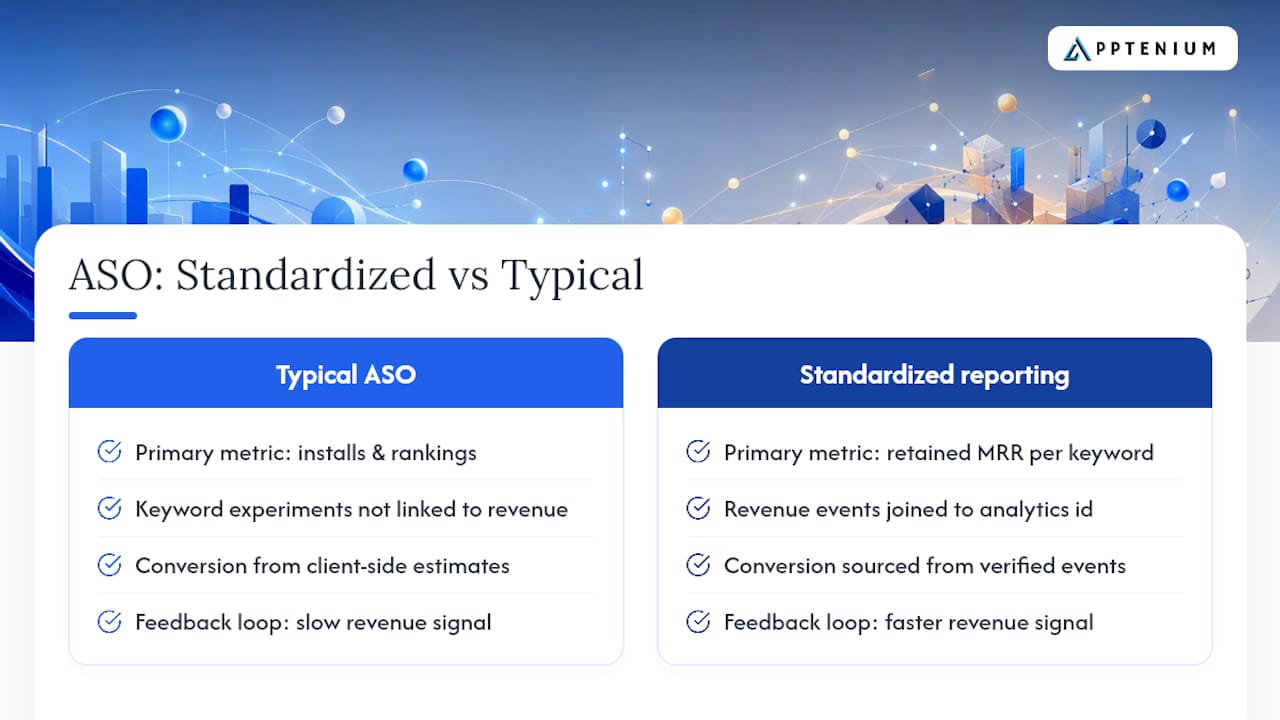
Most ASO conversations focus on keyword rankings and conversion rate optimization. That is the right starting point. But the teams that compound growth fastest are the ones who connect keyword experiments directly to MRR outcomes, not just install volume.
When your subscription revenue reporting is standardized, you can ask a question that most teams cannot: did the keyword cluster we optimized last quarter actually attract subscribers who retained? Install volume is easy to measure. Retained MRR per acquisition keyword is not, unless your revenue events are joined to your analytics identity and your MRR is computed from a canonical ledger.
The same logic applies to feature experiments. A paywall redesign that lifts trial-to-paid conversion by even a small margin produces a proportional MRR lift without additional acquisition spend, making it one of the highest-leverage tests available to a subscription app team. You can only measure that lift reliably if your trial-to-paid conversion metric is sourced from verified events, not client-side estimates.
Standardized reporting also shortens the feedback loop between a product decision and a revenue signal. That speed is a competitive advantage.
Apptenium consolidates your subscription data automatically
Fragmented subscription data costs your team hours every month in manual reconciliation. Apptenium pulls App Store Connect metrics, Firebase events, Google Analytics revenue data, and ad network signals into one place, so your MRR, proceeds, and subscription KPIs are always current and consistent.

The platform is built for teams that need automated ingestion, normalization across billing frequencies, and a single source of truth for subscription dashboards — without building and maintaining a custom data pipeline. If your team is spending meaningful time reconciling CSV exports or explaining MRR discrepancies to finance, Apptenium removes that friction directly.
You can see Apptenium’s full feature set and integrations on the product page, or review pricing tiers to find the plan that fits your team’s reporting needs.
Sources
FAQ
What is subscription revenue recognition in app analytics?
It is the process of attributing, normalizing, and reporting subscription income from App Store Connect and payment rails into product and marketing dashboards. This is an analytics reporting concept, not a GAAP accounting standard.
What is the difference between Sales and Proceeds in App Store Connect?
Sales is the gross customer price. Proceeds is what you receive after Apple deducts taxes and its commission, and it appears in Payments & Financial Reports rather than the Analytics dashboard.
How do you calculate MRR for an annual subscription plan?
Divide the annual plan price by 12 to get the monthly MRR contribution per subscriber. App Store Connect normalizes MRR this way on the Subscriptions dashboard.
Why does my Analytics MRR differ from my Payments & Financial Reports figure?
The two sources use different definitions (gross Sales vs net Proceeds) and different update cadences. Payments & Financial Reports carry roughly a 30-day settlement lag, so comparing them to a current-month Analytics figure will always show a gap.
How can Apptenium help with subscription revenue consolidation?
Apptenium integrates App Store Connect, Firebase, and Google Analytics into a single dashboard, automating the ingestion and normalization that would otherwise require manual CSV reconciliation.